The importance of framing | Networking tutorial (5 of 13)
Key Takeaways
This video tutorial by Ben Eater covers the importance of framing in networking, specifically looking at Ethernet and HDLC framing protocols, and how they determine the start of a frame and handle errors.
Full Transcript
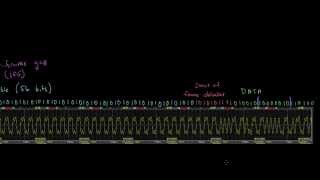
So in the last video we looked at this Ethernet signal and we decoded each of the bits by using this these symbols over here. So a zero is represented as a ne a positive voltage uh transitioning to a negative voltage and a one is a negative voltage transitioning to a positive voltage. And so we decoded each of these bits and then we kind of flipped the order of the bits for for each of the bytes. And this bite is when we convert to decimal is 75 which is a k and then this bite is a 65 which is an a. And so we're sending K a. But you might be wondering how we knew or or more importantly how a receiving computer would know that the that these particular group of of eight bits make up the bytes. You know, presumably there's a whole stream of like ones and zeros off here to the left and that stream is going to continue off to the right as well. So what happens if we pick, you know, the wrong group of eight bits, you know? So here for example we're starting with like the the third of these bits that that's shown here you know but what happens if we start instead with with the fourth. So maybe we we draw our boundaries here you know aren't we going to get up end up with something else. So here we we have the you know two more groups of eight bits and we've reversed the the order there. Um but now if we convert these eight bits to to decimal you know this is equal to uh 165 and that actually maps to if we map it to a symbol depending on what character set we're we're using this is the the yen symbol. Um and this one over here uh if we convert this to decimal is 160 and that maps to just a blank space. Um so if we meant to send the letters K a and the receiver is interpreting this as yen space then you know clearly something has gone very wrong. So how does the receiver know what the correct bite boundaries are? So how does it know that that this bite should start here you know and or actually start over here and not here or here here or anywhere else. Well so the way it knows is that bytes are grouped into something called frames um which might be a thousand or so bytes long. And if we have a way of telling where a frame begins, then we can use that to find the bite boundaries. So hopefully if I show you a couple examples, uh this this will make a bit more sense. So I'm going to show you two different ways of doing framing uh that are used in networks. There there are many others, but this should give you give you a sense. The first framing mechanism that that I want to talk about is uh used by a protocol called HDLC, which stands for highle data link control. And this is a protocol that's used pretty commonly in internet service provider networks and and other large networks. And so what HDLC does is it uses a special bit pattern called a frame delimiter or or a flag. And in and this pattern with HDLC is just defined to be uh 0 one one. It's six ones followed by a zero. And so whenever the receiver sees this particular pattern of bits, it knows that the very next bit starts the beginning of the frame and then every bits a every eight bits after that u makes up a bite. So for example, if we have this stream of bits, we can just go along here until we see this frame delimiter uh and then each set of eight bits following that makes up a bite. So the frame delimiter is right here. So we can just ignore these bytes at the beginning. The frame delimiter is here and then each set of eight byte uh bits after that makes up a bite. So there's eight bits, there's eight bits and there's eight bits. Um and then we could keep going here if there are more bits. And so if we So this is the frame delimiter or the flag. And then this bite right here is 75. This is 65. And then this over here is 248. And so on. We could keep going. So now I did something kind of sneaky here. I don't know if you noticed, but if you look right here, this set of eight bits is actually uh another flag. U but this flag pattern here isn't here to sort of identify the start of another uh frame. It just happens to accidentally show up as part of the data we're sending. So, how do we send this data without the receiver sort of accidentally mistaking this as a new frame and starting a new frame right here at this at this zero? So, it turns out when you're using HDLC framing like this, there's there's another rule that we need to follow. Whenever there are five consecutive one bits anywhere in the data that we're sending, then we should just stuff an extra zero in after those five ones uh to prevent this problem. So then whenever the receiver sees five consecutive one bits like this, then it should expect that the next bit is going to be a zero and it can just ignore it. So if the receiver ever sees like six consecutive ones in a row, then it's either part of a flag like this or there's uh you know been some kind of something has gone wrong. And so this this technique of of putting these extra bits in here is is something called bit stuffing. So that's HDLC. Now Ethernet is uh quite a bit different. So let's scroll down here and I'll show you what the beginning of an Ethernet frame looks like. So at the beginning of an Ethernet frame, there's this uh what's called an inner frame gap, which is actually a period of silence where there's nothing there's nothing being transmitted at all. In fact, the the voltage on on the wire is is zero. And Ethernet requires, you know, an interframe gap of of at least um 96 bit times. So whatever the timing of the bid is depending on the speed of of the Ethernet um this is silent for some period of time and so that's a way to know that that there's no frame being sent and then as data starts to show up that a frame is going to arrive. Following that silence then Ethernet starts to send this preaml which is 56 bits of alternating ones and zeros. And so you can see the ones and zeros here. Um, and I've I've taken a capture from the oscilloscope and and patched together uh the entire uh beginning of an Ethernet frame here just to take a look. And so the the preamble is 56 bits of alternating ones and zeros. And this this does a couple things. One is um it's kind of a distinctive pattern um also following the the silence here where where there are where there's no data being sent. It gives the receiver an opportunity to synchronize its clock because remember as we start to read bits off the data when the data shows up, we want to make sure that the receivers's clock is synchronized with the sender's clock. And so this gives the receiver kind of an opportunity to um to get its clock synchronized among some other things. So there's the the preamble of 56 ones and zeros. And so it keeps alternating 1 0 1 0 1 0. And then it gets to this point where it continues where we get to this uh start of frame delimter. And so it continues 1 0 1 0 1 0 and then the last two bits of the start of frame delimter is 1 one. And so even if the receiver kind of like synchronizes partway through this, it's going to see this stream of ones and zeros. It may not know where it is among those 56 bits, but eventually it's going to get to this point where instead of alternating 1 0 1 0, you get the 1 one. And that's the that's the trigger. That's when the receiver knows that the next the next bit that shows up is the first bit of the data. Um, and then all it needs to do is just start reading the data. And this is exactly what we looked at before. And each each sequence of of eight bits uh forms a bite. Um, and this continues on and on. And so I guess one more thing that I that I'd like to add is just about frame length. And so the number of bytes that that you have in a frame. So after once we've synchronized the frame, we have the start of frame. we start having data here. Um the number of bytes can vary. So like in theory we could send a frame with just one bite. So after this bite we just go silent. We have another inner frame gap. We could do another preamble and have another frame. Um but that's very inefficient because we we have to do this whole preamble nonsense just to send one bite of data. Um so on the other hand you could imagine you know once we've started sending this frame and the receiver knows where the bite boundaries are you know we could send thousands and thousands of bytes or even millions of bytes and that that would work too. Um but the problem is that if any kind of error happens uh and the receiver misreads something or gets out of sync um then it's going to misread everything that follows it up until the next frame. So there's this trade-off, I guess, between efficiency, you know, where you'd want large frames, uh, and being able to quickly recover from an error, in which case you'd kind of want small frames. So in practice, uh, frame sizes tend to vary between 64 bytes and 1500 bytes. Um, uh, but you know, in in some high performance networks, you may see frames as large as 9,000 bytes or more. Um, and those are generally referred to as as jumbo frames.
Original Description
What is framing? Why do we need it? A look at Ethernet and HDLC framing
Support me on Patreon: https://www.patreon.com/beneater
This video is part 5 of an intro to networking tutorial: https://www.youtube.com/playlist?list=PLowKtXNTBypH19whXTVoG3oKSuOcw_XeW
Playlist
Uploads from Ben Eater · Ben Eater · 14 of 60
1
 2
2
 3
3
 4
4
 5
5
 6
6
 7
7
 8
8
 9
9
 10
10
 11
11
 12
12
 13
13
 ▶
▶
 15
15
 16
16
 17
17
 18
18
 19
19
 20
20
 21
21
 22
22
 23
23
 24
24
 25
25
 26
26
 27
27
 28
28
 29
29
 30
30
 31
31
 32
32
 33
33
 34
34
 35
35
 36
36
 37
37
 38
38
 39
39
 40
40
 41
41
 42
42
 43
43
 44
44
 45
45
 46
46
 47
47
 48
48
 49
49
 50
50
 51
51
 52
52
 53
53
 54
54
 55
55
 56
56
 57
57
 58
58
 59
59
 60
60

KA 60 Minutes Sep 2013 rerun (10x speed)
Ben Eater
Frame formats | Networking tutorial (6 of 13)
Ben Eater
TCP: Transmission control protocol | Networking tutorial (12 of 13)
Ben Eater
Clock synchronization and Manchester coding | Networking tutorial (3 of 13)
Ben Eater
TCP connection walkthrough | Networking tutorial (13 of 13)
Ben Eater
Lower layers of the OSI model | Networking tutorial (7 of 13)
Ben Eater
Hop-by-hop routing | Networking tutorial (11 of 13)
Ben Eater
Sending digital information over a wire | Networking tutorial (1 of 13)
Ben Eater
ARP: Mapping between IP and Ethernet | Networking tutorial (9 of 13)
Ben Eater
Analyzing actual Ethernet encoding | Networking tutorial (4 of 13)
Ben Eater
Intro to fiber optics and RF encoding | Networking tutorial (2 of 13)
Ben Eater
The Internet Protocol | Networking tutorial (8 of 13)
Ben Eater
Looking at ARP and ping packets | Networking tutorial (10 of 13)
Ben Eater
The importance of framing | Networking tutorial (5 of 13)
Ben Eater
Programming my 8-bit breadboard computer
Ben Eater
Programming Fibonacci on a breadboard computer
Ben Eater
Connecting to a mystery signal | Digital electronics (4 of 10)
Ben Eater
Using a transistor to solve our problem | Digital electronics (8 of 10)
Ben Eater
Inverting the signal with a transistor | Digital electronics (9 of 10)
Ben Eater
8-bit computer update
Ben Eater
Bus architecture and how register transfers work - 8 bit register - Part 1
Ben Eater
RAM module build - part 2
Ben Eater
Using an EEPROM to replace combinational logic
Ben Eater
Build an Arduino EEPROM programmer
Ben Eater
Build an 8-bit decimal display for our 8-bit computer
Ben Eater
8-bit CPU control logic: Part 2
Ben Eater
Reprogramming CPU microcode with an Arduino
Ben Eater
Update and PODCAST ANNOUNCEMENT!
Ben Eater
The case against Net Neutrality?
Ben Eater
Making a computer Turing complete
Ben Eater
CPU flags register
Ben Eater
Conditional jump instructions
Ben Eater
“Hello, world” from scratch on a 6502 — Part 1
Ben Eater
What is a stack and how does it work? — 6502 part 5
Ben Eater
RAM and bus timing — 6502 part 6
Ben Eater
Subroutine calls, now with RAM — 6502 part 7
Ben Eater
Why build an entire computer on breadboards?
Ben Eater
How assembly language loops work
Ben Eater
Binary to decimal can’t be that hard, right?
Ben Eater
Hardware interrupts
Ben Eater
What is error correction? Hamming codes in hardware
Ben Eater
Installing the world’s worst video card
Ben Eater
World's worst video card gets better?
Ben Eater
Breadboarding tips
Ben Eater
So how does a PS/2 keyboard interface work?
Ben Eater
Keyboard interface hardware
Ben Eater
Keyboard interface software
Ben Eater
How does a USB keyboard work?
Ben Eater
How does USB device discovery work?
Ben Eater
How does n-key rollover work?
Ben Eater
SPI: The serial peripheral interface
Ben Eater
Why was Facebook down for five hours?
Ben Eater
How do hardware timers work?
Ben Eater
The RS-232 protocol
Ben Eater
Hacking a weird TV censoring device
Ben Eater
Let's build a voltage multiplier!
Ben Eater
6502 serial interface
Ben Eater
RS232 interface with the 6551 UART
Ben Eater
Fixing a hardware bug in software (65C51 UART)
Ben Eater
Running Apple 1 software on a breadboard computer (Wozmon)
Ben Eater
More on: Agent Foundations
View skill →



![Build a RAG Agent in n8n | Vector DB Pinecone + WhatsApp + Gmail [2026]](https://i.ytimg.com/vi/4eJsZBgwFJ4/mqdefault.jpg)





Related Reads
📰
📰
📰
📰
We Changed How Work Software Works
Medium · Startup
What Workflow Builders Learn When AI Draft Quality Improves but Publishing QA Still Breaks: Practical Notes for Builders
Dev.to AI
Meshy AI 3D Generator Review 2026: 185 MB Per House, $193 to Ship It
Medium · AI
5 Claude Tricks That Feel Almost Like Cheating
Medium · Data Science
🎓
Tutor Explanation

 DeepCamp AI