Build a Scratch Dinosaur Park (Full Lesson)
Key Takeaways
Building a dinosaur park in Scratch 3.0, utilizing block-based coding and creative design principles
Full Transcript
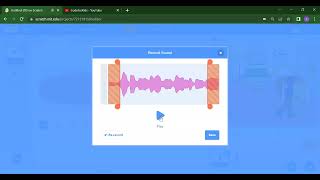
all right so we are back to the start because to now we're going to make our own dinosaur park okay it's very important that we keep very quiet okay because today we're going to record some sounds and I don't want you screaming too loudly in the house yeah you might scare your mom and dad okay so before we go any further does anyone want to tell me what this dinosaur is called this dinosaur is called someone who hasn't talked much Michael what is that dinosaur called is called a t-rex and he's a t-rex fantastic so who wants to tell me what the what the other one is called allow oh whoops someone's hands down you want to tell me what the other dinosaurs called edrick yes what is it a Stegosaurus Stegosaurus fantastic all right so we have two dinosaurs okay but did you know that these dinosaurs they never actually met each other okay the t-rex existed 70 million years ago i erase existed 70 million years ago and the Stegosaurus existed a hundred and fifty million years ago okay a hundred and fifty million years ago let me let me just let me just demonstrate what that means okay I'm just gonna show you something all right imagine we have a time line right this is a time line and then at the very end we have us okay this might be like even okay this is Ethan here this is this is nowadays right and then right about here is 150 million years ago [Music] and then this is where stegasaurus was again Stegosaurus stick our source t-rex existed right here which is 70 million years ago and this is t-rex okay and then when did the dinosaurs actually go extinct out here this is about 65 million years ago okay so the t-rex is actually more likely to have eaten Ethan than it is to have eaten the Stegosaurus okay because the t-rex came existed in the Late Cretaceous period and the Stegosaurus exists in the Jurassic period okay very very cool little fact you can tell your teachers that one day okay when you when you're in class you can tell them did you know that the Stegosaurus and the t-rex never actually met each other okay you can tell them that this t-rex is actually more likely to have met us than to have next a Saurus okay that's a very fun little fact before we do our next exercise which is of course to build our dinosaur okay so we go into share screen we have to get rid of our cap because that dinosaur app does not have any chance we go get rid of that and then what I want you to do is choose a dinosaur theme for your backdrop okay so I would say it's probably an outdoors place more than an indoor space yeah outdoors well what kind of places coming up we're gonna have a blue sky I want you to choose your own okay you don't have to choose exactly what I'm choosing you know it's got to make sense probably not underwater Jurassic looks good Jurassic or jungle looks good oh man these both look good I'm gonna have my dinosaur pack in Jurassic because that's the name of Jurassic Park right Jurassic Park is where dinosaurs came from so I'm gonna choose a dress maybe you have a dinosaur that is at the bench or something if you wanted to okay alright so now we have the backdrop for our dinosaur park now I want to add a dinosaur okay so I'm going to choose a sprite and then I'm going to choose a dinosaur I'm going to animals yes here are some dinosaurs okay we got dinosaur one dinosaur - dinosaur three four and five I'm going to go for dinosaur 4 this looks like a t-rex I just love a t-rex so here is my dinosaur t-rex now what I want to do is to make a walk across and follow my walk across to a descent and then make a make a roar sound okay do you think you can do that we've already done it we've already know learned how to make a sound and we've also learned how to make things move okay so I want you to see if we can make a dinosaur move across the sand maybe when you tap on maybe when you click on the dinosaur to move across the sand and go roar okay give you one minute to get a head start hmm does anybody is anybody already doing it is anybody already ordered you during the pack I wonder how many dinosaurs are going to be in your pack that is going to be an interesting question those dinosaurs they like to socialize don't they so we got to make sure we have a few dinosaurs in this pack I'm going to grab my t-rex and give it an event and go when this sprite clicked I'm going to go give it some motion I'm gonna say go to instead of go to random musician I'm going to no I'm gonna glide that's what I want to do glide I'm gonna use this one Clyde five seconds 2xy okay and then I'm gonna change the x value so this is a number that we can change the position of this dinosaur you can make it 200 let's get 150 150 150 just for the expat okay so when this sprite is clicked it's gonna glide 5 seconds over and move the text value again there it goes it's moving from one side of the screen to the other okay so it's gliding 5 seconds which is kind of cool okay then I can just stop the program and then I can just drag no all right what I gotta do oh that's right I need to make it go to X Y first and when I when I when I when I okay so we go X Y we go from negative 150 and then we go glad to and okay so we go all the way across but now we got to make it make a sound okay so we're going to sound what sound are we gonna make oh we got play sound pop until done and start sound pop you go down there's no other sounds well this is this is what I was talking about before we need to make sure that everybody's not going to be woken up by your screaming okay because you're going to have to pretend to be a dinosaur to record this sound okay you're going to record and then as soon as I press the record button I'm going to record a dinosaur roar okay this is going to be really embarrassing yeah okay so after you've recorded your roar you go save and then this is on your sales tab so you got to click back onto your code tab and then we go play sound I mean start sound recording one okay start sound recording one which is the roar and then you drag it in between and then when I press it here my terrible voice again there there we go we have our dinosaur doing a dinosaur roar I want you to add another two more dinosaurs if you can - more dinosaurs maybe they can make different sounds okay because that's that is the fun thing about about scratch you can make your own sounds you can make it maybe one dinosaur goes roar and the other dinosaur so it might be like ever sounds whoo once okay who's having fun who who has a question has a question he wants to ask me a question want to ask me a question make sure you raise your hand if you're signing in from YouTube or Facebook make sure you first of all welcome and if you have any questions just write it in the comment section below okay just write me a question and then I will answer you as soon as I get off the stream thank you very much for your patience I know some people who have done this before may may find it a little bit slow but like I said at the start of the stream today is all about introducing all of our new friends and family who are joining this stream for the first time while using scratch for the first time okay edrick you wanted to say something he helped me find the sound because because my mom can't find a cent and so I can't I okay no problem okay I'll show you okay so I'm going to scratch desktop do you see code very similar to this so you got your dinosaur yeah okay and then you've got starts down right and does it say pop so now what we have to do is you need to go into record okay you press record okay and then when you want to record the sound you press the record button and then you screen into the microphone okay alright and then you press the stop button [Music] alright and then after you saved it then what you have to do is you go back into the code tab okay make sure you go into code tap and then you go click on the drop menu of your start sound and then find recording one okay which is where you've recorded yourself have you got overworking now a drink no problem a drink so that's as easy as it is guys if you have any questions and we have to do is raise your hand the power of technology means that I'll be able to interact with you in real time Hank best I can we still have ten minutes to go but feel free to continue on building your dinosaur park okay this is the fun part where we can spend a good ten minutes where I answer your questions and also where you can experiment at home okay so if you're at home following along make sure you add at least two more dinosaurs and two more dinosaurs and I want them to have different sounds okay so here I'm I'm going to make a charge at each other I'm gonna make those animals then have this light is pink dinosaur our ride under charge at my other dinosaur when when I go but I needed to actually be looking the other way so I don't looks and then I can go to well actually actually I'll go through that another time okay we'll have them happen race over here dinosaur pink dinosaur has no code okay because all our code is on the green dinosaur okay so a pink dinosaur we have to go events when this frankly and then we're going to go motion go to XY so this is where it's starting then we're going to give it a roar sound whoops they sound I start sound and then we're going to go motion and then we're going to glide glide five seconds to XY then I'm going to change that to 100 yeah living alone but we don't want to pop sound we want to make another roar sounds I gotta hit that pop sound y'all hit another record oh there's what kind of what kind of sounds could this dinosaur me I'm gonna make it I could do it more of it more of ruing sound right okay that's very embarrassing oh man okay yeah save then I go back to code and then start sound recording one okay so now I got two dinosaurs that make sounds when I tweet all right have you got your dinosaur park working did you enjoy the lesson there's a who wants to tell them tell me about the dinosaur pop does anyone want to put their hand up tell me about the dinosaur paw yeah everyone's a little bit shy well that's why we were here to do today guys today was all about setting up scratch 3 for the first time running scratch learning how to save a file ok and learning how to do sounds how to do simple events like using the flag and using when the sprite is clicked and we also learn very simple motion as well learn how to use the glide command so that we can move objects one from one side of the screen to another ok if you have any more questions I will be sticking around for another 10 minutes where you can raise your hand and ask me questions but if not make sure you save your game save your dinosaur pack make sure you name it something that will make sense ok so that you can show your mums and dads when they when they are able to watch it ok so I'll teach you how to save it one more time so you get into file and then you go save to your computer and then I'm gonna call it dinosaur ha and then I got safe and that's your dinosaur pack okay
Original Description
Learn how to build your own dinosaur park in Scratch 3.0! This highlight was taken from a Creator Academy Coding for Kids Webinar.
For more, visit www.creatoracademy.com.au
Playlist
Uploads from Creator Academy Australia · Creator Academy Australia · 20 of 60
1
 2
2
 3
3
 4
4
 5
5
 6
6
 7
7
 8
8
 9
9
 10
10
 11
11
 12
12
 13
13
 14
14
 15
15
 16
16
 17
17
 18
18
 19
19
 ▶
▶
 21
21
 22
22
 23
23
 24
24
 25
25
 26
26
 27
27
 28
28
 29
29
 30
30
 31
31
 32
32
 33
33
 34
34
 35
35
 36
36
 37
37
 38
38
 39
39
 40
40
 41
41
 42
42
 43
43
 44
44
 45
45
 46
46
 47
47
 48
48
 49
49
 50
50
 51
51
 52
52
 53
53
 54
54
 55
55
 56
56
 57
57
 58
58
 59
59
 60
60

LEGO Wedo 2.0 Kangaroo and Joey Demonstration
Creator Academy Australia
LEGO Wedo 2.0 Koala Demonstration
Creator Academy Australia
LEGO WeDo 2.0 Eagle vs Rabbit Demonstration
Creator Academy Australia
Animatronic Australia: The Kangaroo
Creator Academy Australia
How Semiconductors Work: 3D Animation
Creator Academy Australia
LEGO Wedo 2.0 Koala
Creator Academy Australia
First impressions and unboxing First Lego League: Into Orbit 2018
Creator Academy Australia
FLL Into Orbit Team Ranking Gears talks about Artificial Gravity
Creator Academy Australia
FLL Into Orbit team Ev3lution discusses isolation in space
Creator Academy Australia
PI3-BOT (Pie Bot) Prototype
Creator Academy Australia
Dynamic display stand for LEGO Bugatti Chiron (preview)
Creator Academy Australia
Creative Kids TV announcement featuring Creator Academy
Creator Academy Australia
LEGO WeDo 2.0 Guided Lesson: Milo
Creator Academy Australia
LEGO SPIKE PRIME: Turtle Prime Demonstration
Creator Academy Australia
LEGO SPIKE PRIME "Wheelchair Prime"
Creator Academy Australia
10 Reasons why EV3 is SUPERIOR to SPIKE Prime
Creator Academy Australia
Your first launch after installing Python: Python for Kids Webinar Highlight
Creator Academy Australia
What is "Sharpening the Saw": Python for Kids Webinar Highlight
Creator Academy Australia
Why We Use Comments: Python for Kids Webinar Highlight
Creator Academy Australia
Build a Scratch Dinosaur Park (Full Lesson)
Creator Academy Australia
Scratch 3.0: Cat and Mouse Game Stream (Krunal)
Creator Academy Australia
Python Tutorial: Make a Toilet Paper Calculator (Full Lesson)
Creator Academy Australia
Scratch 3.0 Tutorial: Making a chatbot that plays 'heads or tails' (Full Lesson)
Creator Academy Australia
Getting Started with MicroPython on SPIKE PRIME (old)
Creator Academy Australia
Easter Egg Game Tutorial in Scratch (Full Lesson)
Creator Academy Australia
Accessing Weather API with Python (Highlights)
Creator Academy Australia
Accessing Translate API with Python (Highlights)
Creator Academy Australia
Scissors, Paper, Rock with Scratch 3.0 (Highlights)
Creator Academy Australia
Making a really scary game with Scratch 3.0 (Highlights)
Creator Academy Australia
Making a Lemmings game with Scratch 3.0 (Highlights)
Creator Academy Australia
Space Navigation Game in Scratch (Highlights)
Creator Academy Australia
Scratch Supercat Game (Full Lesson)
Creator Academy Australia
Introduction to Robots with LEGO Wedo 2.0 (Full Lesson)
Creator Academy Australia
Getting Started With LEGO Spike Prime (Full Lesson)
Creator Academy Australia
Scratch Walk Cycle Animation Tutorial (Full Lesson)
Creator Academy Australia
Building a Scissor Lift with LEGO Simple Machines (Highlights)
Creator Academy Australia
EV3 datalogging RPM challenge (highlights)
Creator Academy Australia
Learning about buses with LEGO (Full Lesson)
Creator Academy Australia
Make "Flappy Bird" in Scratch 3.0 (Highlights)
Creator Academy Australia
"Memory Arrows" game with Scratch 3.0 Lists (Highlights)
Creator Academy Australia
Learning about Gear Ratios with LEGO Simple Machines (Highlights)
Creator Academy Australia
Scratch 3.0 Bouncing Ball with Stretch, Speed and Acceleration (Full Lesson)
Creator Academy Australia
LEGO SPIKE Prime Order Tracking Robot (Highlights)
Creator Academy Australia
Scratch 3.0 Race Guesser (Full Lesson)
Creator Academy Australia
How Banks Work - a quick explanation for kids
Creator Academy Australia
SPIKE Prime Safe + importance of passwords (Highlights)
Creator Academy Australia
Combination Safe Coding Guide with LEGO SPIKE Prime
Creator Academy Australia
LEGO SPIKE Prime Parcel Scanning Robot
Creator Academy Australia
Building "Addy" the Addition Chatbot
Creator Academy Australia
SPIKE 2.x PID Balancer with Scratch for SPIKE Prime / 51515: Gyro Girl
Creator Academy Australia
What is Procedural Programming
Creator Academy Australia
Zombie game in SCRATCH (plus horrifying zombie facts!)
Creator Academy Australia
Swarming Bugs Scratch Game
Creator Academy Australia
LEGO Mindstorms/SPIKE Prime Scanner and Printer
Creator Academy Australia
Fishing Game with SCRATCH (For Fathers Day!)
Creator Academy Australia
Measuring Paper Plane Speed with SPIKE Prime Line Graphs
Creator Academy Australia
Comparing Mindstorms Robot Inventor and SPIKE Prime
Creator Academy Australia
Code a 'Knock Knock Joke' game in Scratch 3.0
Creator Academy Australia
Creator Academy Australia Live Stream
Creator Academy Australia
Discovering LEGO Mindstorms/SPIKE Gyro Pitch Deadzone
Creator Academy Australia
More on: Visual / Block Coding
View skill →



Related Reads
📰
📰
📰
📰
Best platform for teaching young kids to code for free
Reddit r/learnprogramming
12 Scratch Project Ideas for Students to Learn Coding the Fun Way
Dev.to · Danieldsouza
Why Building a Virtual Pet Game in Scratch Is the Perfect Coding Project for Kids
Medium · Programming
Scratch for kids
Reddit r/learnprogramming
🎓
Tutor Explanation
 DeepCamp AI