Immanuel Bayer- ipyannotator - the infinitely hackable annotation framework | JupyterCon 2020
Skills:
Tool Use & Function Calling90%Prompt Craft80%Prompt Systems Engineering70%Advanced Prompting60%Agent Foundations50%
Key Takeaways
Immanuel Bayer presents ipyannotator, an infinitely hackable annotation framework, and demonstrates its features and applications in various domains, including machine learning and data annotation.
Full Transcript
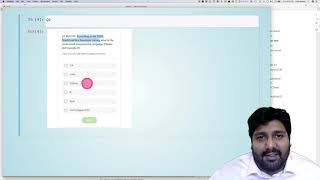
real projects can't be treated like a integral competition with a narrow and predefined outcome we all know that projects involving machine learning and data as key components require iterative development to deal with this high degree of intrinsic uncertainty the key question is therefore how do we measure progress both in the abstract project level as well as on individual machine learning tasks the obvious answer is the use of annotated data however it's much less obvious or get these annotations efficiently in this presentation i will talk about the role and different types of annotation what key features an annotation tool should provide and in the end how to build an annotator with jupiter and a few lines of code i'm a manuel and by the end of this talk i hope to have convinced you to collaborate with us on hyper annotator or similarly exciting machine learning projects roles and phases of annotation let's first clearly understand the problem we want to solve by looking at a simplified example before discussing possible approaches so let's first assume that our project or business goal is to automate a simple repetitive process such as traffic counting our inputs are there for video data and the required output accounts over time the first modeling step could therefore be to recognize relevant objects on individual video frames let's assume we decide to approach this with bounding box-based object detection at this point we already have two different annotation tasks tasks the first is the bodybox annotation task for the first machine learning subtask and the overreaching um annotation which um much closer um reflects the current human task which is video sequence annotation where we um transform videos in direct counts so we have just seen that projects often require muddling types of annotation let's now look at different domain specific annotation tasks and what we will see is that the annotation ui really needs to be able to adapt to a quite different domain requirements um the first example is about annotating objects for 3d object detection so what you see here is a point cloud representing a forest and our task or the task we want to do is we want to recognize individual trees and you see you see here two images the one on the right is those points colored um by belong um if they belong to the same tree they also have the same color this is something we can do with ipod volume which is quite convenient because it means that we don't need to interface with any demon specific application another example is process annotation here we have different um sensor feedbacks from the process and our design expert can can tell us which of the sensor behavior is correct or is expected in which he does it would classify us out of control and this is something we can then use to better model the different process points and also then detect strange or outlying behavior so this is something we could easily realize with pq plot and i think it's it's clear that instead of just having one for one chart would be very interesting to us also simultaneously plot other aspects of the process which helped the domain expert better understand the different process stages my last example comes from the area of remote sensing the task here is to recognize or find uh wildfires and that's something you see in the in the red the red uh boxes they are the areas of jaco and the burning and the other uh bonding boxes um indicate every aspect the smoke from the white voice is visible this is quite important because the white the smoke is much better or easier to find in the the fires itself and at the same time it's really difficult to distinguish smoke from from clouds so what's the deal here um this data comes from satellite images it's geotagged and therefore it's quite important that we can flip back and forth between different layers of the images and also that they are that they are the geolocation is really used in the way we look at the data that's something we can easily do with ipi leaflet so overall we have now seen that we can pull different domain specific annotation tasks all into the notebook and this allows us then yeah to reviews [Music] annotation stages that we need to support with our software so up to now we have talked about annotation and where it happens in the project we have seen the need for different domain specific uis and let's now look at the last aspect i want to talk about before we actually go into the requirement analysis so the annotation really happens in this for many projects in different phases we have initial phase um where we basically start with old annotations or training labels and there's actually quite a lot of research and lots of different ideas how we can start basically from from an empty or unlabeled data set that's for example using labels which are from related tasks which often pre-trained model which might not be um good enough for our purpose but still produce meaningful predictions on our tasks just by understanding the problem the data better we might be able to use loser logs and similar information and sure the last probably the last option is then to really manually uh annotate all the data so the important part is we have initial annotation phase where we want to make a quick progress and come to a model which yeah uh shows the first understanding of [Music] yeah the problem that we want to solve then we can actually go to the second phase where i call here supervision um that's basically we start looking at where does the model make mistakes and by um presenting this in an annotation interface we can annotate the data much more efficiently because like in the example here that you might remember from from google captures the model is already quite strong in uh recognizing uh taxis but it still makes mistakes so we can just show batch of images to the annotator and he picks out the ones which are mistakes and by showing one wedge we get basically all of them annotated in a very efficient way and the last one is this monitoring if you put a model in production it's quite important that we make sure that when we don't have some kind of input or feature drift which means that uh for example if it's a fixed installed camera you know the the lighting might change for some reason which could affect our prediction and we need to have some kind of monitoring to catch this kind of drifts certainly we should use different kinds of statistics to capture this but on top it's also often quite important to also have something like a human in the loop where we from time to time show the predictions to an expert basically sampled on them just to ensure that we don't have some basically uh freak changes that we didn't anticipate so in summary this is a bit prerogative but without annotations we really have no clue what we're doing what i mean by that is you know if you have something like feedback of the model is uh has an air you see your accuracy over 80 80 this really isn't good enough because what does it really tell us about the business problem so we also need to to measure or have an approximation for the business objective not just model performance this is important because this business objective is much more stable and will like guide us through the whole project while the machine learning sub tasks will change much more often design and requirements so before we talk about specific design aspects let's first collect some initial requirements i think we have by now a big enough picture a very wide picture of what an annotation process can contain so we can now really focus more on the details so we have already seen um examples for the first uh point so support different input domains uh which we have seen point clouds we have using geodata and so on but obviously also something like pdfs that we can annotate directly in the poster could be quite relevant labeling history what this means is um it's interesting to um since the labeling for a particular example can actually change over time so we discussed before that we have maybe an initial annotation then a supervision phase so really the label for a particular sample might actually change over time or also it might be we have different annotations from different annotators so having a label history is quite a powerful feature collaborative annotation where we very often have a range of domain experts which annotate our data or we just need a huge cloud of a crowd of people to annotate because we have so much data to annotate in both cases it's um quite i'd say obvious or at least that's a possible way to use something browser-based because that means if you come to the next point it's very accessible for non-technical domain experts which means we don't have to install something on the local machine like setting up in a virtual environment uh installing uh jupiter lab or something like this is really not not not possible in the general setting the secure on premise deployment uh in annotation it's quite common that we deal with also sensitive data like for privacy uh issues uh or because it's like um contains uh important um company information it cannot be put on on the cloud easily so secure on-premise deployments is crucial um scale to 10 to hundreds of users the point here is that we don't want to scale infinitely because this will require completely different architectures and for many projects that's just not needed so we do really have the simplification here it's not single user but something in the range of 10 to 100 users is something we should be able to support hyper annotator was not our first project where we built an annotation tool um i want to quickly talk about two prior annotation tools that we built because i think that really helps to understand why it's so beneficial to build on the jupiter framework so our first approach was really building a javascript application from scratch from web app since we wanted to focus on browser it was clear that we we had to use javascript and using react was mainly um done because it's a popular framework and we needed some kind of background so that was the question if we use craftworld or investing api i think this is not really the just something we just decided to do and then we quickly realized now that we have this uh client uh server setup we need also to have an authorization encryption and so on so that the communication is secure if we deploy it on a public network this worked well so far except that we really realized that you know it took a lot of time to have a very specific annotation tool that was then yeah it would have been very expensive to uh you know extend it with different for different annotation tasks and i think one of the main reasons was that in our team not everyone is a javascript expert and on the other side basically everyone knows enough python code to write scripts or some programs in a truly notebook so our next attempt was then um to use an already existing and very well just robustly designed annotation tool which is called what it's from microsoft the problem that we run into with this approach is that even though the tool supported the integration of predictions from from pretend models it was restricted to only tensorflow.js models which just wasn't flexible enough for us and also we wanted to have multi-user support which is not really um yeah supported and at least wasn't supported at the time when we used it so we extend we looked into the source code extended it ourselves um which again worked to a certain extent but we again had to realize that what was really specialized in a specific type of annotation and extending it further would have really required not just modification of the existing code but complete rewrites and that really would have defeated the purpose of building something pre-existing this now lets me to hyper annotator and i think it really incorporates all the difficulties that we have experienced before so um the different aspects which are important are we can build on ipad widgets which again with um we can then again uh build on even more specialized libraries like ipi events and iphone canvas and these are basically a libraries which wrap a lot of javascript code which allow us to do some like like we see say later do some quite interesting um stuff in the browser which usually can only be done in javascript easily the fact that we build on on jupiter notebooks on on jupiter in general um is that we get this client server and the authentication of the communication between the client and server basically for free that's something we would otherwise have to build ourselves and also maintain i think the um really the most important point for ins for us basically for the adaption was was the release of voila even though it looks like maybe an not such a big change in the overall support that we have with jupiter notebooks the fact that we can use voila to really create a standalone application from notebook was like the key component that was missing for us because now with waller it allows us to build this applications easily where the user doesn't have to install anything at all it doesn't have to know how to use a 2-meter laptop and so on so the lesson learned here was designed to be infinitely hackable and this is something that we basically get for free by putting everything on this jupiter stack in some way somewhere i would say we can't expect an annotation to tool to satisfy all of our needs but by choosing the right libraries and frameworks we can certainly drastically reduce the cost of creating custom tools so after having spent quite some time on understanding the channel annotation problem looking at different requirements you can finally come to more to the implementation details and see some examples for the hyper annotator how we and how we use it internally at the moment so one of the key design principles of ipo annotator is to separate the core containing generic building blocks that you can use independently in different domain-specific annotation notebooks so the code needed to handle domain-specific data aspects and also domain specific ui unless interchangeable and are therefore kept in separate modules let's now look at some examples for the generic parts that we can put in ipad with a core that's the history search and a sync function these are basically requirements that are shared across domain specific annotation tasks we can therefore isolate here's a small example for [Music] this three-year building blocks how we use them and i'm using here a very simple annotation task because the focus should here be more on the possibility of uh including different annotation this search and history widget aspects so what we see here is that's a bit hard to see on the screen but um what we have is an annotation task where we have an image and then we have basically a bunch of candidate classes that we can select based on how similar they are to the image that we see on the right that's the one we want to annotate let's just say okay it's similar this one and maybe it looks a bit what does it look like there's an aspect of two into it so here i can do multi multitarget uh annotation if you want so this is um then we can go to the next image just randomly select something and go again further so this aspect of basically going through images um going back and keeping the annotations that's something that's super generic and that's supported by the history um another feature is search sometimes it's very helpful to um look up specific images for example if you for some reason see that there's a mistake in this image or this image gets a spectacular high score for some reason it might be just helpful to look at it and really quickly and that's why we have the search functionality here sync files this is um if you deploy um the annotator on some uh web server it's very convenient if we can then after deploying actually add new data update the so the data you want to annotate or the annotation itself so there's an option where we can use the sftp to upload data and also to download data so this is uh sync thinking of files sure for sure we can use our support syncing to different endpoints like s3 buckets or something similar um let's now look at um some annotators of some basically domain specific annotators yes these are all image image examples let's start with bounding box annotation because that's something quite common and if i execute it here what you see as again this you know this from from before so we can uh similarly we can go through the different samples but we can also draw on it and that's something that is stored and uh if you choose the the right behavior or support the right behavior this annotations that we that we are basically producing here they're also stored in a database uh including including the history so what's really uh cool here is that destroying volume box drawing also the coloring of the of the bonding box and so on it's all done in python and this is thanks to uh ipi canvas and as you see it's it's quite responsive even though we are actually in in a live presentation it works certainly even better and in the notebook itself or if it's deployed as a runner so this is super efficient we can obviously we can extend it easily to you know have more than one bonding box maybe have polygons that we want to annotate and so on so just a proof of concept something like this is uh quite easily possible supervision with captures okay so now what we have is the captcha annotator and if you just look at the example so the task here select all images with pink squares this is what we should we should do can go to next select all the same question and as you can see it's basically the same oh actually i think i made a mistake here let's go back pink squares it's not pink one let's undo that select none so just by selecting none we're just giving the information that we actually looked at it even though we didn't you know change any of the select anything let's go next okay i think by now the uh the game is clear here you see it there's a different question that we're asking here um teal right angle so we can actually um easily change uh have different questions and have it in one annotation task that's all stuff that's super easy to basically change and i hope you already see here you know chrome you power basically now can play the google capture game yourself if you have a model which is already quite good and you want people to you know help you to quickly select the images which don't work well yet so by now i hope that i have convinced you that annotation is both an important and complex topic and that jupiter and jupiter ecosystem is a great way to build annotation tools the principles on which ipa annotator is built has served us well in multiple projects the specific implementation that we have put on github is still in previous status but we really didn't want to come empty-handed and it was important for us to give you a chance to build your own annotator in a few lines of code we have also good news in the sense that ipa annotator video uh has received a grant so this is something we will build out in the next month for sure and in general we are looking for collaborators for this project and other exciting machine learning opportunities so please feel free to contact us my email address on the slides thanks
Original Description
Brief Summary
In this talk I'm going to explain why standard annotation tools didn't work for us in multiple projects, demonstrate our multiple failed attempts to build a flexible annotation system, and show how we finally came up with ipyannotator - the infinitely hackable annotation framework - and why you should use it, too.
Outline
Even though much less glamorous than developing new machine learning models, the annotation process and the required tooling is often one of the most critical aspects of real world Machine Learning projects.
Many breakthroughs in Machine Learning application such as in image classification, text understanding and recommender systems belong to the class of supervised machine learning. These ML methods often require large collections of input-output pairs from which information is learned. An example for an input-output pair is an animal image together with the species label (name) provided by a human annotator.
The main challenge in creating ML datasets is the cost of acquiring annotations/targets which is much more expensive than getting the inputs. It's well known that the prediction quality of ML models critically depends on the amount of training samples for learning.
The goal of annotation can be framed as generating as much annotations as possible with sufficient quality under a given budget constraint.
Why Jupyter-based annotation tools can save you time and money
Back end and front end: the full data science team can help with development
Annotation can be turned into supervision by pre-labeling with an existing weak models/heuristics
Project specific context can be integrated easily
Key requirements and building blocks for a flexible annotation framework
Easy integration of complex inputs such as video, audio, 3D point clouds
Distributive, collaborative annotation between technical and non-technical users
Fast prototyping
How you can build your own annotation tool with Jupyter, Voilà and a few lines of code
Jupyter plus i
Watch on YouTube ↗
(saves to browser)
Sign in to unlock AI tutor explanation · ⚡30
Playlist
Uploads from JupyterCon · JupyterCon · 18 of 60
1
 2
2
 3
3
 4
4
 5
5
 6
6
 7
7
 8
8
 9
9
 10
10
 11
11
 12
12
 13
13
 14
14
 15
15
 16
16
 17
17
 ▶
▶
 19
19
 20
20
 21
21
 22
22
 23
23
 24
24
 25
25
 26
26
 27
27
 28
28
 29
29
 30
30
 31
31
 32
32
 33
33
 34
34
 35
35
 36
36
 37
37
 38
38
 39
39
 40
40
 41
41
 42
42
 43
43
 44
44
 45
45
 46
46
 47
47
 48
48
 49
49
 50
50
 51
51
 52
52
 53
53
 54
54
 55
55
 56
56
 57
57
 58
58
 59
59
 60
60

Interview Joshua Patterson NVIDIA
JupyterCon
Dave Stuart - Jupyter as an Enterprise “Do It Yourself” (DIY) Analytic Platform | JupyterCon 2020
JupyterCon
Jeffrey Mew - Supercharge your Data Science workflow | JupyterCon 2020
JupyterCon
Michelle Ufford- Supercharging SQL Users with Jupyter Notebooks | JupyterCon 2020
JupyterCon
Alan Yu - What we learned from introducing Jupyter Notebooks to the SQL community | JupyterCon 2020
JupyterCon
Chris Holdgraf- 2i2c: sustaining open source through hosted Jupyter infrastructure | JupyterCon 2020
JupyterCon
Yiwen Li - Intro to Elyra - an AI centric extension for JupyterLab | JupyterCon 2020
JupyterCon
Luciano Resende - What's new on Elyra - A set of AI centric JupyterLab extensions | JupyterCon 2020
JupyterCon
Alan Chin - Explore and Extend AI Pipeline Runtimes with Elyra and JupyterLab | JupyterCon 2020
JupyterCon
Eduardo Blancas- Streamline your Data Science projects with Ploomber | JupyterCon 2020
JupyterCon
Thorin Tabor - Democratizing the accessibility of computational workflows | JupyterCon 2020
JupyterCon
Simon Willison- Using Datasette with Jupyter to publish your data | JupyterCon 2020
JupyterCon
Brendan O'Brien - Using Qri (“query”) to fetch, query, combine and publish datasets.|JupyterCon 2020
JupyterCon
Georgiana Dolocan - Putting the JupyterHub puzzle pieces together | JupyterCon 2020
JupyterCon
Yuvi Panda- Running nonjupyter applications on JupyterHub with jupyter-server-proxy| JupyterCon 2020
JupyterCon
Richard Wagner- The Streetwise Guide to JupyterHub Security | JupyterCon 2020
JupyterCon
TamNguyen- Handling Custom Jupyter Data Sources | JupyterCon 2020
JupyterCon
Immanuel Bayer- ipyannotator - the infinitely hackable annotation framework | JupyterCon 2020
JupyterCon
Rebecca Kelly- A shared Python, R and Q Jupyter Notebook - A Quant Sandbox Dream |JupyterCon 2020
JupyterCon
Itay Dafna - Leap of faith: Transitioning from Excel to Jupyter-based applications | JupyterCon 2020
JupyterCon
Damián Avila - Using the Jupyterverse to power MADS | JupyterCon 2020
JupyterCon
Chiin Rui Tan- From Zero to Hero | JupyterCon 2020
JupyterCon
Firas Moosvi- Teaching an Active Learning class with Jupyter Book| JupyterCon 2020
JupyterCon
Daniel Mietchen- Jupyter in the Wikimedia ecosystem | JupyterCon 2020
JupyterCon
Qiusheng Wu- How Jupyter and geemap enable interactive mapping and analysis | JupyterCon 2020
JupyterCon
Stephanie Juneau- Jupyterenabled astrophysical analysis for researchers and students|JupyterCon 2020
JupyterCon
Denton Gentry- The Care and Feeding of JupyterHub for Climate Solution Models| JupyterCon 2020
JupyterCon
Tingkai Liu- FlyBrainLab: Interactive Computing in the Connectomic/Synaptomic Era | JupyterCon 2020
JupyterCon
Kunal Bhalla- A Notebook Style Guide| JupyterCon 2020
JupyterCon
Julia Wagemann - How to avoid 'Death by Jupyter Notebooks' | JupyterCon 2020
JupyterCon
David Pugh - Best practices for managing Jupyter-based data science | JupyterCon 2020
JupyterCon
Karla Spuldaro - Debugging notebooks and python scripts in JupyterLab | JupyterCon 2020
JupyterCon
Shreyas Dalia - assert browserTest == True # Frontend Testing JupyterLab | JupyterCon 2020
JupyterCon
Chris Holdgraf - The new Jupyter Book stack | JupyterCon 2020
JupyterCon
Hamel Husain - Fastpages - A new, open source Jupyter notebook blogging system | JupyterCon 2020
JupyterCon
Marc Wouts - Jupytext: Jupyter Notebooks as Markdown Documents | JupyterCon 2020
JupyterCon
Sheeba Samuel- ProvBook |JupyterCon 2020
JupyterCon
Philipp Rudiger - To Jupyter and back again | JupyterCon 2020
JupyterCon
Jacob Tomlinson - What is my GPU doing? | JupyterCon 2020
JupyterCon
Afshin Darian - A visual debugger in Jupyter | JupyterCon 2020
JupyterCon
Eric Charles - Jupyter Real Time Collaboration| JupyterCon 2020
JupyterCon
Devin Robison - Optimizing model performance | JupyterCon 2020
JupyterCon
Junhua zhao - PayPal Notebooks: ML & Data Science experience | JupyterCon 2020
JupyterCon
April Wang - Redesigning Notebooks for Better Collaboration | JupyterCon 2020
JupyterCon
Bryan Weber - Distributing and Collecting Jupyter Notebooks for Manual Grading| JupyterCon 2020
JupyterCon
Georgiana Dolocan - The Littlest JupyterHub distribution | JupyterCon 2020
JupyterCon
Tim Metzler - Electronic Examination using Jupyter Notebook | JupyterCon 2020
JupyterCon
Blaine Mooers - Why develop a snippet library for Jupyter in your subject domain? | JupyterCon 2020
JupyterCon
Ryan Abernathey - Cloud Native Repositories for Big Scientific Data | JupyterCon 2020
JupyterCon
Tanya Rai - Introducing Bento: Jupyter Notebooks @ Facebook | JupyterCon 2020
JupyterCon
Kenton McHenry - From Papers to Notebooks | JupyterCon 2020
JupyterCon
Ryan Herr - After model.fit, before you deploy| JupyterCon 2020
JupyterCon
Ana Ruvalcaba - Community building is a sustainability strategy | JupyterCon 2020
JupyterCon
Martin Renou - Xeus: an ecosystem of Jupyter kernels | JupyterCon 2020
JupyterCon
Michael Wilson - Teaching teenagers to understand Dark Energy | JupyterCon 2020
JupyterCon
Davide De Marchi - Voilà dashboards for policy support | JupyterCon 2020
JupyterCon
Marcos Lopez Caniego - ESASky's JupyterLab widget| JupyterCon 2020
JupyterCon
Praveen Kanamarlapud - Kernel Life Cycle Management | JupyterCon 2020
JupyterCon
Aaron Bray - Pulse Physiology Engine | JupyterCon 2020
JupyterCon
Aaron Watters - Using WebGL2 transform/feedback in Jupyter widgets | JupyterCon 2020
JupyterCon
More on: Tool Use & Function Calling
View skill →









Related Reads
📰
📰
📰
📰
One Week, Two AI Lawsuits — and the Line Between What Provenance Can and Cannot Prove
Medium · AI
Meta removes controversial AI feature on Instagram after backlash
TechCrunch AI
The Internet Doesn’t Need Another Platform. It Needs a New Constitution.
Medium · Startup
Apple Is Suing OpenAI for Allegedly Stealing Hardware Secrets
Wired AI
🎓
Tutor Explanation

 DeepCamp AI