Quarter sales by month
Skills:
Data Literacy70%
Key Takeaways
Determines quarter sales by month using Excel functions
Full Transcript
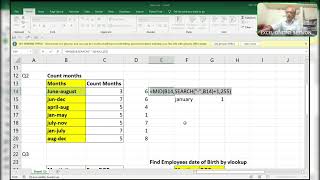
hi guys here your friend rajinikanth excel guru and here i am going to explain you this solution for the test which i posted in the groups right so totally one two sorry one second and let me know that you know one two three and three they got these things are there okay okay let it be i'll explain you so don't skip the video because in between if you skip this video you are unable to understand the concept why i am using that function why i have to use okay all these things you will miss in the future if you face any problem then you are unable to solve it so here is the only months are there okay so here you have to find this which quarter quarter mid january february march is the first quarter april may june this is the second quarter july august september this is third quarter okay so here only months are there see there is no date and there is no years only month so you want to find in which quarter it was this without helper column you have to do and what are the whatever the functions i am using these functions can work from excel 2010 to microsoft p65 right this is the main thing which i am going to explain you because whenever you go for interview so if they it may they use excel 2010 or 12 or 16 like that and not only that i am using excel 2016 then also i'm trying to solve this queries in excel 2010 functions only right so here is the thing which i'm going to explain you step by step don't skip the video and here is the only months are there so you have to find in which quarter it was there one two three totally how many quarters should be there twelve three four quarters okay so what i'll do just i'll use one function but it will not work that function why it will give you value at it because it it is unable to understand if it is a date it can understand but it's not a date it's the only month name okay if it's a date you can understand this is the thing see example i will show you [Applause] something okay so here you can use it like this so to understand it is the sixth june sorry sixth right but here only the month name there is no pre-formatted it's only the month so what i'll do here i'll change little bit to convert this month name to a number that is one ampersand now i press enter see i delete this one okay see february is the second month december is the 12th month july is the seventh month april is the fourth month mark is the tournament now we have to find this in which quarter it was there so what i'll do here simply i'll do divided by three because quarters are only three months entrance so it will give you like this right now here i will use one function that is roundup sorry [Applause] round up and the number of digits will be zero right so if i press ctrl enter it will give you in mid quarter it was there superhour is the first quarter january february mark is in the first quarter april may june this is the second quarter okay so this is the thing double click see december is in the fourth quarter october november december is the three months where it is in the fourth quarter right and coming to here it's very very important and so many people are not able to understand this query now i'm explaining to this query that you have to extract only the third quarter sales third quarter sales means generally month april may june april may june these months sales only i need without helper column april may june okay so here see how i'll do the same procedure but little bit of uh array i'm using the array function but little bit of change that's it the same function month of one ampersand f4 f9 see april geneva this is this is the fourth month okay this is the fourth month so it is showing fourth jan is the first month so it is showing the damn one augustine august is the eighth month so it is showing eight okay see here now see what i'll do and of same procedure divided by three half nine so it will give all the decimals and the whole number so i'll convert this into ground roundup comma zero affluent first of all i'll press enter and i'll show you here to understand better roundup have to [Applause] month of one ampersand yes sorry i have noticed this month number of decimals is zero enter absolutely four one eight six right see if i press f2 and i highlight all the formula and i press f9 see here it is showing two but i did not round up here somewhere after this okay here i did wrong okay here it is wrong it's not a four actually it should be second week okay second somewhere i did wrong here and that's let me check here where i went wrong here round up correct only where i went wrong the same procedure which i over used here see here okay here i did not done divided by three the same this will come over here see f9 2 1 all those things are same wait a minute see two one three two all things are saved now i want to extract only the sales for the third quarter that is april may june so what i'll do here if this whole thing equal to this rocking every set so what you need i need like this row of the whole formula f4 minus rho off in my previous video i explained you why i am using this type of array okay see af9 so wherever it finds the row number it will pick up that number and remaining will be the falses right see if this is the logical text f9 see true true true are they here i'm using the row numbers f9 so automatically it will pick up those numbers which matches the true right uh again i have to do because if comma row of f4 minus row of this thing f4 plus one control enter just simply just show that i don't want to miss the formula now i'll see what i'll do now here so okay control shift enter i'll drag this formula to unlock this let me check simply let me check sit here she'll give all the numbers somewhere i did wrong i think so right that's why it's showing all once wherever um here is equal to this one f4 ctrl shift enter then everything somewhere something it is right already see here i have to now i'll use small function xmd and small and i've come to end of this formula end of this formula and i will use one function that is those goes j dot log five colon js5 ctrl shift enter now now let me check what it will be see the positions where it will be there now simply i will use one function that is index of the sales i'm using without any helper column object guys and if this function will work in all the versions from starting 2000 except 2010 to microsoft t65 right control shift enter um you'll find some errors over here don't worry i'll show you how to read off this error before that i will change this one to see the second quarter sales and the i'll use if error if either if you find any dysfunction give me deep blank i'll learn this formula as it is this is the second work okay this is the quarter within which quarterly will be four fourth month sales it is fourth month sales all of fourth month skills coming to here okay only this query i will giving chance you to prove so how can we find that maximum sales minimum save and who did the maximum sales and some of the quarter okay see here you have to change that thing two it was there so i came to three so automatically it will become three see so here is the criteria where you want to change so that it should get some of quarter three okay so only this thing i will i can post you later and thank you guys thanks for your support have a nice day
Original Description
https://t.me/+8TESWEKBXukwOWVl
Watch on YouTube ↗
(saves to browser)
Sign in to unlock AI tutor explanation · ⚡30
Playlist
Uploads from ExcelGuru · ExcelGuru · 30 of 60
1
 2
2
 3
3
 4
4
 5
5
 6
6
 7
7
 8
8
 9
9
 10
10
 11
11
 12
12
 13
13
 14
14
 15
15
 16
16
 17
17
 18
18
 19
19
 20
20
 21
21
 22
22
 23
23
 24
24
 25
25
 26
26
 27
27
 28
28
 29
29
 ▶
▶
 31
31
 32
32
 33
33
 34
34
 35
35
 36
36
 37
37
 38
38
 39
39
 40
40
 41
41
 42
42
 43
43
 44
44
 45
45
 46
46
 47
47
 48
48
 49
49
 50
50
 51
51
 52
52
 53
53
 54
54
 55
55
 56
56
 57
57
 58
58
 59
59
 60
60

Total Sumproduct Session By Excel Expert Mr.Sanjeev kaushik
ExcelGuru
Uses and Technics of Transpose in 3 Methods
ExcelGuru
Query Solved ExcelExpert
ExcelGuru
counting numbers and text with creteria lenngth
ExcelGuru
For Reverse Looking Fing age By Using Database Function
ExcelGuru
MIS INTERVIEW QUESTION EXTRACTING FIRST AND LAST NAME WHICH IS NOT HAVING DELIMETER
ExcelGuru
finding Unique count of sales between Dates
ExcelGuru
counting 2 lookup values as per dupicates
ExcelGuru
Reverse Vlookup to get DOB
ExcelGuru
17-04-2022 Sridevi Marriage Celebrations
ExcelGuru
INTERVIEW QUERIES WITH ANOTHER QUERY
ExcelGuru
finding maximum sales of product when duplicate products
ExcelGuru
QUERY ASKED IN GROUP
ExcelGuru
MIS TEST WITH AMAZING SOLUTION BY JR.BILLGATES(ANAND)
ExcelGuru
query to count not saled products after saled products
ExcelGuru
Explanation about birla mandir at Hyderabad
ExcelGuru
counting specific weekday in between dates
ExcelGuru
Extract Data As per Creteria with power Query
ExcelGuru
Extracting data as per creteria in different sheets
ExcelGuru
SOLUTION FOR INPHOSYS MIS-1(1-4)
ExcelGuru
solution for inphosis mis 2(12-13)
ExcelGuru
INPHOSIS MIS SOLUTION-3(5-10)
ExcelGuru
LOGICAL MIS INPHOSIS-4(17-18)
ExcelGuru
MIS INTERVIEW QUESTION
ExcelGuru
MIS INPHOSIS -5(19-21)
ExcelGuru
MIS INPHOSIS - 6(23-25)
ExcelGuru
extracting pin codes or number from text string
ExcelGuru
finding maximum sales in one value
ExcelGuru
finding how many months are there between months
ExcelGuru
Quarter sales by month
ExcelGuru
Finding rate with 2 conditions by using vlookup
ExcelGuru
how to find max length word from text string
ExcelGuru
Group query To find sales and Quantity With 2 conditions by using VLOOKUP
ExcelGuru
my angels birthday celebrations
ExcelGuru
Group Query Adding total sales when it is having random delimiter like inches,kgs,Ton
ExcelGuru
Seperating first and last Name by space using function
ExcelGuru
Finding Total Goals from different tables Team members
ExcelGuru
Group Query To Extract Team members Names
ExcelGuru
Extracting data in a single column
ExcelGuru
converting one column data into table interview question
ExcelGuru
MIS INTERVIEW QUESTION-100
ExcelGuru
MIS INTERVIEW QUESTION -101 FINDING VALUE AS PER CHARACTERS LENGTH BY VLOOKUP
ExcelGuru
chi.shreyansh
ExcelGuru
MIS INTERVIEW QUESTION-102(SORT BY LENGTH)
ExcelGuru
query to extract last words from sentence
ExcelGuru
MIS INTERVIEW -103(EXTRACT MAXIMUM CHARACTERS WORD IN A CELL)
ExcelGuru
group query
ExcelGuru
without len function count of characters
ExcelGuru
MIS QUERY
ExcelGuru
mis interview questions part -1
ExcelGuru
Real MIS Query-1
ExcelGuru
real mis interview questions-1
ExcelGuru
finding the value as per length of characters
ExcelGuru
real mis -2
ExcelGuru
real MIS -3
ExcelGuru
REAL MIS -4(PART A)
ExcelGuru
group query
ExcelGuru
tech mahindra mis
ExcelGuru
courier company MIS
ExcelGuru
tech Mahindra (UPDATED)
ExcelGuru
More on: Data Literacy
View skill →









Related AI Lessons
🎓
Tutor Explanation

 DeepCamp AI