QUERY ASKED IN GROUP
Key Takeaways
This video answers a query asked in the ExcelGuru group related to data analytics
Full Transcript
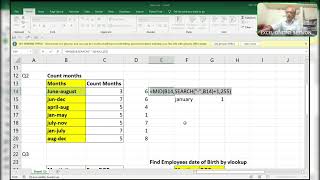
how to do with vlookup so are you able to see my screen clearly okay guys are you able to see my screen clearly let me know so that i can do some changes if it is not there okay i'll start it i'll start it i don't know but i'll start it okay so this is very very important right so i will do with windows see how i'll do first of all before going to this this is the uh say some names are there some names are there so you have to get these values as per this like this one two three four five for rahul if you do direct to vlookup it will pick up the first occurrence see it will do like this pick up the first occurrence f4 comma two or three or whatever or zero okay so it will pick up only the first occurrence no i don't want like this i want two three four five okay before going to start this session i will explain one thing first of all what we need we we look up two three four five six right from starting two to six again two to six again two two six again two two six two three four for vlookup see how i'll do here first of all the formula in h4 so it's dollar for column h4 i'm locking the row but not the column right okay so it will give all the serial numbers from one to still where you drag that is 16. so what i'll do simply i use minus one i'm showing the step by step double so you got 0 2 okay 0 to 15 now what i'll do the mod will give you the reminder okay if it is divisible it will give a reminder so what i'll do i divide with 5 why is 5 because here 5 are there 1 2 3 4 5 so for that reason i am dividing with 5 can see what will happen now it will give you the zero one to see wherever it finds there f5 it will give the zero zero zero zero zero okay now f2 are simply two three four five six i simply have two two three four five six two three four five six two three four five six okay two three four five six if you want you can check it two three four seconds just i copy this formula from here control c maximum people will not do with this okay sorry i delete this one is equal to control b instead of uh h4 i'll use l4 here l4 okay not h4 l4 you'll show the same thing or able to see the screen hmm at all where it is online i don't know what the problem it is now okay now are you able to see my screen yeah yes okay now see here i l4 l okay l4 see here is the difference previously i use here 80.4 here i use the l dollar four to l4 okay butterfly enter double two three four five six two tmc yes i kill this the cell address from here see the wherever the formula is there in that place i logged only the row but not the column okay you know did you got my point which i'm going to explain you so simply i use vlookup of rahul comma the whole table f4 comma and this will be the column index number that is 2 comma 0 enter it's not an array formula it is normal formula if you want sure it will do one thing so the second tourist for two red second values 21. for 2 second value 2 3 second value 21 second value 31 did you got it with the vlookup i did did you got it if you got my this thing any doubts no clay bro no i got it no with the vlookup i did okay yes bro okay some problem with this i'm closing i don't know some problem i'm closing it okay bye brother
Original Description
excelguru
Watch on YouTube ↗
(saves to browser)
Sign in to unlock AI tutor explanation · ⚡30
Playlist
Uploads from ExcelGuru · ExcelGuru · 13 of 60
1
 2
2
 3
3
 4
4
 5
5
 6
6
 7
7
 8
8
 9
9
 10
10
 11
11
 12
12
 ▶
▶
 14
14
 15
15
 16
16
 17
17
 18
18
 19
19
 20
20
 21
21
 22
22
 23
23
 24
24
 25
25
 26
26
 27
27
 28
28
 29
29
 30
30
 31
31
 32
32
 33
33
 34
34
 35
35
 36
36
 37
37
 38
38
 39
39
 40
40
 41
41
 42
42
 43
43
 44
44
 45
45
 46
46
 47
47
 48
48
 49
49
 50
50
 51
51
 52
52
 53
53
 54
54
 55
55
 56
56
 57
57
 58
58
 59
59
 60
60

Total Sumproduct Session By Excel Expert Mr.Sanjeev kaushik
ExcelGuru
Uses and Technics of Transpose in 3 Methods
ExcelGuru
Query Solved ExcelExpert
ExcelGuru
counting numbers and text with creteria lenngth
ExcelGuru
For Reverse Looking Fing age By Using Database Function
ExcelGuru
MIS INTERVIEW QUESTION EXTRACTING FIRST AND LAST NAME WHICH IS NOT HAVING DELIMETER
ExcelGuru
finding Unique count of sales between Dates
ExcelGuru
counting 2 lookup values as per dupicates
ExcelGuru
Reverse Vlookup to get DOB
ExcelGuru
17-04-2022 Sridevi Marriage Celebrations
ExcelGuru
INTERVIEW QUERIES WITH ANOTHER QUERY
ExcelGuru
finding maximum sales of product when duplicate products
ExcelGuru
QUERY ASKED IN GROUP
ExcelGuru
MIS TEST WITH AMAZING SOLUTION BY JR.BILLGATES(ANAND)
ExcelGuru
query to count not saled products after saled products
ExcelGuru
Explanation about birla mandir at Hyderabad
ExcelGuru
counting specific weekday in between dates
ExcelGuru
Extract Data As per Creteria with power Query
ExcelGuru
Extracting data as per creteria in different sheets
ExcelGuru
SOLUTION FOR INPHOSYS MIS-1(1-4)
ExcelGuru
solution for inphosis mis 2(12-13)
ExcelGuru
INPHOSIS MIS SOLUTION-3(5-10)
ExcelGuru
LOGICAL MIS INPHOSIS-4(17-18)
ExcelGuru
MIS INTERVIEW QUESTION
ExcelGuru
MIS INPHOSIS -5(19-21)
ExcelGuru
MIS INPHOSIS - 6(23-25)
ExcelGuru
extracting pin codes or number from text string
ExcelGuru
finding maximum sales in one value
ExcelGuru
finding how many months are there between months
ExcelGuru
Quarter sales by month
ExcelGuru
Finding rate with 2 conditions by using vlookup
ExcelGuru
how to find max length word from text string
ExcelGuru
Group query To find sales and Quantity With 2 conditions by using VLOOKUP
ExcelGuru
my angels birthday celebrations
ExcelGuru
Group Query Adding total sales when it is having random delimiter like inches,kgs,Ton
ExcelGuru
Seperating first and last Name by space using function
ExcelGuru
Finding Total Goals from different tables Team members
ExcelGuru
Group Query To Extract Team members Names
ExcelGuru
Extracting data in a single column
ExcelGuru
converting one column data into table interview question
ExcelGuru
MIS INTERVIEW QUESTION-100
ExcelGuru
MIS INTERVIEW QUESTION -101 FINDING VALUE AS PER CHARACTERS LENGTH BY VLOOKUP
ExcelGuru
chi.shreyansh
ExcelGuru
MIS INTERVIEW QUESTION-102(SORT BY LENGTH)
ExcelGuru
query to extract last words from sentence
ExcelGuru
MIS INTERVIEW -103(EXTRACT MAXIMUM CHARACTERS WORD IN A CELL)
ExcelGuru
group query
ExcelGuru
without len function count of characters
ExcelGuru
MIS QUERY
ExcelGuru
mis interview questions part -1
ExcelGuru
Real MIS Query-1
ExcelGuru
real mis interview questions-1
ExcelGuru
finding the value as per length of characters
ExcelGuru
real mis -2
ExcelGuru
real MIS -3
ExcelGuru
REAL MIS -4(PART A)
ExcelGuru
group query
ExcelGuru
tech mahindra mis
ExcelGuru
courier company MIS
ExcelGuru
tech Mahindra (UPDATED)
ExcelGuru
🎓
Tutor Explanation

 DeepCamp AI