Creating Animations in Microsoft Expressive Pixels (4 of 9)
Skills:
AI Productivity Tools70%
Key Takeaways
Creates animations in Microsoft Expressive Pixels using frame and transition tools
Full Transcript
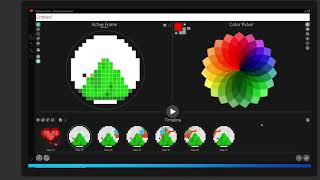
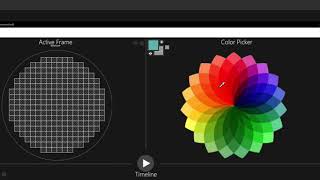
[Music] hello again stacy here now that you know how to create an image we're ready to bring it to life in your my animation screen let's go back to the heart that we created earlier i'll hover over the image and we can see the options menu below i'll select edit animation icon in the middle and this will take us directly to the authoring screen and we can now see the image in the active frame panel at the top and the image is also showing up in the animation timeline down below now in order to animate an image i'll want to add more frames and make each frame a little different than the one before you can make a simple animation which is two frames or make it as complex as you like using many frames let's check out some of the actions we can take in the timeline toolbar we can add a new frame import frames from other images which we'll cover in another tutorial add a waiting period between frames add a fade out transition and copy and paste frames there are also some additional options that you'll see on the side of each frame when you hover over it here we can delete a specific frame duplicate the frame to the right and mark which frame you want as your keyframe meaning it will be the frame that shows up in the animation galleries okay so i could add a frame and draw something new but since i want to make my heart beat i will just duplicate the frame and make some changes to it so i will copy my frame to the right and now i have two identical frames select the frame that you want to make changes to and be sure it's highlighted otherwise you might be making changes to the wrong one now to make it look like it's beading i'm going to adjust the size and there are a number of different ways to do this first i'm going to use my selection tool and draw a square around my image now with the selection tool highlighted we can see some options for actions that can be taken up at the top here you can copy and paste a selection create a fragment which we'll learn more about in a later tutorial cut out a selection and resize and this is the one we're going to choose now when you choose resize you'll notice that when i hover over the edges an arrow will show up and with my cursor held down i can drag my selection in or out okay and then to deselect you can click anywhere outside of the selection within your canvas or just right click all right now you'll notice the image may need to be touched up just a bit afterwards so i'm going to select it again i still have my selection tool highlighted and just move it to the center just a little bit so i have more room and deselect okay so i think i need to fix up the outer edges first and the best way to do that is if you'll remember in our media panel we have our active palette our active palette shows us all of the colors that we're currently using in this animation so first i'm going to clean up the outer edges with my paint brush okay and now i will fill in the purple i think in this frame i will just get rid of the highlighted area and fill in some of the squares here okay and remember if we're using our paintbrush and we want to erase you can also just select set to transparent and that way i can still use my paintbrush tool here and i think i'm going to enlarge it just a little bit more by bringing it down okay great now we have a larger heart so let's take a look and see if it looks like it's beating great now i think i want to add one more frame just for fun and color in the center let's see so again i'm going to copy the frame to the right and i will add a new heart in the center with the yellow that was my highlight so again i'll just use my paintbrush tool and then i will mirror that on the other side and okay so now we have a heart in the middle and let's just color that in and we can color that in with a new color i'm going to go to my color picker choose a bright orange and this time with my paint bucket tool i can color in the entire heart orange okay i think that looks good let's preview the animation if you want to make some adjustments to the animation behavior you can do this in the animation controls down at the bottom left the first button controls the frame rate and that's the speed at which the animation will run this will determine how many frames will be shown per second you can adjust this on the slider right here the more frames per second the faster your animation will be the second button determines how many times your animation will loop on the device let's set this one to five that means it will play all the way through loop back and play from the beginning again and again five times before it stops okay now that we have our animation we can choose which frame we want to be our key frame so i think i will choose this one that we have all colored in and i'm going to select mark this frame as preview key okay there you have it now when we save it this is the frame that shows up in our animation gallery and when you hover over it you can see how it will animate alrighty now try creating your own animation and explore the different ways to create cool transitions and customize your animations learn more about advanced editing features in our other tutorials and visit us at aka dot ms wac expressive pixels to find out more you
Original Description
Learn how to make your image come to life by adding frames and transitions and setting the speed of your animation.
More at https://aka.ms/expressivepixels
Watch on YouTube ↗
(saves to browser)
Sign in to unlock AI tutor explanation · ⚡30
Playlist
Uploads from Microsoft Research · Microsoft Research · 31 of 60
1
 2
2
 3
3
 4
4
 5
5
 6
6
 7
7
 8
8
 9
9
 10
10
 11
11
 12
12
 13
13
 14
14
![Microsoft Urban Futures Summer Workshop | Data Driven Urban Transformation [Day 1]](https://i.ytimg.com/vi/-5Cx8cUQRfY/mqdefault.jpg) 15
15
![Microsoft Urban Futures Summer Workshop | Sensors and Data [Day 2]](https://i.ytimg.com/vi/Q5HBThuj4bY/mqdefault.jpg) 16
16
![Microsoft Urban Futures Summer Workshop | Policy and Social Impact [Day 3]](https://i.ytimg.com/vi/zMmsXTcuYlQ/mqdefault.jpg) 17
17
 18
18
 19
19
 20
20
 21
21
 22
22
 23
23
 24
24
 25
25
 26
26
 27
27
 28
28
 29
29
 30
30
 ▶
▶
 32
32
 33
33
 34
34
 35
35
 36
36
 37
37
 38
38
 39
39
 40
40
 41
41
 42
42
 43
43
 44
44
 45
45
 46
46
 47
47
 48
48
 49
49
 50
50
 51
51
 52
52
 53
53
 54
54
 55
55
 56
56
 57
57
 58
58
 59
59
 60
60

Frontiers in ML: Learning from Limited Labeled Data: Challenges and Opportunities for NLP
Microsoft Research
Frontiers in Machine Learning: Climate Impact of Machine Learning
Microsoft Research
Frontiers in Machine Learning: Security and Machine Learning
Microsoft Research
Hope Speech and Help Speech: Surfacing Positivity Amidst Hate
Microsoft Research
Early Indicators of the Effect of the Global Shift to Remote Work on People with Disabilities
Microsoft Research
Remote Work and Well-Being
Microsoft Research
Challenges and Gratitude of Software Developers During COVID-19 Working From Home
Microsoft Research
Towards a Practical Virtual Office for Mobile Knowledge Workers
Microsoft Research
Impact of COVID-19 crisis on the future of work in India
Microsoft Research
Empowering and Supporting Remote Software Development Team Members through a Culture of Allyship
Microsoft Research
How Work From Home Affects Collaboration: Information Workers in a Natural Experiment During COVID19
Microsoft Research
Phong Surface: Efficient 3D Model Fitting using Lifted Optimization
Microsoft Research
Managing Tasks Across the Work-Life Boundary: Opportunities, Challenges, and Directions
Microsoft Research
Microsoft Urban Futures Summer Workshop | Data Driven Urban Transformation [Day 1]
Microsoft Research
Microsoft Urban Futures Summer Workshop | Sensors and Data [Day 2]
Microsoft Research
Microsoft Urban Futures Summer Workshop | Policy and Social Impact [Day 3]
Microsoft Research
Directions in ML: Algorithmic foundations of neural architecture search
Microsoft Research
MineRL Competition 2020
Microsoft Research
Can we make better software by using ML and AI techniques? With Chandra Maddila and Chetan Bansal
Microsoft Research
From Paper to Product
Microsoft Research
SkinnerDB: Regret Bounded Query Evaluation using RL
Microsoft Research
From SqueezeNet to SqueezeBERT: Developing Efficient Deep Neural Networks
Microsoft Research
Programming with Proofs for High-assurance Software
Microsoft Research
Platform for Situated Intelligence Overview
Microsoft Research
Directional Sources & Listeners in Interactive Sound Propagation using Reciprocal Wave Field Coding
Microsoft Research
Galactic Bell Star Music Demo
Microsoft Research
Importing Animations in Microsoft Expressive Pixels (9 of 9)
Microsoft Research
Welcome to Microsoft Expressive Pixels (1 of 9)
Microsoft Research
Getting Started with Microsoft Expressive Pixels (2 of 9)
Microsoft Research
Creating an Image in Microsoft Expressive Pixels (3 of 9)
Microsoft Research
Creating Animations in Microsoft Expressive Pixels (4 of 9)
Microsoft Research
Managing Animation Galleries in Microsoft Expressive Pixels (5 of 9)
Microsoft Research
Creating Fragments in Microsoft Expressive Pixels (6 of 9)
Microsoft Research
Using Layers in Microsoft Expressive Pixels (7 of 9)
Microsoft Research
Exporting Animations with Microsoft Expressive Pixels (8 of 9)
Microsoft Research
What Kind of Computation is Human Cognition? A Brief History of Thought (Episode 2/2)
Microsoft Research
What Kind of Computation is Human Cognition? A Brief History of Thought (Episode 1/2)
Microsoft Research
Planeverb: Interactive sound propagation for dynamic scenes using 2D wave simulation
Microsoft Research
Making cryptography accessible, efficient, and scalable with Dr. Divya Gupta and Dr. Rahul Sharma
Microsoft Research
Beyond the mega-data center: networking multi-data center regions (SIGCOMM 2020 Talk)
Microsoft Research
Optics for the cloud – Light at the end of the tunnel? (SIGCOMM 2020 Workshop)
Microsoft Research
Beyond the mega-data center: networking multi-data center regions (SIGCOMM 2020 short talk)
Microsoft Research
Sirius: A Flat Datacenter Network with Nanosecond Optical Switching (SIGCOMM 2020 short talk)
Microsoft Research
Novel Image Captioning
Microsoft Research
Forest Sound Scene Simulation and Bird Localization with Distributed Microphone Arrays
Microsoft Research
Decoding Music Attention from “EEG headphones”: a User-friendly Auditory Brain-computer Interface
Microsoft Research
How does holographic storage work?
Microsoft Research
The physics of hologram formation in iron doped lithium niobate
Microsoft Research
Introduction to coax: A Modular RL Package
Microsoft Research
Directions in ML: "Neural architecture search: Coming of age"
Microsoft Research
Microsoft Research AI Breakthroughs 2020: 20 minute research talks + Q&A panel
Microsoft Research
Fireside Chat with Johannes Gehrke during Microsoft Research AI Breakthroughs 2020
Microsoft Research
Fireside Chat with Susan Dumais during Microsoft Research AI Breakthroughs 2020
Microsoft Research
Microsoft Research AI Breakthroughs 2020: 20 minute research talks, Q&A panel, and event wrap-up
Microsoft Research
Clinical Research with FHIR
Microsoft Research
Soundscape Street Preview
Microsoft Research
Tilt-Responsive Techniques for Digital Drawing Boards
Microsoft Research
SurfaceFleet: Exploring Distributed Interactions Unbounded from Device, Application, User, and Time
Microsoft Research
Haptic PIVOT: On-Demand Handhelds in VR
Microsoft Research
SurfaceFleet Supplemental Video Demonstration (UIST 2020)
Microsoft Research
More on: AI Productivity Tools
View skill →








Related Reads
📰
📰
📰
📰
Hyundai and Kia built a UV system that kills bacteria inside a car while you are sitting in it
The Next Web AI
The latest AI news we announced in June 2026
Google AI Blog
AI-Powered Theodore Roosevelt Is Ready To Answer Your Questions
Forbes Innovation
Krafton agrees to pay Subnautica 2 bonuses after CEO who used ChatGPT to dodge them steps down
The Next Web AI
🎓
Tutor Explanation

 DeepCamp AI