Google Cloud Backup and DR - How to mount, clone or restore a VMware VM
Key Takeaways
Google Cloud Backup and DR allows users to mount, clone, or restore a VMware VM, providing options for accessing backups without waiting for restoration, creating new VMs, or restoring to a previous point, with features like performance optimization and data portability across appliances.
Full Transcript
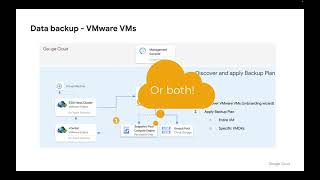
when it becomes time to use a backup of a VMware VM that you've created using Google Cloud backup and drr you can get to them in two different ways either go to App Manager applications and find the application you're interested in right select and go access or go back up and recover recover find the application you're interested in and go next this will bring up the timeline view where you can see all the backup images you've got available in this case I've only got one you can switch to a table view over here if you'd rather see this as a table choose the backup image you want to work with and then you've got three choices Mount clone or restore what's the difference a mount lets you access the backup without waiting for the backup to be restored in other words no data copy is required prior to the Mount job completing what this means is that we can access this backup very very quickly I can either Mount to an existing host which could be a vmw VM or in fact a Google computer engine instance or I could Mount to a new virtual machine a new virtual machine effectively means I'm taking my backup of a VM and turning it into a whole new VM choose the name of your VM choose the V Center where you want the new VM to be created choose the ESX host which you want the VM to be created on choose the data store we want the vmx file and the swap file to be created the mount mode by default is NFS don't use RDM unless you've got icezy enabled on the ESX host if the VM consists of multiple volumes you can select them here because this Mount is coming out of envolt I have performance options in other words do I want to read the from Google cloud storage and then case it locally in the snapshot pool of the backup and Recovery Appliance or do I want every read to come always from Google Cloud Storage or do I in fact want to start caching in the background or fully cache before I start reading the balanced option is the best choice but storage optimized is probably the next best choice when I hit submit the mount job will begin I can then monitor it by going to the system monitor I can go here and go monitor jobs you can see my Mount job is currently running if I log in to my vsphere client what I can see is that a new virtual machine was created and then powered on and look there it is the important Point here is that this VM is being presented using vmdks out of an NFS data store that's being presented itself via the backup and Recovery Appliance this is why it's amount because the data is located not on the vsan data store it hasn't been copied there the data is actually being presented via an NFS data store through the backup and Recovery Appliance at this point I have two choices if I want to keep this VM permanently I could right select the VM go migrate choose the option to change the storage and run what we traditionally call a storage v motion in this case clearly I'd want to Target the vsan data store when this job finishes the VM will switch from being a mounted VM to effectively being a permanent VM in my vs spere environment if on the other hand I don't want to keep the mounted VM I can go app manager active mounts right select the VM and go unmount and delete the job again has been submitted and I can monitor it again via monitor jobs when the job completes what I can see is the VM was powered off reconfigured and in a moment will be deleted and now it's gone in addition to doing amount the other thing we can do is a clone where amount creates a virtual copy which is presented via an NFS data store to the esex host a clone literally copies the data into the targeted data store so again I would give the VM a name choose my V Center choose my server choose my data store and hit submit but the VM would not be available until all of the data copy has been completed finally I could do a restore in a restore I'm not specifying anything about the VM name or its location because what I'm doing is restoring The Source VM in other words the VM where this backup came from where a clone is effectively a restore to any host with any name a restore is literally the restore of the source VM itself if I hit submit I will be asked to confirm data loss because we are restoring the VM to a previous point which means its current operational state will be removed one other thing to be aware of is that if you put backups into onva pools then if that enva pool is accessible to a different backup and Recovery Appliance then the images inside it can be imported in this example you can see that I'm able to import images were created by multiple backup and Recovery appliances in this example there is a considerable number of applications that I could import into my current targeted appliance that were created by a different Appliance what this means is that enval images are truly portable and can be accessed by any appliance that can connect to the Google Cloud Storage bucket that contains them
Original Description
In this video we show how to mount, clone or restore a VMware VM
Playlist
Uploads from Google Cloud · Google Cloud · 3 of 60
1
 2
2
 ▶
▶
 4
4
 5
5
 6
6
 7
7
 8
8
 9
9
 10
10
 11
11
 12
12
 13
13
 14
14
 15
15
 16
16
 17
17
 18
18
 19
19
 20
20
 21
21
 22
22
 23
23
 24
24
 25
25
 26
26
 27
27
 28
28
 29
29
 30
30
 31
31
 32
32
 33
33
 34
34
 35
35
 36
36
 37
37
 38
38
 39
39
 40
40
 41
41
 42
42
 43
43
 44
44
 45
45
 46
46
 47
47
 48
48
 49
49
 50
50
 51
51
 52
52
 53
53
 54
54
 55
55
 56
56
 57
57
 58
58
 59
59
 60
60

Top 3 ways organizations are adjusting their cloud strategies to prepare for economic uncertainty
Google Cloud
Google Cloud Retail Search and Browse Console deep dive
Google Cloud
Google Cloud Backup and DR - How to mount, clone or restore a VMware VM
Google Cloud
Google Cloud Backup and DR - VMware vSphere Backup Overview
Google Cloud
Google Cloud Backup and DR - Creating backup Plans for VMware VM backups
Google Cloud
Google Cloud Backup and DR - Compute Engine Instance Backups and Sole Tenant Nodes
Google Cloud
Google Cloud Backup and DR - Managing Service Accounts
Google Cloud
Let’s solve for what’s next
Google Cloud
Google Cloud Executive Briefing Center | Cloud Space | Silicon Valley
Google Cloud
Tinyclues with Google Cloud offers CRM Intelligence to maximize conversions
Google Cloud
Aible partners with Google Cloud helping customers build predictive models within minutes
Google Cloud
TELUS streamlines big data ingestion with help from Google Cloud and Accenture
Google Cloud
Getting started with Apigee API Management
Google Cloud
Google Cloud Retail Search
Google Cloud
Building your first API proxy with Apigee
Google Cloud
Brands and agencies develop dynamic video ads with Connected-Stories NEXT and Google Cloud
Google Cloud
Redefining the transportation industry
Google Cloud
Google Cloud Project Katalyst
Google Cloud
Israel's Family Court: Creating more compelling experiences for its citizens
Google Cloud
Tausight partners with Google Cloud to help healthcare industry protect PHI activity & take action
Google Cloud
Google Cloud Retail Browse
Google Cloud
Verifying API keys and debugging your API proxy flow
Google Cloud
Getting started with Apigee API Management
Google Cloud
Adding policies to your APIs
Google Cloud
Google Cloud Backup and DR - Configuring Google Cloud VMware Engine to work with Backup and DR
Google Cloud
Topaz Subsea Cable
Google Cloud
Episode 29: Building a culture of data literacy with Latin America’s biggest ecommerce platform
Google Cloud
Weshalb Datananalysten die Sparringspartner von Produktmanagern sein sollten
Google Cloud
Warum und wie METRO eine Machine Learning-Pipeline implementiert hat
Google Cloud
Wie nutzt METRO Data Science, um geschäftliche Herausforderungen zu meistern?
Google Cloud
Google Cloud in Qatar. Let's get solving.
Google Cloud
Google Cloud for Qatar
Google Cloud
Doha has a new Google Cloud region
Google Cloud
The new Google Cloud region in Qatar
Google Cloud
Build, tune, and deploy foundation models with Vertex AI
Google Cloud
Generative AI on Google Cloud
Google Cloud
Who will be coming to Google Cloud Day Tel Aviv? #Shorts
Google Cloud
Protect your organization at the edge
Google Cloud
Google Cloud Backup and DR Alert Notifications setup
Google Cloud
Build, tune, and deploy foundation models with Generative AI Support in Vertex AI
Google Cloud
Where the Internet Lives: Data center on the prairie
Google Cloud
Which developer program are you joining?
Google Cloud
Lufthansa Group baut intelligente Systeme zur Vereinfachung des Flugbetriebs
Google Cloud
How ASML revived Moore's Law and remade chipmaking
Google Cloud
CMO of Unity celebrates Women's History Month
Google Cloud
Vint Cerf on Google Cloud Digital Leader
Google Cloud
Mobile World Congress 2023
Google Cloud
Topaz - Canada
Google Cloud
Google Data Cloud & AI Summit 2023: Reveal opportunities to transform your business
Google Cloud
Building a conversational bot with Google Cloud Gen App Builder
Google Cloud
Elisa Polystar and Google Cloud partner to bring the power of analytics and automation to CSPs
Google Cloud
Network modernization - how can CSPs start now?
Google Cloud
How Semios uses imported and remote models for inference with BigQuery ML
Google Cloud
Deliver your AI solutions up to 100 times faster with Google Cloud partner, Snorkel AI
Google Cloud
Capture consumer perspectives for CPG using NLP and analytics with Harmonya and Google Cloud
Google Cloud
Delivering Cloud-Native Network Transformation
Google Cloud
Proactively detect & investigate anomalies & data quality issues in BigQuery with Telmai
Google Cloud
Introducing AlloyDB Omni
Google Cloud
Episode 30: How Auto Trader transitioned to the cloud to analyze tricky customer data
Google Cloud
MongoDB Atlas on Google Cloud
Google Cloud
Related Reads
📰
📰
📰
📰
Slack Built Its Own EC2 Platform. Buying One Was the Harder Question.
Medium · DevOps
OpenLogi: The Future of Peripheral Control in the Local-First Era
Medium · DevOps
Incident Rollback Safety Explained — Searching Structured Node.js Docker Cron Logs
Dev.to · AidenSterling3417
Terraform Interview Questions & Answers – Part 9: Workspaces, count vs for_each, Lifecycle & Drift…
Medium · Programming
🎓
Tutor Explanation
 DeepCamp AI