Wireshark Tutorial for Beginners - Installation
Key Takeaways
This video tutorial covers the installation of Wireshark, a traffic analyzer tool, and provides a basic overview of its usage for network monitoring and packet capture.
Full Transcript
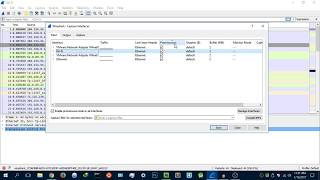
hey guys hack blit here back again with another video and welcome to wire shark for beginners so in these set of tutorials I'm going to be teaching you how to use wire shark and I'm going to be moving you from an beginner level to an advanced level or or an intermediate level so you might be asking what is wire shock well wies shock is a traffic analyzer now you might be asking why do I need to learn wi shock well if you're a network administrator system administ rator and you're interested in basically monitoring what's going on on the network this would be handy for you or if you're just a curious parent at home wants to make sure that your children aren browsing the web um you know in more uh illicit uh methods I mean visiting um inappropriate websites and stuff like that so basically it's just a tool for monitoring what's going on on your Wi-Fi network that's basically it for the Layman so I I guess anyone can really learn how to use this tool it's nothing really hard so yeah let's get to it so I'm over here on their website it's wi.org uh there we are that's the website I will link it in the description section if you don't want to type it out I don't know how long that will take but um yeah once you load it up uh you just want to hit download um and it's free by the way uh so the current stable release is y shark 2.2.3 so uh we have uh the latest uh stable release uh here you have your different platforms you have you have a Windows micros um you have source code for Linux I do believe that you have to install it through the terminal on Linux let me know if you want a tutorial on that uh so again you have your different architectures in terms of platforms uh so you have a 64-bit windows and 32bit windows uh I'm going to download the 64-bit because that's the version of Windows I'm running and the processor of basically the processor that I'm running but I already have it downloaded and installed uh please do note that during the installation uh I want to make uh you have to just uh install Windows uh win peap that's what it's called Uh it will give you that prompt during the installation to install win peap now make sure you do install winp cap because uh as again it's one of the components that goes hand in hand with wire shock so uh once you have it uh downloaded and installed it's very simple process I have it right here very nice icon it say a Shar fin a blue Shar fin boot it up and you're greeted by what appears to be a loading menu uh and this a very very very uh complicated looking uh program but don't worry it's nothing really complicated so basically what I'm going to do I'm just going to give you a basic overview here of what to do to get started uh we're going to look at the advanced stuff in the next video I'm going to cover that then so uh welcome to wiho well thank you very much so it tells me to capture uh don't worry about this using enter a capture filter so basically here what it's asking you is what uh network interface card are you using and want to use to monitor your traffic so right now you can see there's some activity on my Wi-Fi card H that's pretty interesting so I think I'm going to use my Wi-Fi card although if you're using it ethernet just go ahead uh don't worry about these VMware network adapters I have virtual machines running on my computer that's why they have these uh virtual Network ad adapters and I really do know that they might not be working unless you're actually running the virtual machine but nonetheless that's for another video what I'm going to do is I'm just going to hit Wi-Fi there we are and it's uh you want to hit this green button oh it's already started so um unfortunately I did not have to uh press the start button it already started for me so that's the thing uh if you want to if you want to start a capture just hit the green button if you want to stop it hit red all right and then once you stopped uh it's going to stop capturing the packets so that's basically how to get started using W shock I'm going to cover all the other basically the tools and um basically the all the other nooks and crannies uh in the next video but uh yeah I hope you guys are interested in this series of videos uh I know it's going to help you a lot or maybe not I don't know but if it if it does and you you really want to show your support please leave a like down below again one thing I would really request guys is that you follow me on my social networks I need to get some follows on my social networks so that I can at least build a community uh around what I'm doing which is basically ethical hacking and cyber security so yeah I mean if you feel like drop a like on my Facebook Twitter or follow me on Instagram no worries there you'll get all the latest updates on the videos I'm working on and all the uh other stuff the other thing is guys thank you so much for subscribing to the channel uh it's grown a lot since the start of the year I've grown from uh 500 subscribers in 2 to 700 subscribers in like one or two weeks and that's that's really great guys and I'm going to set a goal for this year guys uh you heard it here first in this video uh that this year I want to hit 10,000 subscribers or even more so I have committed to the YouTube channel I'm going to be doing it regularly now I know that's what you guys want like consistency but enough of the chatter uh I'm done thank you for watching this video have a great day and yeah peace guys
Original Description
Wireshark Tutorial for Beginners, become an advanced wireshark user today!
***********************************************************
Wireshark: https://www.wireshark.org
***********************************************************
I Hope you enjoy/enjoyed the video.
If you have any questions or suggestions feel free to ask them in the comments section or on my social networks as well as mu blog.
SOCIAL NETWORKS
-------------------------------
Facebook: https://www.facebook.com/HackerSploit/
Twitter: https://twitter.com/HackerSploit
Instagram: https://www.instagram.com/alexisayub/
--------------------------------
Visit My website/Blog for all documentation and downloads, as well as forums for communication with me and other members.
Watch on YouTube ↗
(saves to browser)
Sign in to unlock AI tutor explanation · ⚡30
Playlist
Uploads from HackerSploit · HackerSploit · 5 of 60
1
 2
2
 3
3
 4
4
 ▶
▶
 6
6
 7
7
 8
8
 9
9
 10
10
 11
11
 12
12
 13
13
 14
14
 15
15
 16
16
 17
17
 18
18
 19
19
 20
20
 21
21
 22
22
 23
23
 24
24
 25
25
 26
26
 27
27
 28
28
 29
29
 30
30
 31
31
 32
32
 33
33
 34
34
 35
35
 36
36
 37
37
 38
38
 39
39
 40
40
 41
41
 42
42
 43
43
 44
44
 45
45
 46
46
 47
47
 48
48
 49
49
 50
50
 51
51
 52
52
 53
53
 54
54
 55
55
 56
56
 57
57
 58
58
 59
59
 60
60

How To Install Kali Linux 2.0 On Virtual Box
HackerSploit
100 Subscriber Q&A! - How I Learned Ethical Hacking
HackerSploit
BlackArch Linux Review - Better Than Kali Linux?
HackerSploit
How to Access the Deep Web Safely | Deep Web Starter Guide 1.0
HackerSploit
Wireshark Tutorial for Beginners - Installation
HackerSploit
Wireshark Tutorial for Beginners - Overview of the environment
HackerSploit
Wireshark Tutorial for Beginners - Capture options
HackerSploit
Wireshark Tutorial for Beginners - Filters
HackerSploit
Complete Ethical Hacking Course - Become a Hacker Today - #1 Hacking Terminology
HackerSploit
Complete Ethical Hacking Course #2 - Installing Kali Linux
HackerSploit
Parrot OS 3.5 Review | The Best Kali Linux Alternative
HackerSploit
Nmap Tutorial For Beginners - 1 - What is Nmap?
HackerSploit
Katoolin | How To Install Pentesting Tools On Any Linux Distro
HackerSploit
Nmap Tutorial For Beginners - 2 - Advanced Scanning
HackerSploit
Nmap Tutorial For Beginners - 3 - Aggressive Scanning
HackerSploit
Zenmap Tutorial For Beginners
HackerSploit
How To Setup Proxychains In Kali Linux - #1 - Stay Anonymous
HackerSploit
How To Setup Proxychains In Kali Linux - #2 - Change Your IP
HackerSploit
How To Change Mac Address In Kali Linux | Macchanger
HackerSploit
How To Setup And Use anonsurf On Kali Linux | Stay Anonymous
HackerSploit
Ubuntu 17.04 "Zesty Zapus" Review - Bye Unity
HackerSploit
VPN And DNS For Beginners | Kali Linux
HackerSploit
Tails OS Installation And Review - Access The Deep Web/Dark Net
HackerSploit
Steganography Tutorial - Hide Messages In Images
HackerSploit
The Lazy Script - Kali Linux 2017.1 - Automate Penetration Testing!
HackerSploit
Best Linux Distributions For Penetration Testing
HackerSploit
Netcat Tutorial - The Swiss Army Knife Of Networking - Reverse Shell
HackerSploit
Gaining Access - Web Server Hacking - Metasploitable - #1
HackerSploit
Web Server Hacking - FTP Backdoor Command Execution With Metasploit - #2
HackerSploit
How To Install Kali Linux On VMware - Complete Guide 2018
HackerSploit
Q&A #1 - Best Cyber-security Certifications?
HackerSploit
Terminator - Kali Linux - Multiple Terminals
HackerSploit
Shodan Search Engine Tutorial - Access Routers,Servers,Webcams + Install CLI
HackerSploit
Q&A #2 - Mr Robot?
HackerSploit
Metasploit Community Web GUI - Installation And Overview
HackerSploit
Linux Expl0rer - Forensics Toolbox - Installation & Configuration
HackerSploit
QuasarRAT - The Best Windows RAT? - Remote Administration Tool for Windows
HackerSploit
Metasploit For Beginners - #1 - The Basics - Modules, Exploits & Payloads
HackerSploit
Metasploit For Beginners - #2 - Understanding Metasploit Modules
HackerSploit
Kali Linux Quick Tips - #1 - Adding a non-root user
HackerSploit
Metasploit For Beginners - #3 - Information Gathering - Auxiliary Scanners
HackerSploit
Spectre Meltdown Vulnerability - How To Check Your System
HackerSploit
Metasploit For Beginners - #4 - Basic Exploitation
HackerSploit
ARP Spoofing With arpspoof - MITM
HackerSploit
WordPress Vulnerability Scanning With WPScan
HackerSploit
Generating A PHP Backdoor with weevely
HackerSploit
Nikto Web Vulnerability Scanner - Web Penetration Testing - #1
HackerSploit
How To Install Kali Linux On Windows 10 - Windows Subsystem For Linux
HackerSploit
Stacer - System Optimizer And Monitoring Tool For Linux
HackerSploit
Kali Linux 2018.1 - Kernel Updates & Patches
HackerSploit
MITM With Ettercap - ARP Poisoning
HackerSploit
Password Cracking With John The Ripper - RAR/ZIP & Linux Passwords
HackerSploit
How To Detect Rootkits On Kali Linux - chkrootkit & rkhunter
HackerSploit
Channel Updates - How To Post Questions & Video Suggestions
HackerSploit
Web App Penetration Testing - #1 - Setting Up Burp Suite
HackerSploit
Web App Penetration Testing - #2 - Spidering & DVWA
HackerSploit
Cl0neMast3r - GitHub Repository Cloning Tool
HackerSploit
Kali Linux On Windows 10 Official - WSL - Installation & Configuration
HackerSploit
DoS/DDoS Protection - How To Enable ICMP, UDP & TCP Flood Filtering
HackerSploit
Web App Penetration Testing - #3 - Brute Force With Burp Suite
HackerSploit
More on: Tool Use & Function Calling
View skill →









Related AI Lessons
⚡
⚡
⚡
⚡
X now offers an MCP server to make its platform easier for AI tools to use
TechCrunch AI
n8n Automation Repurpose Video Content: The 2025 Production Guide
Dev.to AI
You’re Still Paying $200/Month for AI Tools You Could Replace With a Free Local Setup Tonight
Medium · Data Science
Top 10 AI Tools Every College Student Should Know in 2026
Medium · AI
🎓
Tutor Explanation

 DeepCamp AI