Display Equations in ChatGPT
Key Takeaways
This video tutorial demonstrates how to display equations with mathematical symbols in ChatGPT using a custom extension, allowing users to render LaTeX equations directly in the ChatGPT interface. The extension is available on GitHub and can be installed manually in Chrome.
Full Transcript
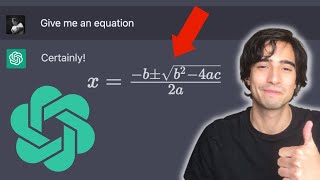
good morning everyone how is it going today today I'm gonna be showing you real quick how to go from this kind of mathematical expressions in chat GPT to this kind of mathematical Expressions okay all right so without further Ado let's get right into it [Music] all right so if you've been anywhere near the internet in the past few months you have probably heard about charger PT and how incredibly useful it is to actually learn and to explain yourself very complicated topics among which is mathematics and some mathematical Concepts um so I mean personally I've been using it a lot for studying mathematics and some topics in machine learning and it's been extremely useful but something that really came short that it came short with was with rendering mathematics inside cha GPT so whenever I would want to display some sort of equation or something or I would kind of ask it to explain a concept to me and it would explain it with an equation I would have to ask it to use latex to to to print the equation and then go to a latex converter to actually display the equation with beautiful symbols so basically I started looking for it so this is a moment to give a shout out to this awesome dude who did this pretty much for free and uh who gave gave it away for everyone he basically developed exactly what what I'm showing you um which is this piece of code right here um which you can copy and paste somewhere where you're using um and then just ask chargpt to use latex to to display mathematical equations and then you you just gotta paste whatever the code he developed and then just hit enter and it's basically going to render the code in chargepd however I found that there is a problem with this one because if you're using it for a long time it tends to break the thing I suppose is that either Chrome or charger PT doesn't really like having external Javascript and injected in a script tag so yeah after a few minutes it would just crash and just I would have to reload and it was very um not extremely a good experience so what I did was basically I just bundled that and repackaged it into this equation right here which basically does the same thing but I've been using it for a few weeks now and it works pretty good so I'll be showing you how to install it yourself so basically the idea behind the question is that you go to chat GPT and you're gonna want to ask chargpt to display all of the equations using latex right so basically I mean what I would do usually is just write a prompt myself but here I just added a button to ask for to to create the prompt automatically and then you would you have to click on render latex right and this basically just takes all of the instances where there is this kind of um latex language in the in the screen and then it just renders it especially for chargept right and then you can just stop the rendering but the thing is that if you continue working with this like for example give me another equation it's going to continue rendering it even if you don't like press the button again it's like continuously rendering a related expression in um in the screen so I mean that part is pretty useful for the moment it only works in charge of PT because that's where I was using it and so now I'm going to show you how to install it to install it I actually tried to put it on on Chrome Webster uh this weekend but um it's taken a bit of time to actually have it like go through all the permissions and like to have it validated so I'm going to show you how to install it from GitHub so I'm gonna put this Link in the description which is the link to the repository of the extension and of course if you're a developer you can totally contribute to it and just send a pull request and we can go through it but the idea here is that if you want to install it in your computer you're going to want to come here I mean to go to the link in the description and then you're going to come here to code and then click on download zip right so download this file right here you will have to unzip it like like in Mac you can just unzip it by clicking on it like this and here you have it all right so inside the file let me show you what it looks like inside the file inside the unzipped file you will have this folder right here it's called extension the rest of it is basically just to to build it to to I mean if you're a developer you know what this kind of things are but um if you just want to install it in your browser the only folder that you're interested in is extension right here so in order to install it in your browser you're going to have to go to in your browser you're going to have to go to Chrome extensions which is like the list of your extensions that you have installed I'm just going to remove the one that I already have here installed and you're going to have to click right here and develop developer mode so that you can see this button right here which is load unpacked then you're going to click on load unpacked and you're going to look for the extension that you just downloaded right and inside the file you're going to select the extension button right I mean ideally I would place this not indeed downloads folder but in some folder that I know that I'm going to keep for a long time because if you delete this folder you're going to delete the extension as well so I would just put it in my document so wherever you want um and then just select the extension folder click on select then it's going to load it and if for some reason the extension crashes you're just going to have to click right here and refresh the extension and now you can definitely just go to chatgpt like this and you will have this new extension right here which is Chad GPT equation renderer I chose just to pin it here and then you click on it you have a pop-up the first button does what I showed you already it automatically creates The Prompt for chatgpt any tasks it asks it to use latex to render equations and then you just render all the equations in its request and as you can see the renderer is is turning all um while you have this enabled so you can continue asking for I mean you can just continue your study session and your all of your questions will be converted into this beautiful Centex like symbols so yeah I mean I'm sure that if someone has um done I'm has a little bit more experience with rgbt maybe there is a prompt um to actually do this without an extension I have been trying to do something like this um these are some tests that I that I used I mean at some point it worked to do this without um the extension but sometimes it just goes crazy and sometimes it just doesn't work like asking it like if you ask it to use double like special characters or something like that um sometimes it works and sometimes it doesn't display the equation um for my I mean myself I've just found that the easiest thing to do is just to use this pretty simple extension uh if you're interested I'm going to show you how to build this equate in this extension in a future video so you can subscribe if you like that um so yeah I mean that's all for this video I hope you you found this useful and I'll see you next time cheers [Music] [Music] foreign [Music]
Original Description
In this video tutorial, we will show you how to display equations with mathematical symbols in ChatGPT - the powerful language model developed by OpenAI. ChatGPT is an amazing tool that can help students studying mathematics, engineering, physics, computer science, and other related fields, to learn faster and more efficiently.
------------------------------------
🔥 Here are the useful links:
👉 Download the extension here: https://github.com/alejandro-ao/chatgpt-equations/tree/build
👉 Gist from awesome Ryan Tremblay: https://gist.github.com/zaptrem/717b168583a323ef8215ada1fb057d1d
(his twitter: https://twitter.com/zaptrem/status/1598553052075761669?s=46&t=rwEzmDLSzwg7o1uMSRHKdQ)
❤️ Buy me a coffee: https://www.buymeacoffee.com/alejandro.ao
Newsletter:
✉️ Get these tutorials in your email once a week: https://bit.ly/42QofVK
------------------------------------
With ChatGPT, you can easily write down complex equations with mathematical symbols such as integrals, derivatives, and summations, and have them displayed beautifully in a matter of seconds. This is particularly useful for university students who need to write mathematical equations as part of their coursework or research projects.
In this tutorial, we will walk you through the steps of displaying equations with mathematical symbols in ChatGPT, using examples from different fields such as mathematics, engineering, and physics. We will also give you some tips on how to optimize your use of ChatGPT to make the most of this amazing tool.
If you are interested in machine learning and artificial intelligence, you will be amazed by the capabilities of ChatGPT. This language model is one of the most powerful tools available today for natural language processing, and it is constantly improving thanks to the work of OpenAI's researchers.
Whether you are a student or a professional in the fields of mathematics, engineering, physics, computer science, or any other related field, ChatGPT can help you study fas
Watch on YouTube ↗
(saves to browser)
Sign in to unlock AI tutor explanation · ⚡30
Playlist
Uploads from Alejandro AO · Alejandro AO · 11 of 60
1
 2
2
 3
3
 4
4
 5
5
 6
6
 7
7
 8
8
 9
9
 10
10
 ▶
▶
 12
12
 13
13
 14
14
 15
15
 16
16
 17
17
 18
18
 19
19
 20
20
 21
21
 22
22
 23
23
 24
24
 25
25
 26
26
 27
27
 28
28
 29
29
 30
30
 31
31
 32
32
 33
33
 34
34
 35
35
 36
36
 37
37
 38
38
 39
39
 40
40
 41
41
 42
42
 43
43
 44
44
![Multimodal RAG: Chat with PDFs (Images & Tables) [2025]](https://i.ytimg.com/vi/uLrReyH5cu0/mqdefault.jpg) 45
45
![Advanced RAG with LlamaIndex - Metadata Extraction [2025]](https://i.ytimg.com/vi/yzPQaNhuVGU/mqdefault.jpg) 46
46
 47
47
 48
48
 49
49
 50
50
 51
51
 52
52
 53
53
 54
54
 55
55
 56
56
 57
57
 58
58
 59
59
 60
60

Linear Regression in R - Full Project for Beginners
Alejandro AO
Configure Webpack 5 in Wordpress (2025) with Typescript and SASS
Alejandro AO
R Programming 101 - Crash Course for beginners
Alejandro AO
Convert HTML template to WordPress Theme (2025) - Full Course
Alejandro AO
Javascript Interactive Map with Leaflet EASY (with Marker Clusters & Popups)
Alejandro AO
Vanilla JS Project: Multi Step form in HTML, CSS & OOP Javascript
Alejandro AO
How to do AJAX in WordPress correctly (2025)
Alejandro AO
React Leaflet Tutorial for Beginners (2025)
Alejandro AO
Linear Regression in Python - Full Project for Beginners
Alejandro AO
Logistic Regression Project: Cancer Prediction with Python
Alejandro AO
Display Equations in ChatGPT
Alejandro AO
Create a Chrome Extension (Manifest V3) for ChatGPT
Alejandro AO
Full-Stack Project | ChatGPT API, React, Node.js, Express
Alejandro AO
Streamlit Python Course: Build a Machine Learning App to Predict Cancer
Alejandro AO
Langchain PDF App (GUI) | Create a ChatGPT For Your PDF in Python
Alejandro AO
LangChain Memory Tutorial | Building a ChatGPT Clone in Python
Alejandro AO
Chat with a CSV | LangChain Agents Tutorial (Beginners)
Alejandro AO
Create a ChatGPT clone using Streamlit and LangChain
Alejandro AO
Chat with Multiple PDFs | LangChain App Tutorial in Python (Free LLMs and Embeddings)
Alejandro AO
Full Python Environment Setup for AI (or other) Apps + Virtual Environments
Alejandro AO
Langchain + Qdrant Cloud | Pinecone FREE Alternative (20GB) | Tutorial
Alejandro AO
LangChain Version 0.1 Explained | New Features & Changes
Alejandro AO
Create a RAG Chain using LangChain 0.1 (New version)
Alejandro AO
Tutorial | Chat with any Website using Python and Langchain (LATEST VERSION)
Alejandro AO
Deploy Your AI Streamlit App for FREE | Step-by-Step (Heroku Alternative)
Alejandro AO
What is Google's Gemini 1.5 Pro | 10 Million Token Window
Alejandro AO
Chat with MySQL Database with Python | LangChain Tutorial
Alejandro AO
Stream LLMs with LangChain + Streamlit | Tutorial
Alejandro AO
Chat with MySQL Database using GPT-4 and Mistral AI | Python GUI App
Alejandro AO
#1 Harrison Chase: LangChain and The Future of LLM Applications | Alejandro AO
Alejandro AO
CrewAI Step-by-Step | Complete Course for Beginners
Alejandro AO
Python: Automating a Marketing Team with AI Agents | Planning and Implementing CrewAI
Alejandro AO
Build a Web App (GUI) for your CrewAI Automation (Easy with Python)
Alejandro AO
Early days of RAG and LlamaIndex - Jerry Liu
Alejandro AO
LlamaParse: Convert PDF (with tables) to Markdown
Alejandro AO
#2 Jerry Liu - What is LlamaIndex, Agents & Advice for AI Engineers
Alejandro AO
CrewAI + Exa: Generate a Newsletter with Research Agents (Part 1)
Alejandro AO
#3 Joe Moura | Multi Agent Systems and CrewAI
Alejandro AO
Python: Create a ReAct Agent from Scratch
Alejandro AO
New Groq Models: Best for Function-Calling Agents
Alejandro AO
Introduction to LlamaIndex with Python (2025)
Alejandro AO
LlamaIndex: How to use LLMs
Alejandro AO
LlamaIndex: How to Get Structured Data from LLMs
Alejandro AO
Multimodal RAG: Chat with PDFs (Images & Tables) [2025]
Alejandro AO
Advanced RAG with LlamaIndex - Metadata Extraction [2025]
Alejandro AO
Learn MCP Servers with Python (EASY)
Alejandro AO
Create MCP Clients in JavaScript - Tutorial
Alejandro AO
Create an MCP Client in Python - FastAPI Tutorial
Alejandro AO
How to Build an MCP Client GUI with Streamlit and FastAPI
Alejandro AO
Vibe Coding For Engineers (make it ACTUALLY work)
Alejandro AO
LlamaExtract Tutorial: Convert PDF & Images into JSON
Alejandro AO
Local MCP Servers for Cursor (Step by step)
Alejandro AO
Anthropic: How to Build Multi Agent Systems
Alejandro AO
Deploy Remote MCP Servers in Python (Step by Step)
Alejandro AO
GPT-5 for Developers: API Changes, Pricing, Model Router & Security
Alejandro AO
Tutorial: Auth for Remote MCP Servers (Step by Step) | OAuth 2.1 with ScaleKit
Alejandro AO
Generate UI Tests with TestSprite MCP Server + TRAE
Alejandro AO
#4 Allan Guo | 19-yo YC Founder - Willow Voice
Alejandro AO
RAG Project: Build an AI Onboarding Chatbot with Streamlit, LangChain, and ChromaDB
Alejandro AO
MCP Security | Malicious MCP Servers (Protect Yourself)
Alejandro AO
More on: LLM Foundations
View skill →






![Run Any AI LOCALLY for FREE Forever! [100% Beginner Tutorial]](https://i.ytimg.com/vi/8GFPZRgtEn8/mqdefault.jpg)


Related AI Lessons
⚡
⚡
⚡
⚡
Stop Guessing: Guaranteed Structured Output from LLMs in Node.js
Dev.to · Hardik Mehta
Spring AI Tutorial — Your First REST Endpoint with OpenAI (2026)
Dev.to AI
Notes: Memory, Context, and Large Language Models (LLMs)
Dev.to · Vladimir Panov
10 ChatGPT Prompts for Job Seekers: Resumes, Interviews & Career Growth
Medium · ChatGPT
🎓
Tutor Explanation

 DeepCamp AI