Unlock Your Application With Your Face using OpenCV
Key Takeaways
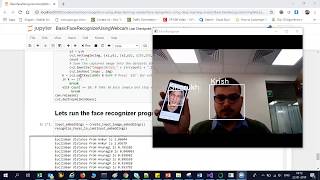
This video demonstrates how to unlock an application using face recognition with OpenCV, specifically utilizing the LBPH face recognizer to train a model and recognize faces with a confidence level of over 75%.
Full Transcript
hello all today we will try to create an application which and will implement a face recognition by using open CV by using face recognition will try to unlock that particular application now when I say unlocking a particular application you're not creating a full-fledged application but instead I will try to open a webcam and we'll train our model with our faces by using open C and then when there is a highly confidence more than 75 person then the application will automatically open all right or at least it'll display a message saying that that issue will successfully open now to begin with is first of all the first step that I am going to do and one more very important thing about this is that we will try to I will try to capture the training data in front of you only in this particular video and then we will train that and you will be seeing that by using this open CV lbh face recognizer which is a face recognizer which is provided in open sea this is very very good because the training usually will be taking very less amount of time because we are good to convert that images into arrays and that but flower values will be trained into this particular lb edge face recognization we will just try to discuss about lbh face recognizer which is already provided in open sea so before that I'm going to create some training data while creating training data what I am going to do is that first of all I'm going to use the Cascade classifier and I have this hard cascade frontal face default what Excel which will be able to capture the face features and then what I'm going to do I am going to just take each and every frame and this is this this whole block of code is actually creating the training data so what I'm going to plan to do is what I'm planning to do is that I'll take hundred frames of my images and I'll store it in a folder later those images I'll be taking it I will be draining with my with my he'll be p lb pH face recognizer which is provided by open CV and then we'll try to see whether we have it will recognize my face and it will unlock the unlock that application or so to begin with here is the code what we are going to do is that first of all I am going to load this arc Cascade phase classifier and then here I am going to read my friends from this when I'm reading my frames at each and every frame and storing in this folder which is that face slash user so you can also write to your own folder names and now what I am doing on each and every count since I want hundred frames you can see that I have given a condition like if hundred is equal to three I'm going to break from there okay so what I'm going to do 100 different images I'm going to store in this folder which will be my training data and this resizing and all I'm doing it because I just want to take my face structure so don't worry about this code guys I'll be providing this code in the github link so to begin with let us go and collect our sample data which will be used as a training data so I'm going to execute this whole line of code and let's see you can see that over here are my flames egg of my faces are getting captured and as soon as 100 frames get over my particular data is ready now you can see that over here inside my faces users I have all my hundred different images so you want to see and click onto this you can see that each and every images are there now after that what I am going to do is that next thing is that I am going to use algorithm which is called as lbh face recognizer let me go to that into the document of OpenCV and this is an algorithm which will actually help you to do see certain Lisa if you want to read more about this particular algorithm can go over here and read it it will basically convert all the images we basically have to convert all the images into arrays and give it to this particular algorithm so that I will get trained with respect to that specific images now after this what I'm going to do I'm going to tree in my model now for training our model what I am going to do is that I'm going to read each and every images from that particular folder I'm going to read that I'm going to convert that into L hurry and this is my unit that that is unit 8 and then after converting into an array I will try to pass this and create my object of LDH face recognizer and then I'm going to do my model training that's it now you see this the best thing about this is that when I execute this this is hardly take around or two to three seconds to just train the model when you can see that model has got successfully it's just two to three seconds max of two to three seconds now the next thing is that I will try to read my facial now let us go and test whether my model is able to detect me on so first of all in this only three blocks of code guys again I'm going to read away here my frames and then you can see that I am doing model dot Brady yeah I have written a condition that if my confidence is greater than 75 it will show me a holo otherwise it will show me block that's it that's the whole code about this and here it is I'm going to execute it and you can see it over here as soon as I execute this you can see that it is it is able to recognize my image and it is sometimes saying no face form that may be because of lightening factor but if I come into the right lightening face it is saying that yes the user is found and it has been unlocked so due to some lightening factor it may not give you an accurate result but yes now you can see that my confidence is more than 75 percent and it is actually so this was about the small application where you can just create it and by using face recognition that is already provided in open CV you are able to unlock it I hope you like this video tutorial guys please do subscribe the channel if you have not done and I'll be uploading this whole code in the github link so you can get it from there and try it by yourself thank you one at all I'll see you the next week
Original Description
Here is a detailed explanation of how to unlock your application with your face using OpenCV
Github Link: https://github.com/krishnaik06/Unlock-Application
Playlist
Uploads from Krish Naik · Krish Naik · 34 of 60
1
 2
2
 3
3
 4
4
 5
5
 6
6
 7
7
 8
8
 9
9
 10
10
 11
11
 12
12
 13
13
 14
14
 15
15
 16
16
 17
17
 18
18
 19
19
 20
20
 21
21
 22
22
 23
23
 24
24
 25
25
 26
26
 27
27
 28
28
 29
29
 30
30
 31
31
 32
32
 33
33
 ▶
▶
 35
35
 36
36
 37
37
 38
38
 39
39
 40
40
 41
41
 42
42
 43
43
 44
44
 45
45
 46
46
 47
47
 48
48
 49
49
 50
50
 51
51
 52
52
 53
53
 54
54
 55
55
 56
56
 57
57
 58
58
 59
59
 60
60

Natural Language Processing|Stemming
Krish Naik
Natural Language Processing|BagofWords
Krish Naik
Gaussian distribution or Normal Distribution in statisctics
Krish Naik
Natural Language Processing|TF-IDF for Machine Learning| Text Prerocessing
Krish Naik
Log Normal Distribution in Statistics
Krish Naik
Covariance in Statistics
Krish Naik
Confusion matrix, Precision, Recall| Data Science Interview questions
Krish Naik
Tutorial 44-Balanced vs Imbalanced Dataset and how to handle Imbalanced Dataset
Krish Naik
Implementing a Spam classifier in python| Natural Language Processing
Krish Naik
Tutorial 11-Exploratory Data Analysis(EDA) of Titanic dataset
Krish Naik
Face Recognition using open CV and VGG 16 Transfer Learning
Krish Naik
Pedestrian Detection using OpenCV from Videos
Krish Naik
Face and Eye Detection from Videos using HAAR Cascade Classifier
Krish Naik
Reading, Writing and Displaying images with Opencv| OpenCV Tutorial
Krish Naik
OpenCV Installation | OpenCV tutorial
Krish Naik
Face and Eye Detection from Images using HAAR Cascade Classifier
Krish Naik
Car Detection using HAAR Cascade and Opencv from Videos.
Krish Naik
Using OpenFace for Face recognition in Keras
Krish Naik
OpenPose Tutorial with Tensorflow
Krish Naik
Multiple Linear Regression using python and sklearn
Krish Naik
Dimensional Reduction| Principal Component Analysis
Krish Naik
Movie Recommender System using Python
Krish Naik
TPR,FPR,FNR,TNR, Confusion Matrix
Krish Naik
Precision, Recall and F1-Score
Krish Naik
Artificial Neural Network for Customer's Exit Prediction from Bank
Krish Naik
GridSearchCV- Select the best hyperparameter for any Classification Model
Krish Naik
RandomizedSearchCV- Select the best hyperparameter for any Classification Model
Krish Naik
K Nearest Neighbor classification with Intuition and practical solution
Krish Naik
K Means Clustering Intuition
Krish Naik
Create custom Alexa Skill- Lambda function- Part2
Krish Naik
Hierarchical Clustering intuition
Krish Naik
Implement Transfer Learning with a generic Code Template
Krish Naik
Gender Classifier and Age Estimator using Resnet Convolution Neural Network
Krish Naik
Unlock Your Application With Your Face using OpenCV
Krish Naik
Draw rectangle from webcam and sketch process it on a live feed
Krish Naik
Complete Life Cycle of a Data Science Project
Krish Naik
How we can apply Machine Learning in Finance
Krish Naik
Deep Learning in Medical Science
Krish Naik
How to switch your career to Data Science.
Krish Naik
Linear Regression Mathematical Intuition
Krish Naik
Handle Categorical features using Python
Krish Naik
Machine Learning Algorithm- Which one to choose for your Problem?
Krish Naik
DBSCAN Clustering Easily Explained with Implementation
Krish Naik
Curse of Dimensionality Easily explained| Machine Learning
Krish Naik
Feature Selection Techniques Easily Explained | Machine Learning
Krish Naik
Tutorial 29-R square and Adjusted R square Clearly Explained| Machine Learning
Krish Naik
Cross Validation using sklearn and python | Machine Learning
Krish Naik
Handling Missing Data Easily Explained| Machine Learning
Krish Naik
Deploy Machine Learning Model using Flask
Krish Naik
Deployment of Deep Learning Model using Flask
Krish Naik
How to Visualize Multiple Linear Regression in python
Krish Naik
K Nearest Neighbour Easily Explained with Implementation
Krish Naik
Predicting Heart Disease using Machine Learning
Krish Naik
Predicting Lungs Disease using Deep Learning
Krish Naik
Stock Sentiment Analysis using News Headlines
Krish Naik
Random Forest(Bootstrap Aggregation) Easily Explained
Krish Naik
Voting Classifier(Hard Voting and Soft Voting Classifier)
Krish Naik
Credit Card Fraud Detection using Machine Learning from Kaggle
Krish Naik
Hyperparameter Optimization for Xgboost
Krish Naik
Tutorial 45-Handling imbalanced Dataset using python- Part 1
Krish Naik
More on: CV Basics
View skill →




Related Reads
📰
📰
📰
📰
Understanding CNNs: The Moment AI Started Making Sense
Medium · Deep Learning
You Can Change Your Password. You Can't Change Your Face — And 376 Million People Just Handed Theirs Over.
Dev.to AI
That "Quick Selfie" Age Check Is the Most Invasive Option You Can Pick
Dev.to AI
The bug was in the colour space, not the parser
Dev.to · Maksym Yastremskyi
🎓
Tutor Explanation
 DeepCamp AI