Predicting Lungs Disease using Deep Learning
Key Takeaways
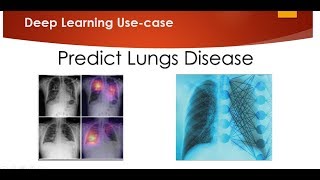
This video demonstrates the use of transfer learning with VGG 16 for predicting lungs disease using deep learning, with a GitHub repository provided for reference.
Full Transcript
hello all today we'll be discussing about solving a very good medical problem basically detecting the different kind of lung disease based on the x-ray that we basically have you know here is a very good data set thanks to Paul Mooney over here we have a very good data set this data set is basically about a checks chest x-ray you have various x-rays images over here and in this particular x-ray you basically have two different types of diseases of the lungs so one is pneumonia and one is normal okay pneumonia is basically a long kind of disease which is also a dangerous disease so based on this x-ray we will be creating a deep learning model which will actually tell us that whether the person is having pneumonia disease or it is not having pneumonia disease this is going to be a wonderful use case because here we are basically going to use transfer learning now for those who does not know about transfer learning it is a very good technique of transfer learning where in what we do is that I hope you have heard of image net computations right image net competitions people different teams so various country come up for you know solving a problem which is just categorizing thousand different objects and for that our transfer learning is basically used I have made already of videos on transfer learning please go to my playlist and have a look onto that today we are just going to try our transfer learning with the help of VG 69 which is 19 and this I have already trained this particular model and it has come up to a very good accuracy I'll just show you the accuracy later on but understand initially what you have to do just go to this particular link and download the data set I have already given this particular data set over here once you download the data set it will be basically in the form of tests and train ok so you'll be having some test data set train data set so I'll be initially using this test and train for training my model after that what I will do is that I will try to verify it from the validation data set like how what kind of prediction it is basically okay so let us just go ahead and try to see how we can actually perform this so over here I'm going to use deep learning framework which is a deep learning we have something called as transfer learning and to transfer learning we are going to use something called as VG 16 which is a type of convolution unilateral so to initially to begin with I'll be inputting all the necessary libraries like vgg 16 since I am going with VG 16 you can also and one more good thing about this particular code is that I will be creating a generic code a generic code that basically means that you just have to change this library name and automatically it will work with respect to VG 16 bgg 19 ResNet 50 so these are the various kind of transfer learning techniques so to begin with guys I'm going to import all the necessary libraries that are available in chaos okay an image data generator which is 16 input lambda dense flat and layer and odd okay after this I'm just going to provide my image size path that is my 224 mar 2 2014 an RGB type of images so RGB channel of images so this is basically will be having three dimension one is - 24 - 24 comma 3 3 is basically for RGB red green blue that I am going to basically use in my next line of code then I am giving my training part my test path right after that I will be importing the vgg 16 model and while I am importing the vgg 16 model I'll be using the weights of the image net so the pool though for the group that had come up with this particular who won this particular competition at that particular year maybe 2012-2013 they are basically usually 16 for categorizing thousand or different categories so here we are going to use this VG 16 make sure over here you you provide image size which is your - 24 - 24 + 3 this 3 is basically for the timing chains of RGB and there is another parameter which is called as include underscore top is equal to false include underscore top is equal to false why I have taken is that because we do not we do not want to classify thousand different categories because our problem data set is all about two categories that is pneumonia and not pneumonia so I have to skip this last layer lastly always remember which is 16 or or of ResNet it is always thousand different categories I'm going to say include underscore top is equal to false that basically means an delete I am just dropping the last column okay and as soon as I drop the last column and the first of the reason I am also dropping the first column because I can also provide my image size as my own size based on my problem statement based on my minutes so this include underscore top is equal to false will make sure that you the first layer and the last layer is basically deleted and then we can design our first and the last layer okay and then we can add it in the BG g16 now after I import this particular widget is 16 library what I have to do is that I have to make this important change and remember what I am doing away I am putting the for loop in all the layers of vgg layer and telling that all the layers should not be trained so I am writing layer dot product reasonably is equal to false okay I'm making sure that you have to make this show otherwise you just imagine whatever weights have actually got captured that will just change if you don't make this change in the power in the code now the next thing is that I will try to see that how many classes I have inside my train dataset to understand how many number of output I should have and when I do this this is basically blow up data set slash trends dot star when you do this you basically get the length of the folders how many folders you are basically inside that that count and that path you will be getting over here now what I will do is that after I drop the first and the last column I will just make a flattened layer and finally I'll just add my last layer now remember when I'm adding the last layer I am going to take this length of the folders this length of the folders basically indicates that how many categories I have in my output layer okay so how many categories I have in my output layer so that is how it is basically done now this basically adds up to output categories since I have two outputs and I'm there I'm going to use an activation function of softmax after that I am going to combine the vgg input and the output prediction and this all together will create a model so when you just write model dot summary you can see all the summaries observe the last layer it is just having to output cavities again guys if you are feeling confused just download this particular code from the github okay once you get it from the github it will be very very clear very very easy to understand okay just go line by line through all the code okay and that particular bit of URL will be present in the description of this particular video after that what I am doing is that I am going to compile this okay I'm going to compile this by using atom atom optimizer and accuracy and then applying cross category of cross-entropy okay now the next thing is that after compiling I have to upload a data set now here is how we upload the data set in chaos I am going to use image data generator and in this I am going to use rescaling I'm going to use some zoom ranging this is just for creating some more additional data set so that it will help us for our training purpose okay similarly with the help of test data j me I don't want to make or create more additional data for test dataset because that is the data set I have to check with respect to the accuracy I don't want that after that what you do is that I will be inserting some images like by using flow from directory okay so from the training data I'm going to put a target size while training and the path size should be 32 so at once 32 images will be given for training and the class mode that will be still be used is for categorical now you can see that as soon as I executed you you will find how many images are basically present in the two passes similarly in this particular case okay after that okay let me just go down then similarly I duel for the test data set what I have done for the training data set and finally I called my v generator as soon as I call this you can see that the epochs have stopped and this particular and I've just done it for 5 epochs now see when I want to run it I'll basically use a fit generator and after using a fit generator as you give me your training data set and whatever data set is my validation data that is basically my test data and then how many folks I am going to run it 4 steps per epoch now you can see that the epochs have already started ok so this is going to take time it will not happen that quickly because you require higher little bit high process or basically you can if you if you try to execute in Google crawler this will work this will try to get execute five minutes because 5000 images are there and VD 16 is quite a bigger layer okay you can see that I'm still in my second nitration in my first epoch itself and you can see the accuracy is actually increasing ah I've done destroying already and my model is basically created let me just show you how my training loss everything looks like okay I'm just going to zoom in so this is basically my or architecture of the model then what I'm done is that I am basically running this whole board in my in the GPU so I'm going to show you the results of that and the first epoch you could see that the validation in PDC was 81% and accuracy was 92% just imagine in the first epoch itself you had accuracy of 92 point one one six and the second a pocket is increasing third it is increasing and fourth fifth it is increasing now finally I see a training accuracy of 96% and a validation accuracy of 83% this basically says that it is not a kind of you know or fitting or under fitting problem it cannot be overfitting also because my validation accuracy has also been increasing yeah and this is how the crease is basically done and what we can do is that now once my model is created right once my model is created I have basically created a model file for this so let us just go and execute that particular model file till that the training is done again the training is done I do not have to run this but in your case please do run this whole code okay in Google kewlabah so you can run it execute that particular file it will take you 30 minutes to execute good considering the data set okay now after that once my model is created how do I check for the validation data that I had over here so this was also my validation data that I had right for this also I should verify you can just verify by you writing and another line of now see this in this particular data set what I have done is that I am trying to load the model that I have created see this is the model that I have and this particular model is stored away a model BG 19 dot H 5 okay this particular model I can load it okay after loading it I can read an image and I can check what what output it is basically given from this model dot ready okay I'm going to execute this whole line and let me first load till here okay so it has been loaded it is it is using a tensor flow in the backend and will work perfectly fine you just see this now after that I will just go inside the validation from the pneumonia section I am just picking up one of the images that is person 1946 underscore bacteria underscore 487 for dot jpg and here is the image and we know from this particular validation data that this belongs to a pneumonia category but will my model say the same result that is the main thing you need to understand so let us just load the image first of all I have loaded the image after loading I'll convert this into an array and I'll expand a dimension this is how it is done for in the case of images then I'll pre process the input and finally I will be predicting the classes now while I am predicting the classes guys I will be getting an array of two values zero value basically indicates that the person is not having pneumonia because how do how do we get to know that the first category does not belong to pneumonia just go to the file explorer here you have two folders normal and pneumonia the first folder is basically normal so my first value basically indicates about the normal the second value is in ammonia my second value is okay so this particular one value basically says that this particular image is an ammonia okay and that is how perfectly it has said okay let us try some other data set after this I will just go and write and see whether we are getting some error also and what kind of error we are getting okay again I am giving an ammonia page and let's see what will be the output that I will be getting so if I go to my classes okay here also it is giving us pneumonia now I will go just go and check whether we are getting any errors also I'll just take a normal image normal image I'll just copy this and here it is and we're just going to check to this I'm just going to replace the image and I'm going to execute it once again oh no such file or directory am I getting some error okay so this is not pneumonia this is normal oh here it is my classes now you can see that first it is saying that it is not normal so the value of one is coming in over here so I hope you like this particular video guys I will be uploading this in the github please make sure you download it if you have not subscribed my channel please do subscribe it try to share with all your friends like subscribe comment see y'all in the next video have a great day ahead never give up keep on learning I'll see y'all in the next video god bless you on thank you
Original Description
In this video we will be predicting Lungs Diseases using Deep Learning. Here we are going to use transfer learning VGG 16.
github url: https://github.com/krishnaik06/Predicitng-Lungs-Disease-
Data Science Interview Question playlist: https://www.youtube.com/watch?v=820Qr4BH0YM&list=PLZoTAELRMXVPkl7oRvzyNnyj1HS4wt2K-
Data Science Projects playlist: https://www.youtube.com/watch?v=5Txi0nHIe0o&list=PLZoTAELRMXVNUcr7osiU7CCm8hcaqSzGw
NLP playlist: https://www.youtube.com/watch?v=6ZVf1jnEKGI&list=PLZoTAELRMXVMdJ5sqbCK2LiM0HhQVWNzm
Statistics Playlist: https://www.youtube.com/watch?v=GGZfVeZs_v4&list=PLZoTAELRMXVMhVyr3Ri9IQ-t5QPBtxzJO
Feature Engineering playlist: https://www.youtube.com/watch?v=NgoLMsaZ4HU&list=PLZoTAELRMXVPwYGE2PXD3x0bfKnR0cJjN
Computer Vision playlist: https://www.youtube.com/watch?v=mT34_yu5pbg&list=PLZoTAELRMXVOIBRx0andphYJ7iakSg3Lk
You can buy my book on Finance with Machine Learning and Deep Learning from the below url
amazon url: https://www.amazon.in/Hands-Python-Finance-implementing-strategies/dp/1789346371/ref=sr_1_1?keywords=krish+naik&qid=1560943725&s=gateway&sr=8-1
Playlist
Uploads from Krish Naik · Krish Naik · 54 of 60
1
 2
2
 3
3
 4
4
 5
5
 6
6
 7
7
 8
8
 9
9
 10
10
 11
11
 12
12
 13
13
 14
14
 15
15
 16
16
 17
17
 18
18
 19
19
 20
20
 21
21
 22
22
 23
23
 24
24
 25
25
 26
26
 27
27
 28
28
 29
29
 30
30
 31
31
 32
32
 33
33
 34
34
 35
35
 36
36
 37
37
 38
38
 39
39
 40
40
 41
41
 42
42
 43
43
 44
44
 45
45
 46
46
 47
47
 48
48
 49
49
 50
50
 51
51
 52
52
 53
53
 ▶
▶
 55
55
 56
56
 57
57
 58
58
 59
59
 60
60

Natural Language Processing|Stemming
Krish Naik
Natural Language Processing|BagofWords
Krish Naik
Gaussian distribution or Normal Distribution in statisctics
Krish Naik
Natural Language Processing|TF-IDF for Machine Learning| Text Prerocessing
Krish Naik
Log Normal Distribution in Statistics
Krish Naik
Covariance in Statistics
Krish Naik
Confusion matrix, Precision, Recall| Data Science Interview questions
Krish Naik
Tutorial 44-Balanced vs Imbalanced Dataset and how to handle Imbalanced Dataset
Krish Naik
Implementing a Spam classifier in python| Natural Language Processing
Krish Naik
Tutorial 11-Exploratory Data Analysis(EDA) of Titanic dataset
Krish Naik
Face Recognition using open CV and VGG 16 Transfer Learning
Krish Naik
Pedestrian Detection using OpenCV from Videos
Krish Naik
Face and Eye Detection from Videos using HAAR Cascade Classifier
Krish Naik
Reading, Writing and Displaying images with Opencv| OpenCV Tutorial
Krish Naik
OpenCV Installation | OpenCV tutorial
Krish Naik
Face and Eye Detection from Images using HAAR Cascade Classifier
Krish Naik
Car Detection using HAAR Cascade and Opencv from Videos.
Krish Naik
Using OpenFace for Face recognition in Keras
Krish Naik
OpenPose Tutorial with Tensorflow
Krish Naik
Multiple Linear Regression using python and sklearn
Krish Naik
Dimensional Reduction| Principal Component Analysis
Krish Naik
Movie Recommender System using Python
Krish Naik
TPR,FPR,FNR,TNR, Confusion Matrix
Krish Naik
Precision, Recall and F1-Score
Krish Naik
Artificial Neural Network for Customer's Exit Prediction from Bank
Krish Naik
GridSearchCV- Select the best hyperparameter for any Classification Model
Krish Naik
RandomizedSearchCV- Select the best hyperparameter for any Classification Model
Krish Naik
K Nearest Neighbor classification with Intuition and practical solution
Krish Naik
K Means Clustering Intuition
Krish Naik
Create custom Alexa Skill- Lambda function- Part2
Krish Naik
Hierarchical Clustering intuition
Krish Naik
Implement Transfer Learning with a generic Code Template
Krish Naik
Gender Classifier and Age Estimator using Resnet Convolution Neural Network
Krish Naik
Unlock Your Application With Your Face using OpenCV
Krish Naik
Draw rectangle from webcam and sketch process it on a live feed
Krish Naik
Complete Life Cycle of a Data Science Project
Krish Naik
How we can apply Machine Learning in Finance
Krish Naik
Deep Learning in Medical Science
Krish Naik
How to switch your career to Data Science.
Krish Naik
Linear Regression Mathematical Intuition
Krish Naik
Handle Categorical features using Python
Krish Naik
Machine Learning Algorithm- Which one to choose for your Problem?
Krish Naik
DBSCAN Clustering Easily Explained with Implementation
Krish Naik
Curse of Dimensionality Easily explained| Machine Learning
Krish Naik
Feature Selection Techniques Easily Explained | Machine Learning
Krish Naik
Tutorial 29-R square and Adjusted R square Clearly Explained| Machine Learning
Krish Naik
Cross Validation using sklearn and python | Machine Learning
Krish Naik
Handling Missing Data Easily Explained| Machine Learning
Krish Naik
Deploy Machine Learning Model using Flask
Krish Naik
Deployment of Deep Learning Model using Flask
Krish Naik
How to Visualize Multiple Linear Regression in python
Krish Naik
K Nearest Neighbour Easily Explained with Implementation
Krish Naik
Predicting Heart Disease using Machine Learning
Krish Naik
Predicting Lungs Disease using Deep Learning
Krish Naik
Stock Sentiment Analysis using News Headlines
Krish Naik
Random Forest(Bootstrap Aggregation) Easily Explained
Krish Naik
Voting Classifier(Hard Voting and Soft Voting Classifier)
Krish Naik
Credit Card Fraud Detection using Machine Learning from Kaggle
Krish Naik
Hyperparameter Optimization for Xgboost
Krish Naik
Tutorial 45-Handling imbalanced Dataset using python- Part 1
Krish Naik
More on: ML Pipelines
View skill →







Related Reads
📰
📰
📰
📰
TimesFM-3 and the Future of Forecasting Architecture
Medium · Machine Learning
The leaderboard that taught materials ML to stop lying to itself
Medium · Machine Learning
The Interview Was Going Perfectly. Then They Asked Me to Remove the Database.
Medium · Programming
Building an Early-Warning System for Student Dropout Not Just a Predictor
Medium · Machine Learning
🎓
Tutor Explanation
 DeepCamp AI