Introducing Draft Mode for Midjourney V7
Skills:
Image Generation Basics90%
Key Takeaways
Midjourney V7 introduces Draft Mode, featuring improved text prompt interpretation and higher image quality with better textures, allowing for rapid iteration and conversational interface.
Original Description
Midjourney V7 is our most intelligent model yet. It features improved text prompt interpretation, more detailed visual outputs, and higher image quality with better textures. Bodies, hands and objects appear more realistic with greater consistency on all details.
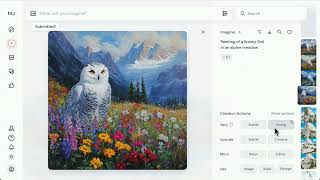
Introducing Draft Mode, our new flagship feature:
- Iterate on ideas: Create at 10x speed for half the cost—perfect for rapid iteration
- Conversational interface: Speak your ideas and see them materialize in real-time
- Enhance quality: Use the "enhance" or "vary" buttons to render draft images in full quality
Join us on this journey through the vast sea of imagination.
https://www.midjourney.com/explore?tab=top
What will you /imagine today?
#midjourneyv7 #midjourney #imagine #generativeart #aiart #ai
Watch on YouTube ↗
(saves to browser)
Sign in to unlock AI tutor explanation · ⚡30
Playlist
Uploads from Midjourney · Midjourney · 2 of 14
1
 ▶
▶
 3
3
 4
4
 5
5
 6
6
 7
7
 8
8
 9
9
 10
10
 11
11
 12
12
 13
13
 14
14
Midjourney Web is Live
Midjourney
Introducing Draft Mode for Midjourney V7
Midjourney
Introducing Midjourney V1 Video
Midjourney
Beginner's Guide to Style References (sref)
Midjourney
How to Use Stylize Parameters
Midjourney
Create and Use Moodboards to Make Images
Midjourney
Get Better Images with Personalization
Midjourney
An Underrated Feature: Chaos / Variety
Midjourney
Create Your First Video
Midjourney
How to Organize Your Creations
Midjourney
Start Here: Making your First Image
Midjourney
Discover Different Creation Modes
Midjourney
5 Ways to Use Images in Midjourney
Midjourney
Midjourney TV 24/7
Midjourney
More on: Image Generation Basics
View skill →


![Qwen 2.5 AI: Complete Beginner Tutorial [100% Free and OpenSource]](https://i.ytimg.com/vi/kdSSgMDk_QE/mqdefault.jpg)



Related Reads
📰
📰
📰
📰
I Put Google’s Squoosh Codecs in the Browser — and Cut My Image Bill Before the Upload Even…
Medium · Programming
I Put Google’s Squoosh Codecs in the Browser — and Cut My Image Bill Before the Upload Even…
Medium · JavaScript
Which AI tools can generate ready-to-use 3D character models for games, animation, or 3D printing?
Reddit r/artificial
A Practical QA Pipeline for Real Estate Image Deliveries
Dev.to · Eric PixelShouters
🎓
Tutor Explanation
 DeepCamp AI