Face Recognition Attendance Based Project In Machine Learning
Skills:
CV Basics90%
Key Takeaways
Explains a face recognition attendance based project using machine learning and the face-recognition library
Full Transcript
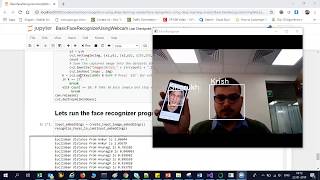
hello all my name is krishnak and welcome to my youtube channel so guys today in this particular video we are going to discuss about the face recognition library and this particular library is pretty much amazing because if you have at least some 10 idea of creating a face recognition algorithm you know that how much pain we go through that right we need to correct a huge number of elements use number of images sorry train it properly you know train it for how many number of epochs and it really really becomes a very difficult task but by using this particular library itself you know this library will actually help you to recognize manipulate faces from python or from the command line with the world's simplest face recognition library that basically means in this you don't have to train something you know you just have to give one image if you give one image then only it will automatically be able to recognize anyone right suppose if i give my image i have to just give one image and it can be an older image also and it will also try to recognize me you know by just comparing with that specific images right for this for utilizing this particular library you will be requiring dlib okay so built using dlib state of art uh face recognition so dlib is basically your c plus library here you can see that it contains machine learning algorithms and tools for creating complex software in c plus plus to solve real world problems and if you really want to use this delay guys first of all you have to go and install visual studio community version right other version like professional enterprise if you are actually just using it for individual for learning purpose you can go with community 2019 so just download this that is community 2019 version of a visual studio 2019 and from here what you have to do is that you just have to install this desktop development with c plus because that is actually required so that you will be able to you know compile the c plus plus tool kit uh which is nothing but delay okay so for that purpose just make sure that you check this particular box and try to just install it i've already done that in my local system now coming to the next thing guys over here when you're trying to use this dlib you know some of the examples over here you can see that suppose the image is actually given and from this particular image here you can see that automatically the face is recognized easily both the faces are recognized very very easily now here also you can see that some of the example over here the left hand side after applying uh this particular face recognition you'll be able to find out all the face locations also right here you have your eyes lips even checks uh everything you can actually find out so some of the examples are there one more example is basically given over here just by giving one image you will definitely be able to just compare your faces and do it and i'll try to show you all these things practically to you all so that it will make complete sense to you okay now this is my entire uh all the files that i required my training images i have just taken one of my image like this so here you can see a very very old image of mine so just show you that what is the performance of this you know and if i go into this documentation the accuracy is somewhere around 99.38 percentage you know and which is pretty much amazing okay all the materials will be given in the description of this particular video now the next thing is that i have this i have also created a requirement.txt now what we are trying to do is that we'll just try to create a simple attendance system that basically means if it is able to recognize my face over there it will just try to put that information in the attendance in this particular excel file that is what i'm planning to do it okay so without wasting any time let's go ahead now first of all uh i'll go to my anaconda prompt inside my anaconda pro first of all i'll create my environment in order to create the environment just search for how to uh just search for like anaconda create environment with python 3.7 here what you are going to get here you are going to get this particular command contact create minus f my env python 3.6 so here i am just going to paste it over here and here i am just going to write my own environment name like one shot and let me make this as python 3.7 okay that is what i have to actually do press enter automatically this particular environment will get created very very simple now once this particular environment is getting created i have already created this environment guys i'm just going to do activate one shot now once i do this here you can see that i'll just go to my e drive now because my entire file is present in the e drive so i'm just going to write cd inside this one shot learning if i go and see my directory so here i have all the files now let me just clear the screen now first of all uh what we need to install is that requirement.txt let's see what all libraries require in requirement.txt i have to install cmake i have to install dlib i have to install this face recognition libraries everything is basically given over here along with that we have pillow opencv python because i really want to show you this in a form of project so that you'll be able to see my face and all the records will get captured over there okay so let's proceed uh after this what i'm going to do is that i'll just install all the requirements so pip install minus r requirement.txt and then i'm going to press enter here you can see that all the requirements are already satisfied because i have done the installation i'm just going to clear the screen once again uh remember guys if you don't have visual studio and if you have not installed cmake and dlib then definitely you are going to get an error so please make sure that you install the visual studio with desktop development with c plus so that it will be able to compile the c make and delete libraries itself right very very important thing otherwise you will face definitely problem now let me just go back to my command prompt and here i'm inside my command prompt now inside this particular command prompt what i can do is that i can open my spider okay probably if spider is not there you can also use any uh just write pip install spider you can use any id like pycharm also you can use okay so pip install spider automatically spider will be installed now then you just open the spider so this is my entire code okay first i'm having the training images so here is krishna training image i'll just put one here is sudan show right so two images i have and what i'm going to do is that i'm just going to use this two images and it will be able to determine my face right so over here you can see that guys uh this is my code inside this i'm using cv2 face recognition library date time so that i will be able to put the attendance inside it you know with respect to the date time now after this you can see that from pil import image graph so i have given my training images path uh class name i'll be able to find out how many number of unique images i have over here and based on the name i have this many unique number of images so this entire code will actually try to find out like how many number of unique classes are there right then you have find encodings encodings basically helps you to find out the face encodings face encoding is basically some of the face features from some of the face features information and then here is my another function which will say that if i am able to if it is able to find my class with respect to this particular image it will just try to put the attendance again i'm not just going to go into deep because this is some simple python code along with the date time you're trying to put up some information then i'm just going to use the opencv after using the opencv you will be able to see that i'm reading the image then i'm doing cv 2. resize then cbt color then i'm trying to find out the face location from that specific image and then we are also trying to do the face encoding after this we are making the matches when it is trying to compare the face basically compares with respect to the faces and then it gives you the output similarly with respect to phase disc here you can see the phase distance also now uh apart from this you have match index of np argument with respect to the minimum values with respect to the matching that you are actually getting and this is the remaining code where we are coming up with the rectangle box on top of the first face right and finally i'm doing cv dot i am show webcam of image so let's execute this without wasting any time and let's see the output um and now what i'm going to do is that i'm just going to disable my video because right now my face is being seen when i'm recording the video over here so let me just disable it after disabling uh you will be able to see that particular output so guys and now i have just disabled my video what i'm going to do is that i'm just going to execute this entire code and probably show you the output how it will look like and whether it will be able to determine based on my image so remember my just one image i have actually provided here where i'm not even looking good and probably if i compare my face with this particular face i think there's a lot of difference so let's execute this i'm just going to execute it shift enter and now here you can see that you can see my face with krishna just but just imagine that with this particular image you are able to just compare my face very much easily right so this is how strong this particular libraries at this particular amazing libraries and yes it can also be able to detect your multiple faces with this specific code you can also try with your face with your friend's face and many of my other face right so just try it by yourself and try to have a look uh probably you'll be able to understand a lot of things so so guys now you had seen my face over there now i also have to see this particular csv file you know whether it was getting captured or not so if i open this particular csv file so here you can see that yes we were able to capture this particular information let me open it from here then it will look quite better so this particular csv file one i'm actually trying to show you probably you'll be able to see that all the information was getting captured along with the time right so here you can see all the details has been getting captured along with the time you know probably i had also tried with some other images so here you can see that attendance is being taken so this is a pretty amazing thing and now you can take this information and put it in the database you can create anything that you actually want so i hope you like this particular video uh this is a simple attendance system with the face recognition attendance system which is pretty much amazing and i think uh other than that i guess you loved it and you also got to learn a lot of things with respect to it right so i hope you like this video guys and i'll see you on the next video have a great day thank you bye
Original Description
github: https://github.com/krishnaik06/Face-Recognition-Attendance-Projects
https://pypi.org/project/face-recognition/
⭐ Kite is a free AI-powered coding assistant that will help you code faster and smarter. The Kite plugin integrates with all the top editors and IDEs to give you smart completions and documentation while you’re typing. I've been using Kite for a few months and I love it! https://www.kite.com/get-kite/?utm_medium=referral&utm_source=youtube&utm_campaign=krishnaik&utm_content=description-only
All Playlist In My channel
Interview Playlist: https://www.youtube.com/playlist?list=PLZoTAELRMXVM0zN0cgJrfT6TK2ypCpQdY
Complete DL Playlist: https://www.youtube.com/watch?v=9jA0KjS7V_c&list=PLZoTAELRMXVPGU70ZGsckrMdr0FteeRUi
Julia Playlist: https://www.youtube.com/watch?v=Bxp1YFA6M4s&list=PLZoTAELRMXVPJwtjTo2Y6LkuuYK0FT4Q-
Complete ML Playlist :https://www.youtube.com/playlist?list=PLZoTAELRMXVPBTrWtJkn3wWQxZkmTXGwe
Complete NLP Playlist:https://www.youtube.com/playlist?list=PLZoTAELRMXVMdJ5sqbCK2LiM0HhQVWNzm
Docker End To End Implementation: https://www.youtube.com/playlist?list=PLZoTAELRMXVNKtpy0U_Mx9N26w8n0hIbs
Live stream Playlist: https://www.youtube.com/playlist?list=PLZoTAELRMXVNxYFq_9MuiUdn2YnlFqmMK
Machine Learning Pipelines: https://www.youtube.com/playlist?list=PLZoTAELRMXVNKtpy0U_Mx9N26w8n0hIbs
Pytorch Playlist: https://www.youtube.com/playlist?list=PLZoTAELRMXVNxYFq_9MuiUdn2YnlFqmMK
Feature Engineering :https://www.youtube.com/playlist?list=PLZoTAELRMXVPwYGE2PXD3x0bfKnR0cJjN
Live Projects :https://www.youtube.com/playlist?list=PLZoTAELRMXVOFnfSwkB_uyr4FT-327noK
Kaggle competition :https://www.youtube.com/playlist?list=PLZoTAELRMXVPiKOxbwaniXjHJ02bdkLWy
Mongodb with Python :https://www.youtube.com/playlist?list=PLZoTAELRMXVN_8zzsevm1bm6G-plsiO1I
MySQL With Python :https://www.youtube.com/playlist?list=PLZoTAELRMXVMd3RF7p-u7ezEysGaG9JmO
Deployment Architectures:https://www.youtube.com/playlist?list=PLZoTAELRMXVOPzVJiSJAn9Ly27Fi1-8ac
Ama
Watch on YouTube ↗
(saves to browser)
Sign in to unlock AI tutor explanation · ⚡30
Playlist
Uploads from Krish Naik · Krish Naik · 0 of 60
← Previous
Next →
1
 2
2
 3
3
 4
4
 5
5
 6
6
 7
7
 8
8
 9
9
 10
10
 11
11
 12
12
 13
13
 14
14
 15
15
 16
16
 17
17
 18
18
 19
19
 20
20
 21
21
 22
22
 23
23
 24
24
 25
25
 26
26
 27
27
 28
28
 29
29
 30
30
 31
31
 32
32
 33
33
 34
34
 35
35
 36
36
 37
37
 38
38
 39
39
 40
40
 41
41
 42
42
 43
43
 44
44
 45
45
 46
46
 47
47
 48
48
 49
49
 50
50
 51
51
 52
52
 53
53
 54
54
 55
55
 56
56
 57
57
 58
58
 59
59
 60
60

Natural Language Processing|Stemming
Krish Naik
Natural Language Processing|BagofWords
Krish Naik
Gaussian distribution or Normal Distribution in statisctics
Krish Naik
Natural Language Processing|TF-IDF for Machine Learning| Text Prerocessing
Krish Naik
Log Normal Distribution in Statistics
Krish Naik
Covariance in Statistics
Krish Naik
Confusion matrix, Precision, Recall| Data Science Interview questions
Krish Naik
Tutorial 44-Balanced vs Imbalanced Dataset and how to handle Imbalanced Dataset
Krish Naik
Implementing a Spam classifier in python| Natural Language Processing
Krish Naik
Tutorial 11-Exploratory Data Analysis(EDA) of Titanic dataset
Krish Naik
Face Recognition using open CV and VGG 16 Transfer Learning
Krish Naik
Pedestrian Detection using OpenCV from Videos
Krish Naik
Face and Eye Detection from Videos using HAAR Cascade Classifier
Krish Naik
Reading, Writing and Displaying images with Opencv| OpenCV Tutorial
Krish Naik
OpenCV Installation | OpenCV tutorial
Krish Naik
Face and Eye Detection from Images using HAAR Cascade Classifier
Krish Naik
Car Detection using HAAR Cascade and Opencv from Videos.
Krish Naik
Using OpenFace for Face recognition in Keras
Krish Naik
OpenPose Tutorial with Tensorflow
Krish Naik
Multiple Linear Regression using python and sklearn
Krish Naik
Dimensional Reduction| Principal Component Analysis
Krish Naik
Movie Recommender System using Python
Krish Naik
TPR,FPR,FNR,TNR, Confusion Matrix
Krish Naik
Precision, Recall and F1-Score
Krish Naik
Artificial Neural Network for Customer's Exit Prediction from Bank
Krish Naik
GridSearchCV- Select the best hyperparameter for any Classification Model
Krish Naik
RandomizedSearchCV- Select the best hyperparameter for any Classification Model
Krish Naik
K Nearest Neighbor classification with Intuition and practical solution
Krish Naik
K Means Clustering Intuition
Krish Naik
Create custom Alexa Skill- Lambda function- Part2
Krish Naik
Hierarchical Clustering intuition
Krish Naik
Implement Transfer Learning with a generic Code Template
Krish Naik
Gender Classifier and Age Estimator using Resnet Convolution Neural Network
Krish Naik
Unlock Your Application With Your Face using OpenCV
Krish Naik
Draw rectangle from webcam and sketch process it on a live feed
Krish Naik
Complete Life Cycle of a Data Science Project
Krish Naik
How we can apply Machine Learning in Finance
Krish Naik
Deep Learning in Medical Science
Krish Naik
How to switch your career to Data Science.
Krish Naik
Linear Regression Mathematical Intuition
Krish Naik
Handle Categorical features using Python
Krish Naik
Machine Learning Algorithm- Which one to choose for your Problem?
Krish Naik
DBSCAN Clustering Easily Explained with Implementation
Krish Naik
Curse of Dimensionality Easily explained| Machine Learning
Krish Naik
Feature Selection Techniques Easily Explained | Machine Learning
Krish Naik
Tutorial 29-R square and Adjusted R square Clearly Explained| Machine Learning
Krish Naik
Cross Validation using sklearn and python | Machine Learning
Krish Naik
Handling Missing Data Easily Explained| Machine Learning
Krish Naik
Deploy Machine Learning Model using Flask
Krish Naik
Deployment of Deep Learning Model using Flask
Krish Naik
How to Visualize Multiple Linear Regression in python
Krish Naik
K Nearest Neighbour Easily Explained with Implementation
Krish Naik
Predicting Heart Disease using Machine Learning
Krish Naik
Predicting Lungs Disease using Deep Learning
Krish Naik
Stock Sentiment Analysis using News Headlines
Krish Naik
Random Forest(Bootstrap Aggregation) Easily Explained
Krish Naik
Voting Classifier(Hard Voting and Soft Voting Classifier)
Krish Naik
Credit Card Fraud Detection using Machine Learning from Kaggle
Krish Naik
Hyperparameter Optimization for Xgboost
Krish Naik
Tutorial 45-Handling imbalanced Dataset using python- Part 1
Krish Naik
More on: CV Basics
View skill →






Related Reads
📰
📰
📰
📰
Designing High-Availability Identity Systems Processing Billions of API Calls
Hackernoon
Graphify Setup in 20 Minutes: What Works, What Breaks, What’s Not Free
Medium · Programming
What if your software could explain its own outages?
Medium · Python
What if your software could explain its own outages?
Medium · LLM
🎓
Tutor Explanation

 DeepCamp AI