How to Create a Facebook Landing Page (HTML / iFrame Edition)
Key Takeaways
The video demonstrates how to create a Facebook landing page using HTML and iFrame, with a workaround for the timeline format. It covers the use of Facebook's Static HTML iframes tab application, creating a landing page for fans and non-fans, and customizing the page with images, copy, and a call to action.
Full Transcript
hey everybody what's up this is Pat Flynn from the smart passive income blog that is me right there you can find me at smartpassiveincome.com thanks for joining me today I just wanted to shoot this quick video for you to show you how to install the static HTML iframes tab application again that's the static static HTML iframes tab now the reason why this is important is because starting March 11th 2011 Facebook is actually getting rid of all fbml type stuff you know another change that they're doing that's fine they're getting rid of more things and changing things they're getting rid of all fbml so if you are trying to create a landing page after March 11th you know you can't go the route that we did before which is use the static fbml uh application now we have to go with this one the static HTML iframes tab uh which is which is pretty cool and actually you know don't worry if you already have a landing page that you made with fbml those aren't going away uh you're not affected at all it just affects those who are trying to create landing pages and do you know uh create other tabs with fbml you can't do that anymore so starting March 11th you have to go this route in order to create new tabs and create a landing page which is what our goal is today so I'm going to show you how to do that right now if you already have a landing page you might consider you know starting over and doing this because uh there's some cool things involved that I'm going to show you so basically I want to show you that and what's what's nice is it's HTML and and you know we more more people know HTML than fbml so you're going to have a easier chance to make your landing page look really nice add things like optin forms videos much easier than before uh which is the good thing now just for the purposes of this example when I show you the landing pages that I create I'm just going to pop a picture up there and I'll show you what those pictures look like now because I don't want to get into the code or script or anything uh like that right now but if you head on over to Smart passive income /fb FB that's terrible uh FB smartpassiveincome.com slfb that'll that'll be the blog post that'll kind of embed this video that will also have links to uh scripts and and HTML and the like button that you can use all there for you smartpassiveincome.com slfb that'll redirect you to this blog post so the these are the two images that uh I'm going to embed you know and actually what's cool is you'll notice that there's two one for fans and one for non-fans now that's awesome because uh you know the landing page typically is for the people who are non-fans um and and our goal with the landing page here is to get them to click the like button to become a fan you know it's basically a squeeze page but now we have the opportunity uh to really easily create one that is for fans as well um so people who become non-fans will be able to see this one there's some cool things you could do I'm sure you could think of things ready I'll go over those things in a second but just so you know the width of these images are 520 pixels uh and and the height could be whatever you want but but it's a fixed width in Facebook of 520 this particular image is 500 tall uh 500 pixels it could be however tall you want but this is just for the purposes of the this example so I've have already uploaded or uh kind of put those images onto a server and uh um they're ready to go so if you don't have your own website where you could upload those pictures you can put them onto places like I've heard of people putting them in places like uh Flicker and and photo bucket or Dropbox or other places like that so if you don't have a website that's what you could do but I recommend if you do have a website obviously putting it on your website and uh in a folder somewhere making sure you you can recall where that is coming from because we're going to need that in a second so the first thing you need to do is obviously create a Facebook page if you haven't you know go ahead and do that you click on the button on the screen right now that'll take you to the video about how to create a a Facebook page now if you already have one this is what you have to do to install the static HTML iframes tab click on edit page here uh from your wall on your page and then click on apps here on the leth hand side this it's the fourth from the bottom and you're going to scroll all the way to the bottom and click on browse more applications right there now we're going to search for this application and to properly search for this make it easier for you just simply type in static HTML not fbml HTML and if frame static HTML iframe and iframe singular not plural you're going to get different results with plural and this is the one we want right here this is done by a guy named Jason padak I'm totally butchering this name I'm sorry Jason pad vorac gosh I'm sorry um and he emailed me he's an SPI reader so uh and he he he told me about this and what it does and it's awesome just in time for this change I'm sure there are other ones out there but this one I've worked uh I I've done tests on it and it's really good so uh the way you can remember this is It's the star so click on that opens up the application and to install this on your page you're going to have to click on add to my page here on the left hand side it's really easy to install so add to my page you're going to select add to page to this particular page that you have as you can see I have multiple pages and then close and then I'm going to head back to my page at facebook.com smartp passiveincome and what's nice about this is you don't have to go into the edit page area in order to edit this application you can simply scroll down and you'll see that that uh app was added here to my kind of Link or tab area here on the leftand side so I'm going to click on that and now I'm going to edit now you're going to see the image is already in there because I've I've gone through this uh process before but these These are the uh this is code and again you can go to uh smartpassiveincome.com FB to get all this code to show an image or to show other things uh again this is HTML now so it's it's it's code that we know or we we can hire someone that knows HTML really easily so this one up here actually it's important to know that this box up here this field up here is for the non fans and this one down here which is optional is for the fans only so as you can see I have code in there to show the image for non-fans up here and fans down here so to kind of save and preview what it's going to look like I'm going to click save and view Tab and what's nice is I can now view my tab as a non-fan and view my tab as a fan so I'm going to view tab as a non-fan show you what that looks like and there you go so so obviously it wouldn't look like this you'd have some type of HTML or or a better looking image something that uh that is is you know not this but so what kind of elements would you want to have on the non-fan uh particular you know landing page again this is the page that people go to that are not fans and you want them to click on that like button again this is pretty much a squeeze page so the first thing you could do is you can add C some copy up here that says something like click the like button above very clear call to action and usually the like button will be just to the right of the name of your uh page so that's the first thing you can do the second thing you do is you can add some basic copy like who you are or what your business is about you know benefits about why they should become uh a fan or click that like button uh maybe you have some type of offer you know uh click the like button to get access to a free ebook or something like that or free 7-Day ecourse um free download uh another thing you want to add or another thing you can add is like a picture you know people connect with faces and and people so this would be a great memorable first impression if your picture was on there uh you don't have to include all these elements to I'm just throwing things off the top of my head uh a video obviously you can put a video in there and again this is HTML will be a lot easier to do than with f fbml um maybe I don't know that you can put all types of things on there make it look really nice again drive people to click that like button up there so now I'm going to show you what it looks like on the fan page or when people become fans what they see on this particular tab so to go back uh you have to click down here click back on the welcome it takes you back to the editing area click save and view Tab and now now I'm going to view tab as a fan so now I'm viewing the fan side of things so this is what people will see when they come to the uh the page and if they click on that non-fan page they click the like button this is what they're going to see now so what would you want to include on this particular page you want to include you can include any number of things just simply like a thank you or you know if you have an offer you know you give them that offer uh make sure you fulfill those offers uh maybe a second video or another video here that says thank you or maybe it has a call to action to go purchase a product or something um another thing you could do is a opt-in form to you know sign up for an email list here to get whatever it is that you're offering uh you know links links to your website more pictures or images maybe your photographers is more in your portfolio here uh links to Twitter you know an RSS feed there any number of things anything you could do in HTML you could do here uh so so that's what I recommend doing that that's pretty cool now one other thing I'd like to to show you before we end is that you can actually go back uh to this application and you can add more tabs so you can you can actually uh have you know more than one of these you can actually have up to three I think and and you can have them do different things and if uh non-fan see them you know it'll say one thing and if a fan sees them it'll it'll be another thing so maybe it's a free free video something or maybe a free webinar or something again just other things that you could do to get people to become fans other things you could do to interact with them now uh before I go I want to make sure that you know how to make this particular welcome tab the landing page because right now we have this this tab but it's not exactly the landing page just yet there's one more step we have to do and so we're going to actually go back to our wall click on edit page here and now we're going to click on manage permissions now this is where we can set the default Landing Tab and we want to uh set it to the welcome now this welcome with the exclamation point I know is the old one the static fbml application the one we just installed which is going to be here at the bottom is right there so now I know that that's my default Landing tab I'm going to save the changes um and there you go go so now every time someone comes to my Facebook page for the first time uh they're going to see that non-fan page and then it's going to have copy to help them click the like button and then they're going to see the fan one and really cool things can happen so I hope that all makes sense again 520 pixels wide you can have a non-fan one and a fan one the name of that application once again static HTML I iframe Tab and that's it so hopefully that helps you guys thank you so much if you want to check out my Facebook page for the first time you can go to facebook.com/ smmart passiveincome or you can actually go to the shortcut which is Pat onf facebook.com check out my landing page see what it looks like um I probably will keep updating it and changing it and trying to optimize it so again go to smartpassiveincome.com FB if you want want to go to the page where this blog post where this video is embedded to get more downloads and and scripts that you can get to place on your site uh I'll continually add to it so if you're watching this you know the day after I posted this I might not have many things on there right now but I will continually add to it to hopefully help you out so thank you guys so much I really appreciate it I would love it if you become a fan that's my call to action right there head on over click the like button I appreciate it and good luck to you and I wish you all the best thanks bye oh one last thing uh I wanted to share with you really quick is if you wanted to change the name from welcome to something else so it shows up differently on your uh on your wall you can go to apps here after you go to the edit page area scroll down to the static fbml iframes Tab and click on edit settings and there you could change the name to whatever you want it to be uh whether it's free webinar I don't know it's up to you but I just want to share that with you I totally forgot to put it in there so thank you guys take care have a good one bye
Original Description
http://www.smartpassiveincome.com/timeline - ***IMPORTANT***
Please note that on March 30th all Facebook Pages will be switched to the timeline format. Although they say Facebook landing pages are GONE, there is a workaround for a landing page in the timeline setup. Click the link below to get more information about timeline and the new landing page:
http://www.smartpassiveincome.com/timeline
-~-~~-~~~-~~-~-
New and updated: "Podcast Marketing in 2020 (Top 5 Podcasting Tips that Get More Downloads and Subscribers)"
https://www.youtube.com/watch?v=Y2nUb2YJT9s
-~-~~-~~~-~~-~-
Are you a YouTuber? Then check out Tubebuddy, my favorite YouTube add-on that helps me do keyword research, rank higher in search results, get more views, and gain more subscribers. Sign-up for a 30 Day Free Trial of TubeBuddy here: https://www.tubebuddy.com/freetrial?a=spi
Watch on YouTube ↗
(saves to browser)
Sign in to unlock AI tutor explanation · ⚡30
Playlist
Uploads from Pat Flynn · Pat Flynn · 29 of 60
1
 2
2
 3
3
 4
4
 5
5
 6
6
 7
7
 8
8
 9
9
 10
10
 11
11
 12
12
 13
13
 14
14
 15
15
 16
16
 17
17
 18
18
 19
19
 20
20
 21
21
 22
22
 23
23
 24
24
 25
25
 26
26
 27
27
 28
28
 ▶
▶
 30
30
 31
31
 32
32
 33
33
 34
34
 35
35
 36
36
 37
37
 38
38
 39
39
 40
40
 41
41
 42
42
 43
43
 44
44
 45
45
 46
46
 47
47
 48
48
 49
49
 50
50
 51
51
 52
52
 53
53
 54
54
 55
55
 56
56
 57
57
 58
58
 59
59
 60
60

Smart Passive Income - Camtasia | Bamboo | Omnidazzle
Pat Flynn
How to Create a Facebook Fan or Business Page
Pat Flynn
How to Build a Blog in Less than 4 Minutes and Write Your First Blog Post
Pat Flynn
The Over-The-Top Office of a 6 Figure Work at Home Blogger
Pat Flynn
Passive Income Streams 101
Pat Flynn
Is Your Website or Blog Optimized? Here Are 5 Questions You Can Ask
Pat Flynn
How to Make a Facebook Landing Page
Pat Flynn
5 Easy Tricks to Get Facebook Fans Fast
Pat Flynn
One Sneaky Trick to Get More Twitter Followers
Pat Flynn
Electronic Info Products (Ebooks) vs. Physical | Online Marketing
Pat Flynn
Strategies to Increase Blog Traffic in Less Time
Pat Flynn
Tricks to Get More Comments on Your Blog
Pat Flynn
How to Earn More Money Working 9 to 5 Versus Working For Yourself Online
Pat Flynn
InfoBarrel - Interview with InfoBarrel Owner Ryan McKenzie
Pat Flynn
Mastering Keyword Research and SEO Competition
Pat Flynn
How to Create a 3d Ebook Cover Image - Free and Non-Free Methods
Pat Flynn
SPI 1: SPI 001: Introduction | Show Formalities | What to Expect
Pat Flynn
Selecting a Niche Market - Pat vs. Tyrone Niche Site Challenge
Pat Flynn
Oops! The Niche I Selected Was Bad, And Here's Why
Pat Flynn
3 Cool Ways to Find Your Google Keyword Search Engine Ranking (SERPs)
Pat Flynn
Are You Optimizing Your Feedburner / Feedblitz Email RSS Subject Line?
Pat Flynn
I'm On The First Page of Google!
Pat Flynn
Backlinking 001 - Backlinking Strategy & Process Overview
Pat Flynn
Backlinking 002 - The Best Spinner - Article Spinning
Pat Flynn
Backlinking 003- Unique Article Wizard - Massive Backlinks
Pat Flynn
How to Create a Facebook Page (UPDATED!)
Pat Flynn
How to Create a Facebook Landing Page (UPDATED!)
Pat Flynn
Facebook Pages Update and Redesign
Pat Flynn
How to Create a Facebook Landing Page (HTML / iFrame Edition)
Pat Flynn
Green Screen Setup for Smart Passive Income
Pat Flynn
Passive Income Business Model
Pat Flynn
Keoni Movie Trailer
Pat Flynn
The SPI Blog Gets Reviewed - Conversion and Subscriber Optimization with Derek Halpern
Pat Flynn
How to Create a BRANDED Facebook Page (With Matching Profile and Banner Images)
Pat Flynn
Keoni MadPad Toddler Remix - SWEET!
Pat Flynn
Pat Flynn - How to Stand Out From the Crowd - Financial Bloggers Conference 2011
Pat Flynn
Traffic Isn't Everything - What You Need to Know About Conversions and Click-Through Rates
Pat Flynn
How to Be Everywhere - Building a Profitable BRAND by Thinking Outside the Blog
Pat Flynn
Add to Cart Button MADE EASY - The Magic Button
Pat Flynn
Are You Giving Instant Results? You Should, and Here's Why
Pat Flynn
Electronic White Board - How to Make One, Tips and Tricks
Pat Flynn
And this is what happens after Christmas.
Pat Flynn
5 Mini SEO Tips to Help You Get an Edge on the Competition
Pat Flynn
Create a Clickable US Map for FREE - Quick!
Pat Flynn
Thanks for the Support + Some Quick Announcements!
Pat Flynn
OptinSkin Demo, Review and Bonus!
Pat Flynn
Wireless Mic Test - Sony UWP-V6 Wireless Mic on Canon T3i DSLR
Pat Flynn
Facebook Timeline for Pages Tutorial - Getting Started
Pat Flynn
Facebook Landing Page (on TIMELINE)
Pat Flynn
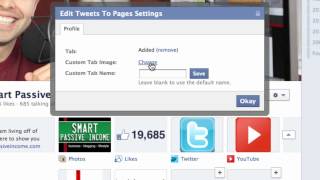
How to Integrate Twitter and YouTube on Your Facebook Page & Timeline
Pat Flynn
How to Get More Traffic with Corbett Barr (in HD)
Pat Flynn
Do You Actually Need Passion to Profit Online?
Pat Flynn
Smart Passive Income Video Intro Bloopers
Pat Flynn
How to Add "Pop Up Text" to Your Videos
Pat Flynn
DIY Videoscribing - How to Create Video Scribe Videos Electronically
Pat Flynn
LeadPlayer Wordpress Plugin Demo and Review
Pat Flynn
Pat Flynn from SmartPassiveIncome.com on Fox 5 San Diego
Pat Flynn
The View - GoPro HD Hero Cam
Pat Flynn
How to Start a Podcast - Video 1: Equipment and Software
Pat Flynn
Podcasting Tutorial - Video 2: My Top 10 Recording Tips
Pat Flynn
More on: SEO & SEM
View skill →





Related Reads
📰
📰
📰
📰
Website Optimization: How to Turn More Visitors Into Customers
SiteTuners Blog
MCP in 2026: The numbers behind the ecosystem explosion
Dev.to · GrahamduesCN
My 90-Day Hands-On Test: Building an AI API Affiliate Income From Absolute Zero
Dev.to AI
41 Best Sites to Buy Established Old Gmail Accounts
Dev.to AI
🎓
Tutor Explanation

 DeepCamp AI