
Project Planning and Scheduling Tools
Key Takeaways
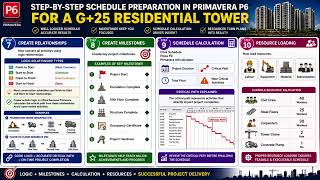
Plans, schedules, executes, and monitors projects using Primavera P6, including project setup, activity management, resource allocation, and Earned Value Management
Original Description
Learn how to plan, schedule, execute, and monitor projects using Primavera P6, one of the world's leading project planning and control software solutions. This hands-on course provides practical training in project setup, activity management, resource allocation, Work Breakdown Structures (WBS), reporting, and Earned Value Management (EVM).
The course begins with the foundations of Primavera P6, introducing project management lifecycle concepts, Primavera data structures, and key navigation features. Learners will develop confidence in navigating the software and understanding how projects are organized and managed within the Primavera environment.
As the course progresses, learners will work with activities, scheduling views, calendars, and resource management tools. Practical exercises help learners understand how to organize tasks, track project activities, and optimize resource utilization within real-world scheduling environments.
Advanced modules focus on project setup and structuring. Learners will create projects from templates and from scratch, configure project details and budgets, and develop comprehensive Work Breakdown Structures (WBS) to improve project organization and control.
The course concludes with advanced execution and monitoring techniques, including project reporting, milestone management, schedule optimization, and Earned Value Management (EVM). Learners will gain practical skills to track project performance, analyze progress, and support informed project decision-making.
What makes this course unique is its step-by-step practical approach to Primavera P6, combining project management principles with hands-on software application. By the end of the course, learners will be able to confidently create, manage, monitor, and optimize projects using Primavera P6 in professional project environments.
AI explanation not available for this lesson yet
This lesson is still being prepared for the AI tutor. In the meantime, explore lessons that are ready.
Browse explainer-ready lessons →
More on: PM Basics
View skill →




Related Reads
🎓
Tutor Explanation

 DeepCamp AI