How to Plot an ROC Curve in Python | Machine Learning in Python
Key Takeaways
The video demonstrates how to plot a Receiver Operating Characteristic (ROC) curve in Python using scikit-learn, comparing the performance of two classifiers, Random Forest and Gaussian Naive Bayes, on a synthetic dataset.
Full Transcript
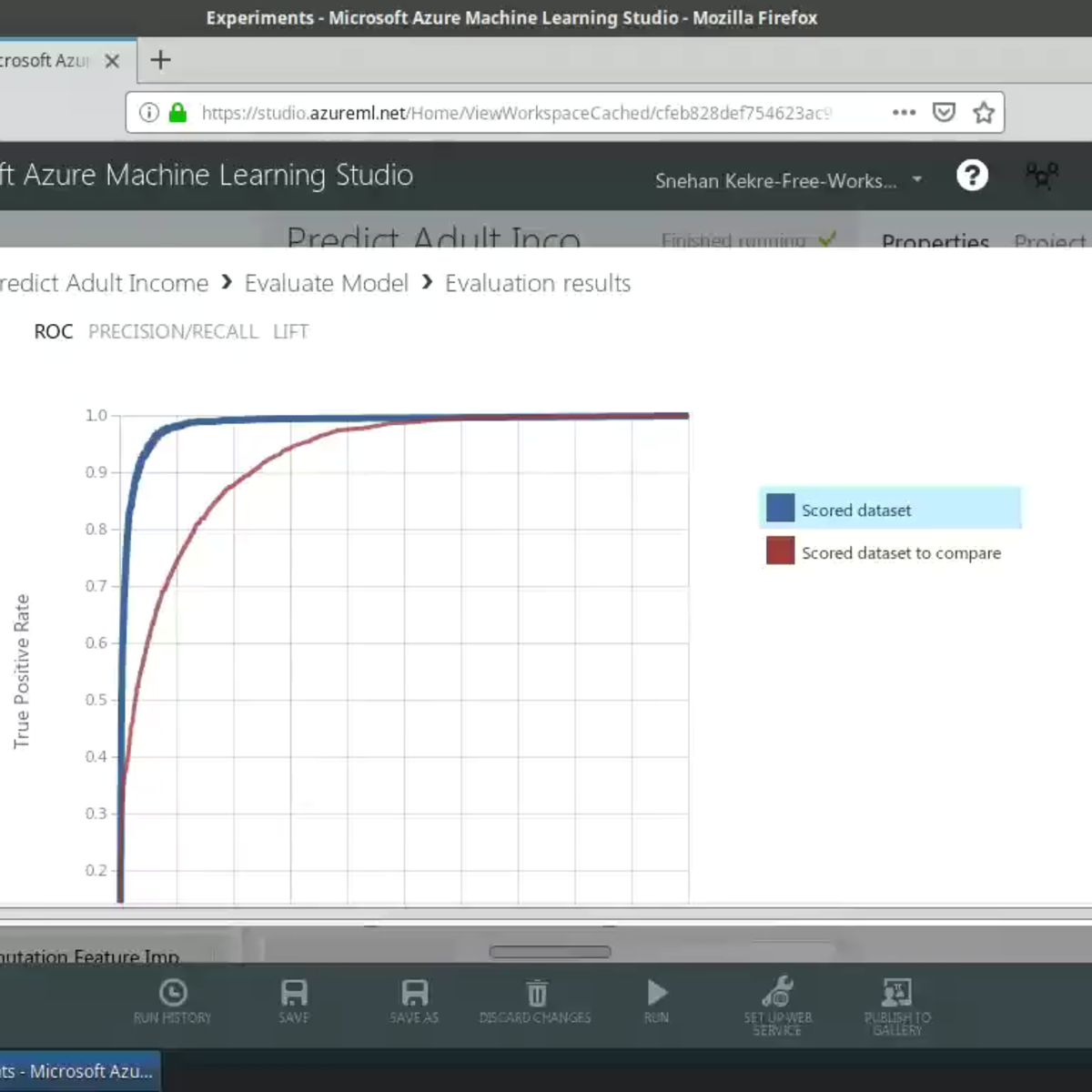
welcome back to the beta professor YouTube channel in this video I'm going to show you how to create the RLC curve which you can use to compare the performance of different machine learning models so without further ado let's get started so the first thing that you want to do is head over to the github of the data professor click on the code repository go to Python and then find the RLC curve click on that right click on the raw link and save a local copy to your computer or you could also follow along by looking at the github right save link s and save it to your computer so if you would like to use the Google collab you can also free free to do so as well so first thing that you want to do is click on the github and then type in data professor enter and then find our LLC curve click on that and so today is going to be machine learning and python series and we're gonna create receiver operating characteristic curve or shortly known as roc okay and today we're not going to use the irish dataset but we're going to use a synthetic data set so in a nutshell the ROC curve will summarize the prediction performance of a classification model at all classification thresholds as a function of the true positive rate and false positive rates okay and the true positive rate will be on the y axis and the false positive rate will be on the x axis and for the true positive rate it is also known as sensitivity and for the false positive rate it is also known as 1 minus specificity okay and the equation is provided right here okay so let's stop on to the next step is to generate the synthetic data set and for this one we're going to use the make classification function of scikit-learn and also we're going to use the numpy and actually number I will be used here so let me move this over to here okay and here we're gonna create two thousand samples in the data set and it's going to create two classes and the features will be ten can import numpy SNP and then we're going to make noisy features in order to make the data set look more real in otherwise it will make perfect prediction and it would look just too good to be true so let's make it a little bit more difficult for the machine learning model to perform okay and so let's now perform the data splitting and now we're going to perform the actual trains have split using import argument of XY data matrices and the test size we're going to set it to be twenty percent okay and now we're going to build two classification models which we will compare the first one will be the random forest and the second one will be the Gaussian naive Bayes okay and then we're going to assign the random forest to the RF variable and that are F dot fit to create the model and the import argument will be the X screen and the y train which will be the 80% training set and finally it will be evaluated on the test set okay and now we're going to create the naive Bayes model so here we're going to create the prediction probability data matrices and ask the baseline we're going to have a variable called our probs and so this one will contain zero or the worst case scenario and here will contain the probability of the predicted values by the random forest model and by the naive Bayes model and here we are using the predict proper function to get the probability from the prediction and so in the following cell code we're going to keep the positive outcome and here we're going to import the library as fill n dot metrics and we're gonna use the function RLC curve roc AUC score okay now we're going to compute the a URL see a URL see is the area under the ROC curve so under the curve what is the area and then we're gonna print the scores and then here you see so by random chance prediction it is 0.5 so random chance prediction will mean that all predictions are wrong in here okay so when we have a sign a probability of the prediction to be all 0 it means that all predictions are wrong and for the worst-case scenario the a URL C will equal to 0.5 okay and then the performance of the random forest will be about 0.894 and now you based performed better by having a URL C of 99.3 okay and now we're gonna compute the fpr and TPR which will be used to create the RLC curve all right so now I think we're ready to finally plot the curve okay and here we go we have the RLC curve so in a nutshell the ROC curve is commonly used in the machine learning community to compare the performance of different learning models so here we can see that the naive Bayes provided the best performance as it occupies the curve at the far left and top and so the area under the curve will essentially be one almost one 0.99 3 we're asked for the random forest the area under the curve is about 0.894 right so it's the area under this curve okay and so for the labels here in the legend we put in the a URL see value in the parentheses so you can see that the area under the curve values are provided by these three variables and be a UC RF a USC and are a USC okay so if you run it individually you will see the values right 7.5 are FA you see 0.89 and NBA C 0.99 okay and then we're gonna put the modulo operator in here and then we're gonna print something else we're gonna say and B : and then it's going to be encapsulated in the print function and we're going to say % point 3f shift enter okay there you go actually okay there you go so you see that it round the number off to only three digit decimal 0.99 three so if you make it 2 it will be only two digits all right you can make it for as small 993 two okay so that's the label here which will be present in the legend and so the RLC plot title is in the PLT title function okay and you could also modify the X label Y label and smell in here alright so congratulation you have now created the RLC plot so you can improvise and try this on a different data set and then upload it to github grow your data science portfolio because the best way to learn data science is by doing data science not only by learning not by watching the science but by doing data science because when you do data science you will encounter errors you will encounter problems and the journey that you use to solve the problems will allow you to mature and learn and grow as a data scientist okay so embark on this journey to become a data scientist by doing the science so enjoy thank you for watching please like subscribe and share and I'll see you in the next one but in the meantime please check out these videos
Original Description
In this video, I will show you how to plot the Receiver Operating Characteristic (ROC) curve in Python using the scikit-learn package. I will also you how to calculate the area under an ROC (AUROC) curve. In the tutorial, we will be comparing 2 classifiers via the ROC curve and the AUROC values.
🌟 Buy me a coffee: https://www.buymeacoffee.com/dataprofessor
📎CODE: https://github.com/dataprofessor/code/blob/master/python/ROC_curve.ipynb
⭕ Playlist:
Check out our other videos in the following playlists.
✅ Data Science 101: https://bit.ly/dataprofessor-ds101
✅ Data Science YouTuber Podcast: https://bit.ly/datascience-youtuber-podcast
✅ Data Science Virtual Internship: https://bit.ly/dataprofessor-internship
✅ Bioinformatics: http://bit.ly/dataprofessor-bioinformatics
✅ Data Science Toolbox: https://bit.ly/dataprofessor-datasciencetoolbox
✅ Streamlit (Web App in Python): https://bit.ly/dataprofessor-streamlit
✅ Shiny (Web App in R): https://bit.ly/dataprofessor-shiny
✅ Google Colab Tips and Tricks: https://bit.ly/dataprofessor-google-colab
✅ Pandas Tips and Tricks: https://bit.ly/dataprofessor-pandas
✅ Python Data Science Project: https://bit.ly/dataprofessor-python-ds
✅ R Data Science Project: https://bit.ly/dataprofessor-r-ds
⭕ Subscribe:
If you're new here, it would mean the world to me if you would consider subscribing to this channel.
✅ Subscribe: https://www.youtube.com/dataprofessor?sub_confirmation=1
⭕ Recommended Tools:
Kite is a FREE AI-powered coding assistant that will help you code faster and smarter. The Kite plugin integrates with all the top editors and IDEs to give you smart completions and documentation while you’re typing. I've been using Kite and I love it!
✅ Check out Kite: https://www.kite.com/get-kite/?utm_medium=referral&utm_source=youtube&utm_campaign=dataprofessor&utm_content=description-only
⭕ Recommended Books:
✅ Hands-On Machine Learning with Scikit-Learn : https://amzn.to/3hTKuTt
✅ Data Science from Scratch : https://amzn.to/3fO0JiZ
Playlist
Uploads from Data Professor · Data Professor · 47 of 60
1
 2
2
 3
3
 4
4
 5
5
 6
6
 7
7
 8
8
 9
9
 10
10
 11
11
 12
12
 13
13
 14
14
 15
15
 16
16
 17
17
 18
18
 19
19
 20
20
 21
21
 22
22
 23
23
 24
24
 25
25
 26
26
 27
27
 28
28
 29
29
 30
30
 31
31
 32
32
 33
33
 34
34
 35
35
 36
36
 37
37
 38
38
![Making Scatter Plots in R [Data Visualisation in R series]](https://i.ytimg.com/vi/5Sekjv0aouI/mqdefault.jpg) 39
39
 40
40
 41
41
 42
42
 43
43
 44
44
 45
45
 46
46
 ▶
▶
 48
48
 49
49
 50
50
 51
51
 52
52
 53
53
 54
54
 55
55
 56
56
 57
57
 58
58
 59
59
 60
60

How a Biologist became a Data Scientist
Data Professor
WEKA Tutorial #1.1 - How to Build a Data Mining Model from Scratch
Data Professor
WEKA Tutorial #1.2 - How to Build a Data Mining Model from Scratch
Data Professor
WEKA Tutorial #1.3 - How to Build a Data Mining Model from Scratch
Data Professor
Computational Drug Discovery: Machine Learning for Making Sense of Big Data in Drug Discovery
Data Professor
Quotes #1 on Big Data and Data Science
Data Professor
Quotes #2 on Big Data and Data Science
Data Professor
Quotes #3 on Big Data and Data Science
Data Professor
Quotes #4 on Big Data and Data Science
Data Professor
Quotes #5 on Big Data and Data Science
Data Professor
Data Science 101: Starting a Data Science / Data Mining Project
Data Professor
Data Science 101: CRISP-DM - Data Mining / Data Science in 6 Steps
Data Professor
R Programming 101: How to Define Variables
Data Professor
R Programming 101: Read and Write CSV files
Data Professor
Data Science 101: Basic Command-Line for Data Science
Data Professor
Strategies for Learning Data Science in 2020 (Data Science 101)
Data Professor
Building your Data Science Portfolio with GitHub (Data Science 101)
Data Professor
R Programming 101: Setting up R programming environment (R, RStudio and RStudio.cloud)
Data Professor
Exploratory Data Analysis in R: Towards Data Understanding
Data Professor
Exploratory Data Analysis in R: Quick Dive into Data Visualization
Data Professor
Machine Learning in R: Building a Classification Model
Data Professor
Machine Learning in R: Repurpose Machine Learning Code for New Data
Data Professor
Data Science 101: Deploying your Machine Learning Model
Data Professor
Machine Learning in R: Deploy Machine Learning Model using RDS
Data Professor
Data Pre-processing in R: Handling Missing Data
Data Professor
Machine Learning in R: Speed up Model Building with Parallel Computing
Data Professor
Data Science 101: Overview of Machine Learning Model Building Process
Data Professor
Web Apps in R: Building your First Web Application in R | Shiny Tutorial Ep 1
Data Professor
Web Apps in R: Build Interactive Histogram Web Application in R | Shiny Tutorial Ep 2
Data Professor
Web Apps in R: Building Data-Driven Web Application in R | Shiny Tutorial Ep 3
Data Professor
Web Apps in R: Building the Machine Learning Web Application in R | Shiny Tutorial Ep 4
Data Professor
Web Apps in R: Build BMI Calculator web application in R for health monitoring | Shiny Tutorial Ep 5
Data Professor
Machine Learning in R: Building a Linear Regression Model
Data Professor
What programming language to learn for Data Science? R versus Python
Data Professor
How to Become a Data Scientist (Learning Path and Skill Sets Needed)
Data Professor
Using Python in R
Data Professor
Interpretable Machine Learning Models
Data Professor
Making Scatter Plots in R [Data Visualisation in R series]
Data Professor
Machine Learning in Python: Building a Classification Model
Data Professor
Compare Machine Learning Classifiers in Python
Data Professor
Hyperparameter Tuning of Machine Learning Model in Python
Data Professor
Practical Introduction to Google Colab for Data Science
Data Professor
File Handling in Google Colab for Data Science
Data Professor
Pandas for Data Science: Create and Combine DataFrames / Rename Columns
Data Professor
Machine Learning in Python: Building a Linear Regression Model
Data Professor
Machine Learning in Python: Principal Component Analysis (PCA) for Handling High-Dimensional Data
Data Professor
How to Plot an ROC Curve in Python | Machine Learning in Python
Data Professor
Installing conda on Google Colab for Data Science
Data Professor
Use native R on Google Colab for Data Science
Data Professor
How to Save and Download files from Google Colab
Data Professor
Easy Web Scraping in Python using Pandas for Data Science
Data Professor
Data Science for Computational Drug Discovery using Python (Part 1)
Data Professor
Pandas Profiling for Data Science (Quick and Easy Exploratory Data Analysis)
Data Professor
Exploratory Data Analysis in Python using pandas
Data Professor
Quick tour of PyCaret (a low-code machine learning library in Python)
Data Professor
How to Upload Files to Google Colab
Data Professor
How to Install and Use Pandas Profiling on Google Colab
Data Professor
How to Adjust the Style of Pandas DataFrame
Data Professor
How to use Bamboolib for Data Wrangling in Data Science
Data Professor
How to use Pandas Profiling on Kaggle
Data Professor
More on: ML Pipelines
View skill →






Related Reads
📰
📰
📰
📰
Nobody Tells Beginners There Is a Second Way to Use AI
Medium · AI
From Release Note to Useful Learning in 48 Hours
Medium · AI
Google Gemini Scene Extension Rolls Out Globally for AI Plus, Pro and Ultra Subscribers
Dev.to · Ali Farhat
What Happens to Tutoring When AI Knows Everything?
Medium · Startup
🎓
Tutor Explanation

 DeepCamp AI