Python Dataclasses: Here's 7 Ways It Will Improve Your Code
Key Takeaways
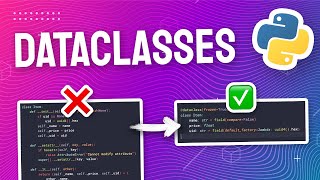
The video demonstrates the use of Python's built-in dataclasses module to simplify the creation of data structures, providing a cleaner way to define data structures and offering additional functionality such as automatic implementation of equals method and control over attribute properties. The video covers the use of the @dataclass decorator, field function, and Frozen keyword to create and customize dataclasses.
Full Transcript
data classes are a built-in module in Python that lets you easily create a useful data structure with very little boilerplate code it is one of my favorite tools to use in Python because it helps to save time and it also helps to make your code clearer and more functional in this video we're going to look at seven ways in which data classes can help you to become more productive and efficient with python let's get started so what is a data class exactly a data class is a decorator in Python that means that you can add it to the top of your class declaration like this and it will give you some extra functionality it's built into the standard python Library so you don't even need to install anything you already have it for free you just have to import it like this and then you can start using it its main use case is when you want to create a very simple data structure like this for example um but you want it to have a lot of functionality but without having to write a lot of extra boilerplate code some simple although incomplete comparisons would be something like a struct in goang or maybe an interface in typescript so that already brings us to our first benefit data classes in Python will give you a cleaner way to define a data structure more easily than a regular python class can but beyond that it also gives you a lot more functionality under the hood so let's take a look at some examples say I wanted to create an online store and I needed to model an item which will have a name and a price here's a very basic example of how it would look look as a data class I just have to add this at data class decorator to the top and then underneath that I'm declaring a class called item with a name which is a string and a price which is a float and here's what it looks like if I want to use it this will give me a very simple data structure that I can initialize and use just like a normal class but with way less code and I can specify the arguments either positionally or using keywords as well if I decide to print this object I also get a really useful description of what the item is now how does all this compare to just using a regular class in Python well first of all with regular classes you need a lot more code to do the same thing this is what the implementation looks like for the item we saw earlier if we were just using regular python classes you need this init function you need to add these arguments and then also set these arguments as attributes on the instance it's just a lot of extra work for the same thing and the less code you have the better because it means means you're less likely to make a mistake whenever you need to update or extend your code the second benefit of using data classes is that you get this reper function for free so what does this function actually do well previously we already saw it in action but first let's take a look at what a regular class does in this piece of code I'm creating an item using my regular python class and then I'm printing it out but as you can see we don't really get a useful description of it instead we just get this memory address which probably isn't that helpful for for us it doesn't tell us about the name of the item or even the price to make this class show its useful attributes we'll have to add this reper method to it that way we can see something actually useful when we print it out but as you saw earlier this is a functionality that data class just gives us for free if you create an instance of a data class and just print it out you already get this useful description as you can see this is quite handy and you'll save time by not having to write out this repper method for yourself another important difference between data classes and regular classes is how you can check for equality if you create two instances of a regular python class and compare them it's usually going to be false even if the values of those items were exactly the same that's because python is comparing if they are the same instance in memory which they aren't to solve this problem in regular classes you can Implement an EQ method to compare them but that's another example of something that data classes just give you for free the same comparison with data classes will evaluate to true because data classes automatically implements an equals method for us by comparing each of its instance attributes the next thing I also really like about data classes is the control it gives you over the property of your attributes or Fields this means things like default values for your fields or whether or not that field shows up in the repper when you print it for example if you want the price on your item to have a default value of 1 .0 then you can do it like this doing this will also make the price attribute optional so now I can create an item without specifying the price and it's just going to be 1.0 by default now what if we wanted to add a unique ID to each item that we create if the user doesn't specify one for us then we want to generate one right on the spot with regular python classes we can do something like this set a default value for uid to none and then if a value is provided for us we just use it otherwise if it remains none then generate a brand new unique ID using this uu ID function this works of course but once again data classes gives us a better way we can use something called a field this will give us fine grained control over that attribute with the field we can specify a function as the default Factory so when this class is created and no value is provided for this field it will use that function to generate a value in this example it's going to call my generate ID function each time that it needs a new default value for this field here's a full example of how all that code will look with an inline uuid generator and with all of the Imports at the top of the script also here's an expanded list of all the attributes available on a field along with their default values I won't go through them all but have a look at the documentation if you want to find out what each of them would do now before we move on here's a really important piece of information that I wish I learned earlier if you want to make a field that is an empty list by default you cannot do it like this this won't work with a list in fact it won't work with anything that isn't a string number Boolean or basically a primitive data type if you try to do this you'll get an error right away the correct way to do this is to use a default Factory to create a new list data classes also gives you an easy way to make your data immutable if you've used typescript or JavaScript before then this is like creating a constant variable or if you use Java this is kind of like using the final keyword uh but if you're not familiar what immutability means it basically just means that you cannot change the value of your data after you've created it if you're writing production code this is usually a good thing because it'll make your code more reliable threat safe and it'll also help you avoid nasty side effects so let's go back to our item example to make this class immutable all you have to do is just add this Frozen keyword to the data class decorator now if we create a new item and we call it app Apple but then we try to change the name of that item to Orange it's not going to let us do that we'll get a frozen instance error so this is good because now we can be sure that when we're using one of these items its values hasn't been tampered or altered since it was first created now what if you wanted the ability to customize how your data is compared and sorted you can do this pretty easily by just adding order equals true to your data class decorator this will add a feature to our item that lets us easily compare one item to another based on their details so let's see that in action here I'm going to create an apple with a price of $5 and then a banana with a price of $1 when we try to see if apple is greater than the banana what do you think should happen I mean it's higher in price so maybe it should be true but actually python looks at their names first in fact python Compares all of their attributes as if they were tuples so because apple is before banana in the alphab it we get false as our result now what if we wanted python to ignore the name for the comparison and only use the price well we can also do that really easily by just making the name into a field and then setting this compare attribute to false now if we run it again python only looks at the price so this comparison will now evaluate to true now the last feature we're going to talk about in this video is something I use very often data classes have this really useful function which lets you convert any instance of a data class into a normal python dictionary this is extremely useful if you need to save your data to disk or to a database because you can really easily just serialize this object into Json and when you want to load a data class from a dict or a Json you can also do that quite easily by just using this unpacking operator so those are the seven ways in which data classes can help you become more productive and efficient with python this was not an exhaustive list either so if you think that there was something else about data classes I should have covered then please let me know in the comments if you found this useful then there's also actually another python Library I recommend you check out it's called pantic and it does similar things to a data class except that it also gives you validation and serialization capabilities on top of that as well it's really useful if you're working with things like apis or databases where you need your data to travel in and out of your python app I have a video about it too so check it out if you're interested otherwise see you next time
Original Description
Dataclasses in Python simplify the creation of data structures with minimal code, and gives you a lot of useful utility right out of the box.
🔗 https://docs.python.org/3/library/dataclasses.html
📚 Chapters
00:00 Introduction
00:25 What is a Dataclass?
01:06 Create Data Structures with Less Code
02:34 Descriptive REPR
03:30 Built-in Equality Check
04:11 Fields and Default Values
06:19 Frozen Objects
07:16 Ordered Objects
08:21 Convert To and From Dict
#pixegami #python
Watch on YouTube ↗
(saves to browser)
Sign in to unlock AI tutor explanation · ⚡30
Playlist
Uploads from pixegami · pixegami · 58 of 60
1
 2
2
 3
3
 4
4
 5
5
 6
6
 7
7
 8
8
 9
9
 10
10
 11
11
 12
12
 13
13
 14
14
 15
15
 16
16
 17
17
 18
18
 19
19
 20
20
 21
21
 22
22
 23
23
 24
24
 25
25
 26
26
 27
27
 28
28
 29
29
 30
30
 31
31
 32
32
 33
33
 34
34
 35
35
 36
36
 37
37
 38
38
 39
39
 40
40
 41
41
 42
42
 43
43
 44
44
 45
45
 46
46
 47
47
 48
48
 49
49
 50
50
 51
51
 52
52
 53
53
 54
54
 55
55
 56
56
 57
57
 ▶
▶
 59
59
 60
60

How to Build an AWS Lambda Function in Python in Just 7 Minutes!
pixegami
AWS CDK Tutorial: Deploy a Python Lambda Function using AWS
pixegami
I used GPT-3 to Write Poetry • Is AI the Future of Creative Writing?
pixegami
Create NFT Generative Art with Python! (Full Tutorial)
pixegami
Build an AI-driven SaaS Application: FULLSTACK Tutorial with Python, React, and AWS
pixegami
NextJS and TailwindCSS: How to Build a Portfolio Site from Scratch
pixegami
Python Web Scraping Tutorial • Step by Step Beginner's Guide
pixegami
Build Wordle in Python • Word Game Python Project for Beginners
pixegami
How to create 1000+ unique NFT-style images (like Cryptopunk) | Python Tutorial
pixegami
Top 10 Python Modules 2022
pixegami
How to Send SMS Text Messages with Python & Twilio - Quick and Simple!
pixegami
How To Write Unit Tests in Python • Pytest Tutorial
pixegami
How to Style Your React Landing Page with Tailwind CSS
pixegami
FastAPI Python Tutorial - Learn How to Build a REST API
pixegami
How to Deploy FastAPI on AWS EC2: Quick and Easy Steps!
pixegami
PyScript • How to run Python in a browser
pixegami
My Custom Ubuntu Linux Terminal with Themes and Plug-ins 💻
pixegami
Deploy FastAPI on AWS Lambda ⚡ Serverless hosting!
pixegami
NextJS Firebase Auth Tutorial • How to Authenticate Users for Your App
pixegami
AWS Lambda Python functions with a database (DynamoDB)
pixegami
How To Build a CRUD (TO-DO) App on AWS using FastAPI and Python
pixegami
How to Make a Discord Bot with Python
pixegami
How To Use GitHub Copilot (with Python Examples)
pixegami
PyTest • REST API Integration Testing with Python
pixegami
Python Beginner Project: Build a Caesar Cipher Encryption App
pixegami
Decorators in Python: How to Write Your Own Custom Decorators
pixegami
NextJS 13 Tutorial: Create a Static Blog from Markdown Files
pixegami
Exploring ChatGPT for Coding and Business ✨ 8 Real Examples!
pixegami
How I Would Learn Python (if I had to start over) • A Roadmap for 2023
pixegami
Build an AI Pokemon Generator with Python and Midjourney
pixegami
Why You Should Learn Python in 2023 (as your first programming language)
pixegami
ChatGPI API in Python ✨ How to Build a Custom AI Chat App
pixegami
Learn Python • #1 Installation and Setup • Get Started With Python!
pixegami
Learn Python • #2 Variables and Data Types • Python's Building Blocks
pixegami
Learn Python • #3 Operators • Add, Subtract and More...
pixegami
Learn Python • #4 Conditions • If / Else Statements
pixegami
Learn Python • #5 Lists • Storing Collections of Data
pixegami
Learn Python • #6 Loops • How to Repeat Code Execution
pixegami
Learn Python • #7 Dictionaries • The Most Useful Data Structure?
pixegami
Learn Python • #8 Tuples and Sets • More Ways To Store Data!
pixegami
Learn Python • #9 Functions • Python's Most Important Concept?
pixegami
Learn Python • #10 User Input • 4 Ways To Get Input From Your User
pixegami
Learn Python • #11 Classes • Create and Use Classes in Python
pixegami
Learn Python • #12 Final Project • Build an Expense Tracking App!
pixegami
Stripe & Firebase Tutorial • Add Payments To Your NextJS App
pixegami
How To Use GitHub Actions • Automate Your AWS Deployments
pixegami
How to Run a Python Docker Image on AWS Lambda
pixegami
My MacOS Terminal Setup for HIGH Productivity
pixegami
Host a Python Discord Bot on AWS Lambda (Free and Easy)
pixegami
Python FastAPI Tutorial: Build a REST API in 15 Minutes
pixegami
Pydantic Tutorial • Solving Python's Biggest Problem
pixegami
How to Get Started with AWS • Crash Course
pixegami
Python Requests Tutorial: HTTP Requests and Web Scraping
pixegami
Amazon Bedrock Tutorial: Generative AI on AWS
pixegami
How to Publish a Python Package to PyPI (pip)
pixegami
Langchain: The BEST Library For Building AI Apps In Python?
pixegami
RAG + Langchain Python Project: Easy AI/Chat For Your Docs
pixegami
Python Dataclasses: Here's 7 Ways It Will Improve Your Code
pixegami
Build a Custom AI RPG Game with OpenAI GPTs
pixegami
Create a Custom AI Assistant + API in 10 Mins
pixegami
More on: AI Pair Programming
View skill →





Related AI Lessons
⚡
⚡
⚡
⚡
Bloom Filters, Explained Properly
Dev.to · Daksh Gargas
Prefix Sums: The Preprocessing Trick That Makes Range Queries Instant
Medium · Programming
I Thought I Was Ready for the Interview — Then One Simple Math Question Destroyed Me
Medium · Programming
Week 2(Day 10): LeetCode Two Pointers(slow & fast): Remove Duplicates from Sorted Array (Brute…
Medium · Python
Chapters (9)
Introduction
0:25
What is a Dataclass?
1:06
Create Data Structures with Less Code
2:34
Descriptive REPR
3:30
Built-in Equality Check
4:11
Fields and Default Values
6:19
Frozen Objects
7:16
Ordered Objects
8:21
Convert To and From Dict
🎓
Tutor Explanation

 DeepCamp AI