Pydantic Tutorial • Solving Python's Biggest Problem
Skills:
AI Productivity Tools80%
Key Takeaways
This video teaches how to use Pydantic for data validation in Python
Full Transcript
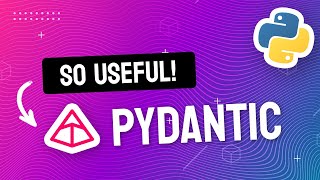
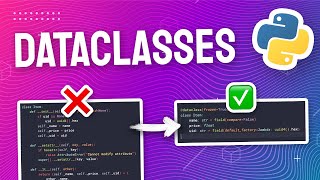
welcome to this video tutorial where I'm going to show you how to use the pedantic module in Python one of the biggest issues with python as a programming language is the lack of static typing python uses Dynamic typing which means that when you create a variable you don't have to declare its type like this X for example compare this to something like Java or C where you actually have to declare the type up front once a python variable is created you can also override it with a different type than what you created it with so here if I create x equals 10 in the next line I can override that with the word hello as a string and python allows you to do this this does make it easier to get started with python but it can cause a lot of problems later on for example as your app gets bigger it becomes harder and harder to keep track of all your variables and what type they should be it's also difficult when you have to work with functions where the argument types aren't obvious for example what is this rect argument supposed to be here it could be a tuple but then it doesn't tell you if the x-axis or the y-axis should come first but the biggest downside of using Dynamic types by far is that it allows you to accidentally create an invalid object by that I mean an object with values that it shouldn't be allowed to have for example here I'm trying to create a person and the second argument is supposed to be age so it's supposed to be a number in the first example I created correctly with 24 as an integer but in the second example I created with the 24 is a string and both of them might work at the beginning hyphen will allow you to do this and things can actually seem fine for a while but eventually when you do try to use that age variable as a number it will fail this can be really hard to debug because the failure could occur at any time in your program and it could be hard to associate that failure with the actual cause luckily these days python has a lot of tools you can use to solve these problems this includes data classes and type hinting like in this code example here but today we're going to be taking taking a look at pedantic it's an external library and it gives you powerful tools to model your data and solve all of these problems that we've just been talking about pedantic is a data validation library in Python it's used by some of the top python modules out there notably hugging faced fast API and Lang chain its main benefits are that by modeling your data you get better IDE support for type hints and autocomplete you can also validate your data so that when you create an object you can be 100 sure that it's valid and it won't fail you later and finally if you ever need your data to be in a universal format like Json pedantic gives you an easy way to serialize your objects this really comes in handy if you need your python app to talk to other apps on the Internet or if you just want to save your data to disk let's take a look at how all of that works first make sure that you've installed pedantic into your python environment you can do it using this command to create a pedantic model first define a class that inherits from the base model class inside the class Define the fields of the model as class variables in this example I'm creating a user model and it's got three Fields a name which is a string an email also a string and an account ID which is going to be an integer you can create an instance of the model like this and then just pass in the data as keyword arguments you can also do this by unpacking a dictionary so this works well if you already have the data and you just want to put it inside the model for example you have a response from an external API if the data that you've passed in is valid then this user object will be successfully created you can then access each of the attributes of the user object like this I'm going to head over to my IDE so I can show you how this works in action I have my user model defined here and I think by far the most useful feature of modeling your data is that you get type hints in your IDE so what I mean is if I start typing out my user I get autocomplete and auto suggestions based on this model so here I've created this user object and I haven't filled in the data yet but if I Mouse over it it actually tells me which arguments it accepts and here I can fill it in with the examples you saw earlier so a valid name a valid email and an account ID and now if I print the user you can see that all of this information is contained in this one object and of course the type hinting makes it easier to work with when you actually need to use one of these models so for example here if I'm printing the user I can just press a DOT and then I get a list of all the valid variables associated with it so for example if I wanted email I just start typing and it knows that this user has an email attribute with type hints your code becomes much easier to work with because you don't have to remember everything yourself your IDE does it for you and this is especially useful if you're working with really large code bases or if you need to collaborate with other Developers pedantic also provides data validation right out of the box this means that if you try to create an object with the wrong type of data it will fail right then and there this is good because if your software has to fail then it's better that it fails as early as possible this will make it easier to debug so let's go back to our example here and see how that works if I try to create this user with an account ID that's not an integer for example if I turn it into a string and I try to run it I now get a validation error so I can see immediately that I try to create this object with the wrong type of data and in cases like these I much rather it fail right away with the descriptive error message than silently succeed but then fail at some point much later down the line you can also validate more complex types of data for example let's say I wanted to validate that this string is actually a valid email first let's change it to an invalid email for example Just Jack on its own so this is no longer a new email and if I run this it still works because all this checks for is that it's a string but I can actually import a special data type called email string from pedantic and if I replace this instead and run this again you'll now see that I get this validation error and that this string here is not a valid email so let me change this back to a valid email again and see if that works and after fixing this value the validation passes so I have an easy way to assert that this email field always has a valid email string if none of the inbuilt validation types cover your needs you can also add custom validation logic to your model for example let's say that we want to enforce that all account IDs must be a positive number so we don't accept negative integers for our account ID this is what we can add to our class to make that happen first we'll have to use this validator decorator from pedantic and then we write a custom function this is going to be a class function and then inside the function we can check if the value is less than or equal to zero and if it is we can raise a value error saying that this is not a valid value for this field but if it is we can return the value so let's go back to our code editor and try that out and here I've imported this validator decorator and this is the validation logic I'm adding as a class function of this user model and here you can change this validation condition to whatever you want it to be for your app but in this case I'm just checking that it's greater than zero so if I run this with my current data it should still work and here you can see that it's fine but if I change this to a negative number let's see what happens now it fails with that validation error and it says the account ID must be positive and here we can actually make the error message really descriptive because we can print anything we want here and we can even print the value that the user tried to create this model with another great thing about pedantic is that it provides built-in support for Json serialization makes it really easy to convert pedantic models to or from Json to convert a pedantic model to Json you can call the Json method on the model instance this will return a Json string representation of the model's data so if you print it out you'll see something like this and if you don't want a Json string but you just want a plain python dictionary object instead you can use this addict method if you have a Json string that you want to convert back into a pedantic model you can use the parse raw method and since Json is widely used and understood across every major Tech stack this feature will make it really easy to integrate your python code with external applications or apis finally let's see how pedantic compares to data classes which is Python's built-in module that solves a similar problem as great as pedantic sounds python actually does ship with some data modeling and type hinting capabilities on its own for example you can already specify type hints like this and most Ides should pick it up there's also an inbuilt module called Data class in Python that lets you create a class with Fields so if you haven't used it before this is what the syntax looks like it's very similar to bidantic except instead of extending from a base model class you're using this data class decorator instead as you can see it's also really easy to use so how does this compare to pedantic well let's take a look at some of the top criteria they actually both give you type hints in the IDE which personally is the biggest reason for using these libraries to me so both of them pick that box data classes however does not give you any easy validation or deep Json serialization out of the box now if validation is a big deal for you for example you have a lot of emails or you have a lot of fields where the data type is very specific then you probably should go with pedantic if you're using data class then your Json serialization capability isn't as good out of the box as pedantic but if your data is simple enough you can still do some basic serialization with a one-liner like this the one major advantage that data classes have over pedantic is that they're inbuilt into python directly that means that it's more lightweight and you don't even have to install it for many users this may be enough if you want some rough guidance as to which module you should use then I recommend pedantic if you have complex data models or you need to do a lot of Json serialization or you need to work with a lot of external apis but if data validation isn't important to you and your data isn't super complex you can get away with data classes and that's it for pedantic if you haven't used it yet then give it a try and let me know what you think if you've enjoyed this video and want to see more tutorials like this then please subscribe to the channel and let me know in the comments what type of topics or modules you'd like to see covered next otherwise I hope you found this useful and thank you for watching
Original Description
Learn how to use Pydantic in this short tutorial!
Pydantic is the most widely used data validation library for Python. It lets you structure your data, gives you type-hints and auto-complete in your IDE, and helps to serialize to and from JSON. Learn how to use it in just 10 minutes!
👉 Links
🔗 Pydantic Docs: https://docs.pydantic.dev/
🔗 Pydantic GitHub: https://github.com/samuelcolvin/pydantic
📚 Chapters
00:00 Python's Dynamic Typing Problem
02:11 How To Use Pydantic
05:04 Validating Data with Pydantic
06:36 Custom Field Validation
07:58 JSON Serialization
08:49 Pydantic vs Dataclasses
#pixegami #python
Watch on YouTube ↗
(saves to browser)
Sign in to unlock AI tutor explanation · ⚡30
Playlist
Uploads from pixegami · pixegami · 51 of 60
1
 2
2
 3
3
 4
4
 5
5
 6
6
 7
7
 8
8
 9
9
 10
10
 11
11
 12
12
 13
13
 14
14
 15
15
 16
16
 17
17
 18
18
 19
19
 20
20
 21
21
 22
22
 23
23
 24
24
 25
25
 26
26
 27
27
 28
28
 29
29
 30
30
 31
31
 32
32
 33
33
 34
34
 35
35
 36
36
 37
37
 38
38
 39
39
 40
40
 41
41
 42
42
 43
43
 44
44
 45
45
 46
46
 47
47
 48
48
 49
49
 50
50
 ▶
▶
 52
52
 53
53
 54
54
 55
55
 56
56
 57
57
 58
58
 59
59
 60
60

How to Build an AWS Lambda Function in Python in Just 7 Minutes!
pixegami
AWS CDK Tutorial: Deploy a Python Lambda Function using AWS
pixegami
I used GPT-3 to Write Poetry • Is AI the Future of Creative Writing?
pixegami
Create NFT Generative Art with Python! (Full Tutorial)
pixegami
Build an AI-driven SaaS Application: FULLSTACK Tutorial with Python, React, and AWS
pixegami
NextJS and TailwindCSS: How to Build a Portfolio Site from Scratch
pixegami
Python Web Scraping Tutorial • Step by Step Beginner's Guide
pixegami
Build Wordle in Python • Word Game Python Project for Beginners
pixegami
How to create 1000+ unique NFT-style images (like Cryptopunk) | Python Tutorial
pixegami
Top 10 Python Modules 2022
pixegami
How to Send SMS Text Messages with Python & Twilio - Quick and Simple!
pixegami
How To Write Unit Tests in Python • Pytest Tutorial
pixegami
How to Style Your React Landing Page with Tailwind CSS
pixegami
FastAPI Python Tutorial - Learn How to Build a REST API
pixegami
How to Deploy FastAPI on AWS EC2: Quick and Easy Steps!
pixegami
PyScript • How to run Python in a browser
pixegami
My Custom Ubuntu Linux Terminal with Themes and Plug-ins 💻
pixegami
Deploy FastAPI on AWS Lambda ⚡ Serverless hosting!
pixegami
NextJS Firebase Auth Tutorial • How to Authenticate Users for Your App
pixegami
AWS Lambda Python functions with a database (DynamoDB)
pixegami
How To Build a CRUD (TO-DO) App on AWS using FastAPI and Python
pixegami
How to Make a Discord Bot with Python
pixegami
How To Use GitHub Copilot (with Python Examples)
pixegami
PyTest • REST API Integration Testing with Python
pixegami
Python Beginner Project: Build a Caesar Cipher Encryption App
pixegami
Decorators in Python: How to Write Your Own Custom Decorators
pixegami
NextJS 13 Tutorial: Create a Static Blog from Markdown Files
pixegami
Exploring ChatGPT for Coding and Business ✨ 8 Real Examples!
pixegami
How I Would Learn Python (if I had to start over) • A Roadmap for 2023
pixegami
Build an AI Pokemon Generator with Python and Midjourney
pixegami
Why You Should Learn Python in 2023 (as your first programming language)
pixegami
ChatGPI API in Python ✨ How to Build a Custom AI Chat App
pixegami
Learn Python • #1 Installation and Setup • Get Started With Python!
pixegami
Learn Python • #2 Variables and Data Types • Python's Building Blocks
pixegami
Learn Python • #3 Operators • Add, Subtract and More...
pixegami
Learn Python • #4 Conditions • If / Else Statements
pixegami
Learn Python • #5 Lists • Storing Collections of Data
pixegami
Learn Python • #6 Loops • How to Repeat Code Execution
pixegami
Learn Python • #7 Dictionaries • The Most Useful Data Structure?
pixegami
Learn Python • #8 Tuples and Sets • More Ways To Store Data!
pixegami
Learn Python • #9 Functions • Python's Most Important Concept?
pixegami
Learn Python • #10 User Input • 4 Ways To Get Input From Your User
pixegami
Learn Python • #11 Classes • Create and Use Classes in Python
pixegami
Learn Python • #12 Final Project • Build an Expense Tracking App!
pixegami
Stripe & Firebase Tutorial • Add Payments To Your NextJS App
pixegami
How To Use GitHub Actions • Automate Your AWS Deployments
pixegami
How to Run a Python Docker Image on AWS Lambda
pixegami
My MacOS Terminal Setup for HIGH Productivity
pixegami
Host a Python Discord Bot on AWS Lambda (Free and Easy)
pixegami
Python FastAPI Tutorial: Build a REST API in 15 Minutes
pixegami
Pydantic Tutorial • Solving Python's Biggest Problem
pixegami
How to Get Started with AWS • Crash Course
pixegami
Python Requests Tutorial: HTTP Requests and Web Scraping
pixegami
Amazon Bedrock Tutorial: Generative AI on AWS
pixegami
How to Publish a Python Package to PyPI (pip)
pixegami
Langchain: The BEST Library For Building AI Apps In Python?
pixegami
RAG + Langchain Python Project: Easy AI/Chat For Your Docs
pixegami
Python Dataclasses: Here's 7 Ways It Will Improve Your Code
pixegami
Build a Custom AI RPG Game with OpenAI GPTs
pixegami
Create a Custom AI Assistant + API in 10 Mins
pixegami
More on: AI Productivity Tools
View skill →








Related AI Lessons
⚡
⚡
⚡
⚡
How to Create a Second Version of Yourself Inside Obsidian Using AI (Step-by-Step Guide)
Medium · ChatGPT
How to prepare TIC teacher exams in Spain with AI (oposiciones 2026)
Dev.to AI
Why I built a simple AI provider wrapper (and you might too)
Dev.to · zhongqiyue
This ChatGPT Prompt Replaced 3 Hours of PowerPoint Work
Medium · AI
Chapters (6)
Python's Dynamic Typing Problem
2:11
How To Use Pydantic
5:04
Validating Data with Pydantic
6:36
Custom Field Validation
7:58
JSON Serialization
8:49
Pydantic vs Dataclasses
🎓
Tutor Explanation

 DeepCamp AI