Python Data Science Tutorial #10 - Scatter Plots with Matplotlib
Skills:
ML Maths Basics60%
Key Takeaways
This video tutorial covers the basics of creating scatter plots using Matplotlib in Python, including generating random data points, customizing plot styles, and understanding the importance of scatter plots in machine learning.
Full Transcript
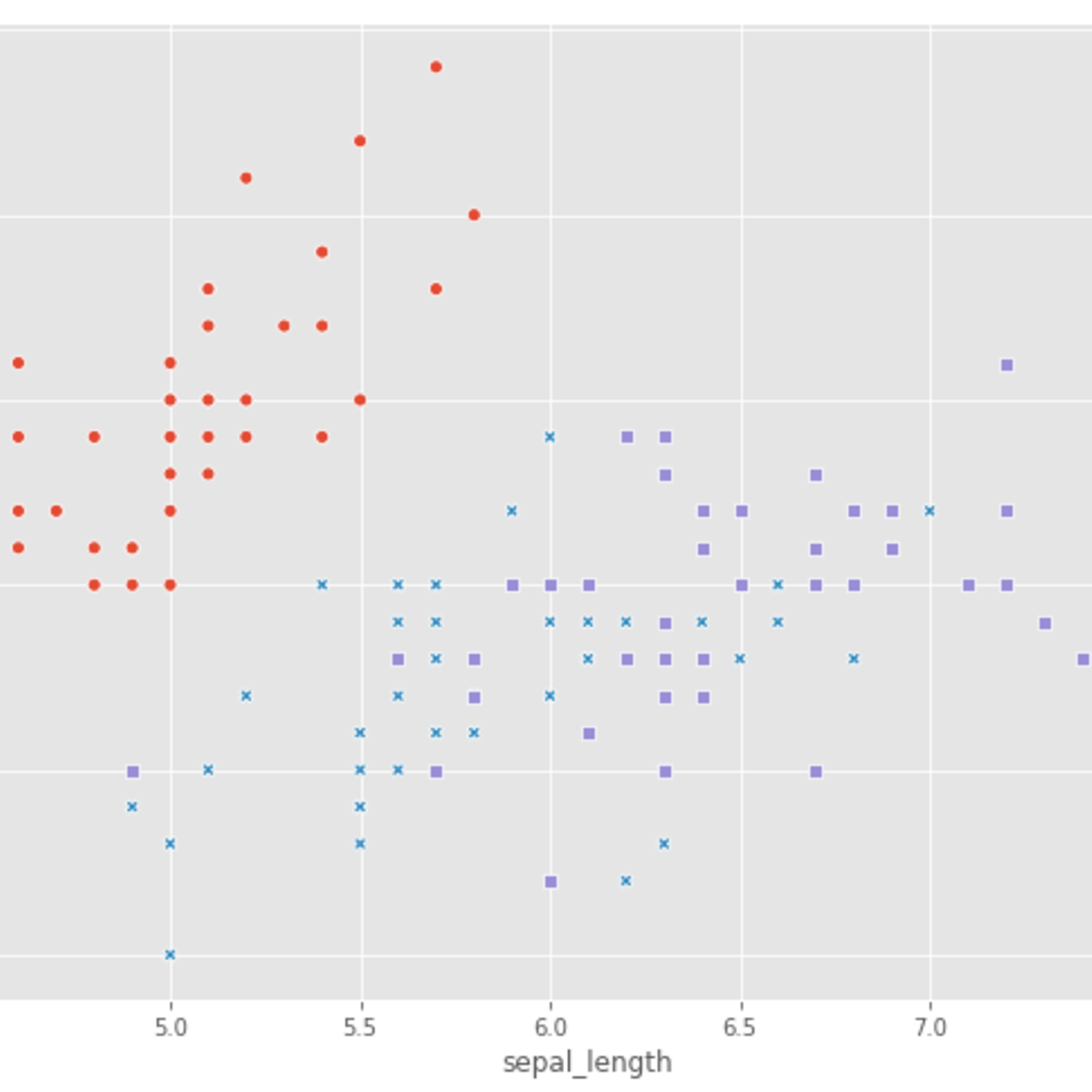
what is going on guys welcome to this Python tutorial series for data science in today's video we're going to learn about scatter plot so plotting individual points instead of functions or bar charts or pie charts so let us get into the code so as always the first thing that we're going to do is to import numpy and math 11 after that we're going to define the ax and the y coordinates because when we do a scatter plot we're dealing with individual data points we're not dealing with functions we're not dealing with bar charts we're dealing with individual points so for example if you have a data frame with I don't know 10 columns and you take one row that would be one data point now if you have 10 columns it would be one data point in ten dimensions but we're going to deal with just two dimensions so we're going to have the ax value and the Y value and this can be whatever you want for example the height and the weight of a person would be one data point so you would have the height or the weight on the y axis and the height on the x axis and then you would have the individual data points spread over this graph and then you could look for correlations for example so scatter plots are just plotting individual data points that's basically it and to generate them we're just going to say x equals NP dot random rant and we're going to generate 50 random values for X and 50 random values for random for y and then we're just going to use them as the coordinates for a point so the first x coordinate and the first y coordinate would be the first data point and to now plot the scatter plot we're just going to say PLT scatter and ax and y that's basically it and then we're going to say PLT dot show so as you can see this is a scatter we have all these individual data points of course what we can also do is we can just define them ourselves so if we don't want to or randomly generate them we can just create lists I think it actually should work with ordinary Python lists so for example let's say and we need 30 40 and maybe again 20 and then y equals I don't know 5 7 3 2 1 4 6 and then we should be able to plot that as well hopefully yeah so this would be of course first of all not that many data points but also I chose the values manually so whatever you need you can define your values the way you want but a scatter plot works basically like that so now we're going to do is we're going to adjust the style of our scatter plot a little bit because when you look at it we have some blue dots and dad's basically it and maybe we don't want to have dots maybe we want to have a different color we want to have a different marker we want to have a different size and this is all or these are all things that we can adjust in the scatter function so for example if I want to change the color I can just say C equals and then rad for example I think rad should work but otherwise R should work yeah rad works so now we have rad dots but maybe I'm not interested in dots maybe I want to have crosses so I can say marker equals and then provide a string with an axe symbol in there and it should change the marker to X as you can see and there are a bunch of different markers there are a lot of different markers actually so for example one would be the triangle here triangle facing up would be just a basic power sign we could also have triangles facing down there should be the V character and actually you can just google all these but you have very a lot of different options for example you can use two you can use three four five four different markers so two would be that and for example five would be something else and of course you can just okay five we don't have five unfortunately I think age should be hexagon or something like that I'm not sure but I think so yeah as you can see it is and now what we're going to do is we're going also to change the size so I'm going to say as equals and to be honest I don't know what size was default so I'm going to go with one and see if it okay one is less than what we had so let's take a hundred maybe I hope that's not too big but it should work yeah that's fine so with the as parameter we can adjust the size of the scatterplot or of the individual dots or not dots of the individual markers actually of course this works with all kinds of markers and that's how you basically style your scatterplot now why are scatter plots even important because when we get into machine learning later on we're going to train for example some linear regression models or classification models and of course the linear regression line is a function and the classification is also not a data point but the individual things that we're classifying or that we're using as a training or testing data are actually data points and data points need to be plotted with the scatter function because they're individual points there enough lines they're not polygons certain of areas they're just individual data points and this is why we need to scatter function so this is basically plotting scatter plots in Python so this was the tutorial on scatter plots I know it was quite a short video but it's fine because we covered all the material and we're going to use scatter plots in the future and then we're maybe going to learn a little bit more about them but for now that's enough so if you enjoyed this video if you learned something if you liked it hit the like button for me also feel free to ask questions and give feedback in the comment section down below and course as always subscribe to his channel if you want to see more and thank you very much for watching see you in the next video bye [Music] you
Original Description
Today we learn how to plot individual data points with scatter plots in Matplotlib.
Website: https://www.neuralnine.com/
Instagram: https://www.instagram.com/neuralnine
Twitter: https://twitter.com/neuralnine
GitHub: https://github.com/NeuralNine
Programming Books: https://www.neuralnine.com/books/
Outro Music From: https://www.bensound.com/
Subscribe and Like for more free content!
Playlist
Uploads from NeuralNine · NeuralNine · 32 of 60
1
 2
2
 3
3
 4
4
 5
5
 6
6
 7
7
 8
8
 9
9
 10
10
 11
11
 12
12
 13
13
 14
14
 15
15
 16
16
 17
17
 18
18
 19
19
 20
20
 21
21
 22
22
 23
23
 24
24
 25
25
 26
26
 27
27
 28
28
 29
29
 30
30
 31
31
 ▶
▶
 33
33
 34
34
 35
35
 36
36
 37
37
 38
38
 39
39
 40
40
 41
41
 42
42
 43
43
 44
44
 45
45
 46
46
 47
47
 48
48
 49
49
 50
50
 51
51
 52
52
 53
53
 54
54
 55
55
 56
56
 57
57
 58
58
 59
59
 60
60

Visualizing Stock Data With Candlestick Charts in Python
NeuralNine
Python Beginner Tutorial #1 - Installation and First Program
NeuralNine
Python Beginner Tutorial #2 - Variables and Data Types
NeuralNine
Python Beginner Tutorial #3 - Operators and User Input
NeuralNine
Python Beginner Tutorial #4 - If Statements and Conditions
NeuralNine
Python Beginner Tutorial #5 - Loops
NeuralNine
Python Beginner Tutorial #6 - Sequences and Collections
NeuralNine
Python Beginner Tutorial #7 - Functions
NeuralNine
Python Beginner Tutorial #8 - Exception Handling
NeuralNine
Python Beginner Tutorial #9 - File Operations
NeuralNine
Python Beginner Tutorial #10 - String Functions
NeuralNine
Python Intermediate Tutorial #1 - Classes and Objects
NeuralNine
Python Intermediate Tutorial #2 - Inheritance
NeuralNine
Python Intermediate Tutorial #3 - Multithreading
NeuralNine
Python Intermediate Tutorial #4 - Synchronizing Threads
NeuralNine
Python Intermediate Tutorial #5 - Events and Daemon Threads
NeuralNine
Python Intermediate Tutorial #6 - Queues
NeuralNine
Python Intermediate Tutorial #7 - Sockets and Network Programming
NeuralNine
Python Intermediate Tutorial #8 - Database Programming
NeuralNine
Python Intermediate Tutorial #9 - Recursion
NeuralNine
Python Intermediate Tutorial #10 - XML Processing
NeuralNine
Python Intermediate Tutorial #11 - Logging
NeuralNine
Python Data Science Tutorial #1 - Anaconda and PyCharm Setup
NeuralNine
Python Data Science Tutorial #2 - NumPy Arrays
NeuralNine
Python Data Science Tutorial #3 - Numpy Functions
NeuralNine
Python Data Science Tutorial #4 - Plotting Functions With Matplotlib
NeuralNine
Python Data Science Tutorial #5 - Subplots and Multiple Windows
NeuralNine
Python Data Science Tutorial #6 - Matplotlib Styling
NeuralNine
Python Data Science Tutorial #7 - Bar Charts with Matplotlib
NeuralNine
Python Data Science Tutorial #8 - Pie Charts with Matplotlib
NeuralNine
Python Data Science Tutorial #9 - Plotting Histograms with Matplotlib
NeuralNine
Python Data Science Tutorial #10 - Scatter Plots with Matplotlib
NeuralNine
Python Data Science Tutorial #11 - 3D Plotting with Matplotlib
NeuralNine
Python Data Science Tutorial #12 - Pandas Series
NeuralNine
Python Data Science Tutorial #13 - Pandas Data Frames
NeuralNine
Python Data Science Tutorial #14 - Pandas Statistics
NeuralNine
Python Data Science Tutorial #15 - Pandas Sorting and Functions
NeuralNine
Python Data Science Tutorial #16 - Pandas Merging Data Frames
NeuralNine
Python Data Science Tutorial #17 - Pandas Queries
NeuralNine
Python Machine Learning Tutorial #1 - What is Machine Learning?
NeuralNine
Python Machine Learning Tutorial #2 - Linear Regression
NeuralNine
Python Machine Learning Tutorial #3 - K-Nearest Neighbors Classification
NeuralNine
Python Machine Learning #4 - Support Vector Machines
NeuralNine
Python Machine Learning Tutorial #5 - Decision Trees and Random Forest Classification
NeuralNine
Python Machine Learning Tutorial #6 - K-Means Clustering
NeuralNine
Python Machine Learning Tutorial #7 - Neural Networks
NeuralNine
Python Machine Learning Tutorial #8 - Handwritten Digit Recognition with Tensorflow
NeuralNine
Generating Poetic Texts with Recurrent Neural Networks in Python
NeuralNine
Stock Portfolio Visualization with Matplotlib in Python
NeuralNine
Analyzing Coronavirus with Python (COVID-19)
NeuralNine
Making Text Images Readable Again with Python and OpenCV
NeuralNine
Neural Networks Simply Explained (Theory)
NeuralNine
Motion Filtering with OpenCV in Python
NeuralNine
Top 5 Programming Languages To Learn in 2020
NeuralNine
Simple TCP Chat Room in Python
NeuralNine
Image Classification with Neural Networks in Python
NeuralNine
Edge Detection with OpenCV in Python
NeuralNine
S&P 500 Web Scraping with Python
NeuralNine
Simple Sentiment Text Analysis in Python
NeuralNine
Introduction - Algorithms & Data Structures #1
NeuralNine
More on: ML Maths Basics
View skill →

![AI With Python Full Course 2026 [FREE] | Learn Artificial Intelligence With Python | Simplilearn](https://img.youtube.com/vi/IvFW-r_S6UI/mqdefault.jpg)
Related Reads
📰
📰
📰
📰
Free Online AI Analysis Tools for Music Track Tagging
Medium · AI
Top Free AI Tools to Boost Your Daily Productivity in 2026
Medium · AI
Per-Tenant Content Moderation Text Labeling Without an Endpoint Using Chat Completions
Dev.to · CorneliusHayes8579
The Proliferation of Money-Making Tools on Vynixal's Subreddit: A Practical Guide for Developers, Founders, and AI Build
Dev.to AI
🎓
Tutor Explanation

 DeepCamp AI