Add Real‑Time Data to Your Agent – Server Webhook Tools Explained
Unlock the power of real‑time information. This tutorial shows how to create server tools (webhooks) so your agent can fetch data from your backend. Tools let agents interact with external systems; ElevenLabs supports client tools (executed on the client) and server tools (executed server‑side). You’ll learn to configure a webhook to fetch order details, set path parameters and dynamic variables, adjust timeouts and pre‑tool speech, and add the tool to your agent. Finally, see how conversation logs reveal tool calls and how fetched data persists in the context window.
New to conversational AI Agents? Get started here:
Build your first agent → https://youtu.be/fnivYSh0Cqk
Twilio telephony integration → https://youtu.be/1_ebl-acp6M
Embed the widget → https://youtu.be/XweA70b45Ws
React SDK customization → https://youtu.be/ftf-8F91bAc
Chapters:
00:00 – Introduction: why LLMs need real‑time data and the difference between client and server tools.
00:30 – Creating a server webhook tool: defining the URL and description.
01:00 – Adding path parameters: capturing order IDs or other dynamic inputs.
01:40 – Configuring timeout & dynamic variables: controlling response time and injecting user data.
02:30 – Pre‑tool speech & authentication: using pre‑tool speech and optional headers.
03:10 – Adding the tool to your agent: via UI or JSON/CLI and reviewing the tool ID.
04:00 – Testing the tool: live conversation retrieving order status, items and shipping cost.
05:10 – Reviewing conversation logs: examining tool calls, parameters and returned data.
06:30 – Persisting context: how the agent uses fetched data for follow‑up questions.
07:10 – Preview of client tools & next video: controlling UI actions on the client side.
Watch the rest of the series:
Security & authentication → https://youtu.be/8hZ4IWL7iqw
Watch on YouTube ↗
(saves to browser)
Sign in to unlock AI tutor explanation · ⚡30
Playlist
Uploads from ElevenLabs · ElevenLabs · 0 of 60
← Previous
Next →
1
 2
2
 3
3
 4
4
 5
5
 6
6
 7
7
 8
8
 9
9
 10
10
 11
11
 12
12
 13
13
![Increasing reader engagement with Audio Native [June 2024 Webinar]](https://i.ytimg.com/vi/4ubdV1JaZVE/mqdefault.jpg) 14
14
 15
15
 16
16
 17
17
 18
18
 19
19
 20
20
 21
21
 22
22
 23
23
 24
24
 25
25
 26
26
 27
27
 28
28
 29
29
 30
30
 31
31
 32
32
 33
33
 34
34
 35
35
 36
36
 37
37
 38
38
 39
39
 40
40
 41
41
 42
42
 43
43
 44
44
 45
45
 46
46
 47
47
 48
48
 49
49
 50
50
 51
51
 52
52
 53
53
 54
54
 55
55
 56
56
 57
57
 58
58
 59
59
 60
60

AI Multilingual TTS Demo | ElevenLabs
ElevenLabs
Professional Voice Cloning Demo | ElevenLabs
ElevenLabs
Introducing: Projects
ElevenLabs
ElevenLabs Dubbing Studio
ElevenLabs
ElevenLabs Speech to Speech
ElevenLabs
Sound Effects are Coming Soon to ElevenLabs
ElevenLabs
It Started to Sing
ElevenLabs
It Started to Sing (Jazz)
ElevenLabs
Broke my Heart
ElevenLabs
My Love
ElevenLabs
ElevenLabs Dubbing API
ElevenLabs
ElevenLabs Audio Native
ElevenLabs
Increasing reader engagement with Audio Native [June 2024 Webinar]
ElevenLabs
ElevenLabs Text to Sound Effects API Demo
ElevenLabs
ElevenLabs Voiceover Studio
ElevenLabs
ElevenLabs Speech to Speech Tutorial
ElevenLabs
ElevenLabs Voice Isolator API Demo
ElevenLabs
ElevenLabs Turbo v2.5
ElevenLabs
ElevenLabs Reader App - Android
ElevenLabs
ElevenLabs Impact Program
ElevenLabs
We’ve reduced our pricing.
ElevenLabs
Sound Effects Explore
ElevenLabs
Behind the Voice - Michael Marshall
ElevenLabs
X to Voice
ElevenLabs
Huberman Labs now Dubbing with ElevenLabs
ElevenLabs
GenFM, Now Playing on ElevenReader: Smart Podcasts Produced by Generative AI
ElevenLabs
Introducing ElevenLabs Conversational Agents
ElevenLabs
Meet Flash
ElevenLabs
Transforming media production with AI sound effects & dubbing
ElevenLabs
ElevenLabs Conversational AI Webinar
ElevenLabs
ElevenLabs - Text to Speech, Dubbing, Sound Effects and more
ElevenLabs
Talk to Santa
ElevenLabs
Year in Review with special guest TIME's CTO Burhan Hamid
ElevenLabs
Conversational AI Voice Agents that can issue refunds
ElevenLabs
Prenez une longueur d'avance avec ElevenLabs
ElevenLabs
Studio is now available to everyone, with new features (walkthrough)
ElevenLabs
Build Conversational AI agents with Gemini 2.0 Flash
ElevenLabs
Meet Alexis & El – Support Agents Handling 4,000 Calls a Day
ElevenLabs
Transform your Speech with ElevenLabs Voice Changer
ElevenLabs
Personalize conversational AI phone calls with Twilio
ElevenLabs
Spotify is now accepting Audiobooks Narrated by ElevenLabs
ElevenLabs
Build Outbound AI Sales Agents
ElevenLabs
Meet Scribe
ElevenLabs
Build a multilingual speech transcription bot with the ElevenLabs transcriber API
ElevenLabs
Streaming and Caching Speech with Supabase
ElevenLabs
Meet GibberLink, Conversational AI's secret language
ElevenLabs
Building a Personal AI Receptionist
ElevenLabs
Cross-platform AI Voice Agents with Expo React Native
ElevenLabs
Automatic Language Detection for Conversational AI
ElevenLabs
Native Retrieval-Augmented Generation (RAG) in Conversational AI
ElevenLabs
Text to Bark from ElevenLabs
ElevenLabs
Meet KUBI the Conversational Robot Barista
ElevenLabs
Introducing the ElevenLabs MCP server
ElevenLabs
Collect and analyze data with Conversational AI
ElevenLabs
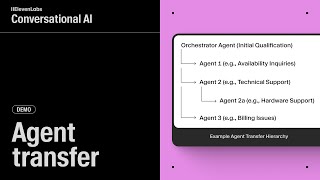
Agent Transfer - Conversational AI
ElevenLabs
Sound Effects are now available in Studio
ElevenLabs
How to Make your Professional Voice Clone.
ElevenLabs
Get unique AI Voiceovers in CapCut
ElevenLabs
Transfer to human - Conversational AI
ElevenLabs
Use HeyGen Avatar IV to Make AI Movie Characters
ElevenLabs
More on: Tool Use & Function Calling
View skill →









Related AI Lessons
⚡
⚡
⚡
⚡
Anthropic acquires Stainless to improve Claude developer tools
Medium · AI
35 ChatGPT Prompts for Fundraising Managers: Raise More, Write Better, and Build Stronger Donor Relationships
Dev.to · ClawGear
I Built 3 Free AI Tools in 3 Hours - Here Is How
Dev.to AI
I Tested 10 AI-Powered APIs for Developers So You Don't Have To
Dev.to · Yury
Chapters (10)
Introduction: why LLMs need real‑time data and the difference between client a
0:30
Creating a server webhook tool: defining the URL and description.
1:00
Adding path parameters: capturing order IDs or other dynamic inputs.
1:40
Configuring timeout & dynamic variables: controlling response time and injecti
2:30
Pre‑tool speech & authentication: using pre‑tool speech and optional headers.
3:10
Adding the tool to your agent: via UI or JSON/CLI and reviewing the tool ID.
4:00
Testing the tool: live conversation retrieving order status, items and shippin
5:10
Reviewing conversation logs: examining tool calls, parameters and returned dat
6:30
Persisting context: how the agent uses fetched data for follow‑up questions.
7:10
Preview of client tools & next video: controlling UI actions on the client sid
🎓
Tutor Explanation
 DeepCamp AI