Kubernetes API Server Connection Refused — Causes and Fix
📰 Medium · DevOps
Learn to troubleshoot Kubernetes API Server connection refused errors and fix common causes such as API server not running or wrong kubeconfig file
Action Steps
- Check if the API server is running using kubectl get pods
- Verify the kubeconfig file for correct cluster endpoint and credentials
- Use kubectl cluster-info to check the cluster's health
- Run kubectl get nodes to test the connection
- Check the API server logs for errors or warnings
Who Needs to Know This
DevOps engineers and Kubernetes administrators can benefit from this article to resolve connection issues with the API server, ensuring cluster management and deployment tasks are executed smoothly
Key Insight
💡 The API server is a critical component of a Kubernetes cluster, and connection issues can be caused by various factors, including the API server not running or incorrect configuration
Share This
🚨 Troubleshoot Kubernetes API Server connection refused errors! 🤔 Check API server status, kubeconfig file, and cluster health to resolve issues quickly 💻
Key Takeaways
Learn to troubleshoot Kubernetes API Server connection refused errors and fix common causes such as API server not running or wrong kubeconfig file
Full Article
Title: Kubernetes API Server Connection Refused — Causes and Fix
URL Source: https://medium.com/@brahmaiahcheerla/kubernetes-api-server-connection-refused-causes-and-fix-7eab7620f714?source=rss------devops-5
Published Time: 2026-04-14T00:36:01Z
Markdown Content:
# Kubernetes API Server Connection Refused — Causes and Fix | by BRAHMAIAH CHEERLA | Apr, 2026 | Medium
[Sitemap](https://medium.com/sitemap/sitemap.xml)
[Open in app](https://play.google.com/store/apps/details?id=com.medium.reader&referrer=utm_source%3DmobileNavBar&source=post_page---top_nav_layout_nav-----------------------------------------)
Sign up
[Sign in](https://medium.com/m/signin?operation=login&redirect=https%3A%2F%2Fmedium.com%2F%40brahmaiahcheerla%2Fkubernetes-api-server-connection-refused-causes-and-fix-7eab7620f714&source=post_page---top_nav_layout_nav-----------------------global_nav------------------)
[](https://medium.com/?source=post_page---top_nav_layout_nav-----------------------------------------)
Get app
[Write](https://medium.com/m/signin?operation=register&redirect=https%3A%2F%2Fmedium.com%2Fnew-story&source=---top_nav_layout_nav-----------------------new_post_topnav------------------)
[Search](https://medium.com/search?source=post_page---top_nav_layout_nav-----------------------------------------)
Sign up
[Sign in](https://medium.com/m/signin?operation=login&redirect=https%3A%2F%2Fmedium.com%2F%40brahmaiahcheerla%2Fkubernetes-api-server-connection-refused-causes-and-fix-7eab7620f714&source=post_page---top_nav_layout_nav-----------------------global_nav------------------)

# Kubernetes API Server Connection Refused — Causes and Fix
[](https://medium.com/@brahmaiahcheerla?source=post_page---byline--7eab7620f714---------------------------------------)
[BRAHMAIAH CHEERLA](https://medium.com/@brahmaiahcheerla?source=post_page---byline--7eab7620f714---------------------------------------)
Follow
2 min read
·
2 hours ago
[](https://medium.com/m/signin?actionUrl=https%3A%2F%2Fmedium.com%2F_%2Fvote%2Fp%2F7eab7620f714&operation=register&redirect=https%3A%2F%2Fmedium.com%2F%40brahmaiahcheerla%2Fkubernetes-api-server-connection-refused-causes-and-fix-7eab7620f714&user=BRAHMAIAH+CHEERLA&userId=b995f3562f11&source=---header_actions--7eab7620f714---------------------clap_footer------------------)
[](https://medium.com/m/signin?actionUrl=https%3A%2F%2Fmedium.com%2F_%2Fbookmark%2Fp%2F7eab7620f714&operation=register&redirect=https%3A%2F%2Fmedium.com%2F%40brahmaiahcheerla%2Fkubernetes-api-server-connection-refused-causes-and-fix-7eab7620f714&source=---header_actions--7eab7620f714---------------------bookmark_footer------------------)
[Listen](https://medium.com/m/signin?actionUrl=https%3A%2F%2Fmedium.com%2Fplans%3Fdimension%3Dpost_audio_button%26postId%3D7eab7620f714&operation=register&redirect=https%3A%2F%2Fmedium.com%2F%40brahmaiahcheerla%2Fkubernetes-api-server-connection-refused-causes-and-fix-7eab7620f714&source=---header_actions--7eab7620f714---------------------post_audio_button------------------)
Share
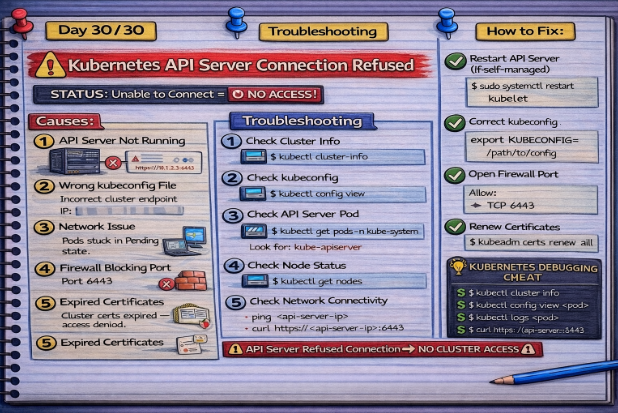
In Kubernetes, the **API Server** is the brain of the cluster.
Every command you run:
kubectl get pods
👉 goes through the API Server.
But sometimes…
❌ You get:
The connection to the server <IP>:6443 was refused
## 🔍 Problem Statement
You run:
kubectl get nodes
And see:
## Get BRAHMAIAH CHEERLA’s stories in your inbox
Join Medium for free to get updates from this writer.
Subscribe
Subscribe
- [x]
Remember me for faster sign in
❌ Unable to connect
❌ Connection refused
❌ Cluster unreachable
## 🚨 Common Causes
## 1️⃣ API Server Not Running
Control plane component is down.
## 2️⃣ Wrong kubeconfig File
Incorrect cluster endpoint or credentia
URL Source: https://medium.com/@brahmaiahcheerla/kubernetes-api-server-connection-refused-causes-and-fix-7eab7620f714?source=rss------devops-5
Published Time: 2026-04-14T00:36:01Z
Markdown Content:
# Kubernetes API Server Connection Refused — Causes and Fix | by BRAHMAIAH CHEERLA | Apr, 2026 | Medium
[Sitemap](https://medium.com/sitemap/sitemap.xml)
[Open in app](https://play.google.com/store/apps/details?id=com.medium.reader&referrer=utm_source%3DmobileNavBar&source=post_page---top_nav_layout_nav-----------------------------------------)
Sign up
[Sign in](https://medium.com/m/signin?operation=login&redirect=https%3A%2F%2Fmedium.com%2F%40brahmaiahcheerla%2Fkubernetes-api-server-connection-refused-causes-and-fix-7eab7620f714&source=post_page---top_nav_layout_nav-----------------------global_nav------------------)
[](https://medium.com/?source=post_page---top_nav_layout_nav-----------------------------------------)
Get app
[Write](https://medium.com/m/signin?operation=register&redirect=https%3A%2F%2Fmedium.com%2Fnew-story&source=---top_nav_layout_nav-----------------------new_post_topnav------------------)
[Search](https://medium.com/search?source=post_page---top_nav_layout_nav-----------------------------------------)
Sign up
[Sign in](https://medium.com/m/signin?operation=login&redirect=https%3A%2F%2Fmedium.com%2F%40brahmaiahcheerla%2Fkubernetes-api-server-connection-refused-causes-and-fix-7eab7620f714&source=post_page---top_nav_layout_nav-----------------------global_nav------------------)

# Kubernetes API Server Connection Refused — Causes and Fix
[](https://medium.com/@brahmaiahcheerla?source=post_page---byline--7eab7620f714---------------------------------------)
[BRAHMAIAH CHEERLA](https://medium.com/@brahmaiahcheerla?source=post_page---byline--7eab7620f714---------------------------------------)
Follow
2 min read
·
2 hours ago
[](https://medium.com/m/signin?actionUrl=https%3A%2F%2Fmedium.com%2F_%2Fvote%2Fp%2F7eab7620f714&operation=register&redirect=https%3A%2F%2Fmedium.com%2F%40brahmaiahcheerla%2Fkubernetes-api-server-connection-refused-causes-and-fix-7eab7620f714&user=BRAHMAIAH+CHEERLA&userId=b995f3562f11&source=---header_actions--7eab7620f714---------------------clap_footer------------------)
[](https://medium.com/m/signin?actionUrl=https%3A%2F%2Fmedium.com%2F_%2Fbookmark%2Fp%2F7eab7620f714&operation=register&redirect=https%3A%2F%2Fmedium.com%2F%40brahmaiahcheerla%2Fkubernetes-api-server-connection-refused-causes-and-fix-7eab7620f714&source=---header_actions--7eab7620f714---------------------bookmark_footer------------------)
[Listen](https://medium.com/m/signin?actionUrl=https%3A%2F%2Fmedium.com%2Fplans%3Fdimension%3Dpost_audio_button%26postId%3D7eab7620f714&operation=register&redirect=https%3A%2F%2Fmedium.com%2F%40brahmaiahcheerla%2Fkubernetes-api-server-connection-refused-causes-and-fix-7eab7620f714&source=---header_actions--7eab7620f714---------------------post_audio_button------------------)
Share

In Kubernetes, the **API Server** is the brain of the cluster.
Every command you run:
kubectl get pods
👉 goes through the API Server.
But sometimes…
❌ You get:
The connection to the server <IP>:6443 was refused
## 🔍 Problem Statement
You run:
kubectl get nodes
And see:
## Get BRAHMAIAH CHEERLA’s stories in your inbox
Join Medium for free to get updates from this writer.
Subscribe
Subscribe
- [x]
Remember me for faster sign in
❌ Unable to connect
❌ Connection refused
❌ Cluster unreachable
## 🚨 Common Causes
## 1️⃣ API Server Not Running
Control plane component is down.
## 2️⃣ Wrong kubeconfig File
Incorrect cluster endpoint or credentia
 DeepCamp AI