JavaScript: Handling Large Files in the Browser. Part 1/2: Reading Large Files
📰 Medium · JavaScript
Learn how to handle large files in the browser using JavaScript, focusing on reading large files and understanding the PNG file format.
Action Steps
- Read the PNG file format specification to understand its structure and blocks
- Use JavaScript to append custom data to a PNG file after the IEND block
- Implement a file reader in JavaScript to handle large files in the browser
- Test and optimize the file reading process for performance and efficiency
- Apply this knowledge to real-world scenarios, such as storing data in images or optimizing file uploads
Who Needs to Know This
Frontend developers and software engineers can benefit from this knowledge to optimize their web applications for handling large files, improving user experience and performance.
Key Insight
💡 The PNG file format allows for custom data to be appended after the IEND block, enabling efficient storage and handling of large files in the browser.
Share This
📄 Handle large files in the browser with JavaScript! Learn how to read and append data to PNG files without breaking the image. #JavaScript #LargeFiles #BrowserOptimization
Key Takeaways
Learn how to handle large files in the browser using JavaScript, focusing on reading large files and understanding the PNG file format.
Full Article
Title: JavaScript: Handling Large Files in the Browser. Part 1/2: Reading Large Files
URL Source: https://medium.com/codex/javascript-handling-large-files-in-the-browser-part-1-2-reading-large-files-4e820f59d97f?source=rss------javascript-5
Published Time: 2026-04-26T04:52:00Z
Markdown Content:
# JavaScript: Handling Large Files in the Browser. Part 1/2: Reading Large Files | by Alexey Boyko | Apr, 2026 | Medium
[Sitemap](https://medium.com/sitemap/sitemap.xml)
[Open in app](https://play.google.com/store/apps/details?id=com.medium.reader&referrer=utm_source%3DmobileNavBar&source=post_page---top_nav_layout_nav-----------------------------------------)
Sign up
[Sign in](https://medium.com/m/signin?operation=login&redirect=https%3A%2F%2Falexey-boyko.medium.com%2Fjavascript-handling-large-files-in-the-browser-part-1-2-reading-large-files-4e820f59d97f&source=post_page---top_nav_layout_nav-----------------------global_nav------------------)
[](https://medium.com/?source=post_page---top_nav_layout_nav-----------------------------------------)
Get app
[Write](https://medium.com/m/signin?operation=register&redirect=https%3A%2F%2Fmedium.com%2Fnew-story&source=---top_nav_layout_nav-----------------------new_post_topnav------------------)
[Search](https://medium.com/search?source=post_page---top_nav_layout_nav-----------------------------------------)
Sign up
[Sign in](https://medium.com/m/signin?operation=login&redirect=https%3A%2F%2Falexey-boyko.medium.com%2Fjavascript-handling-large-files-in-the-browser-part-1-2-reading-large-files-4e820f59d97f&source=post_page---top_nav_layout_nav-----------------------global_nav------------------)

# JavaScript: Handling Large Files in the Browser. Part 1/2: Reading Large Files
[](https://medium.com/?source=post_page---byline--4e820f59d97f---------------------------------------)
[Alexey Boyko](https://medium.com/?source=post_page---byline--4e820f59d97f---------------------------------------)
Follow
4 min read
·
1 hour ago
[](https://medium.com/m/signin?actionUrl=https%3A%2F%2Fmedium.com%2F_%2Fvote%2Fp%2F4e820f59d97f&operation=register&redirect=https%3A%2F%2Falexey-boyko.medium.com%2Fjavascript-handling-large-files-in-the-browser-part-1-2-reading-large-files-4e820f59d97f&user=Alexey+Boyko&userId=abf66e846ea1&source=---header_actions--4e820f59d97f---------------------clap_footer------------------)
[](https://medium.com/m/signin?actionUrl=https%3A%2F%2Fmedium.com%2F_%2Fbookmark%2Fp%2F4e820f59d97f&operation=register&redirect=https%3A%2F%2Falexey-boyko.medium.com%2Fjavascript-handling-large-files-in-the-browser-part-1-2-reading-large-files-4e820f59d97f&source=---header_actions--4e820f59d97f---------------------bookmark_footer------------------)
[Listen](https://medium.com/m/signin?actionUrl=https%3A%2F%2Fmedium.com%2Fplans%3Fdimension%3Dpost_audio_button%26postId%3D4e820f59d97f&operation=register&redirect=https%3A%2F%2Falexey-boyko.medium.com%2Fjavascript-handling-large-files-in-the-browser-part-1-2-reading-large-files-4e820f59d97f&source=---header_actions--4e820f59d97f---------------------post_audio_button------------------)
Share
The [DGRM.net online whiteboard](https://dgrm.net/) stores data in PNG images. With attachments, the files become large. I’ll explain how data is stored in PNG files.
Press enter or click to view image in full size
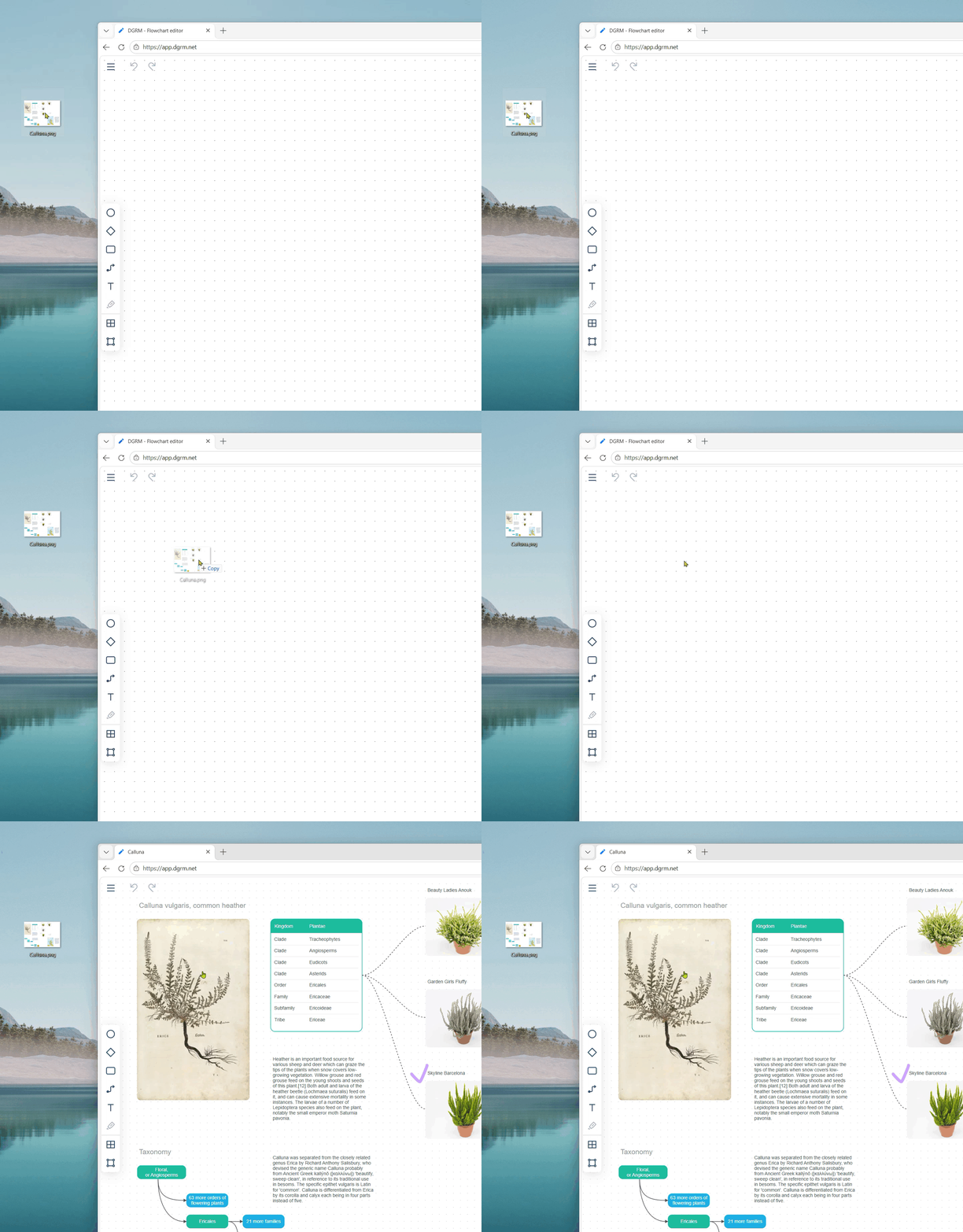
_Fig. 1. DGRM.net opens diagrams from PNG images._
## PNG file format
A PNG file consists of blocks. These blocks contain various information. For example, the tIME block contains the editing date.
At the end comes the required IEND block. After the IEND, you can append your own data to the file without breaking the image.
URL Source: https://medium.com/codex/javascript-handling-large-files-in-the-browser-part-1-2-reading-large-files-4e820f59d97f?source=rss------javascript-5
Published Time: 2026-04-26T04:52:00Z
Markdown Content:
# JavaScript: Handling Large Files in the Browser. Part 1/2: Reading Large Files | by Alexey Boyko | Apr, 2026 | Medium
[Sitemap](https://medium.com/sitemap/sitemap.xml)
[Open in app](https://play.google.com/store/apps/details?id=com.medium.reader&referrer=utm_source%3DmobileNavBar&source=post_page---top_nav_layout_nav-----------------------------------------)
Sign up
[Sign in](https://medium.com/m/signin?operation=login&redirect=https%3A%2F%2Falexey-boyko.medium.com%2Fjavascript-handling-large-files-in-the-browser-part-1-2-reading-large-files-4e820f59d97f&source=post_page---top_nav_layout_nav-----------------------global_nav------------------)
[](https://medium.com/?source=post_page---top_nav_layout_nav-----------------------------------------)
Get app
[Write](https://medium.com/m/signin?operation=register&redirect=https%3A%2F%2Fmedium.com%2Fnew-story&source=---top_nav_layout_nav-----------------------new_post_topnav------------------)
[Search](https://medium.com/search?source=post_page---top_nav_layout_nav-----------------------------------------)
Sign up
[Sign in](https://medium.com/m/signin?operation=login&redirect=https%3A%2F%2Falexey-boyko.medium.com%2Fjavascript-handling-large-files-in-the-browser-part-1-2-reading-large-files-4e820f59d97f&source=post_page---top_nav_layout_nav-----------------------global_nav------------------)

# JavaScript: Handling Large Files in the Browser. Part 1/2: Reading Large Files
[](https://medium.com/?source=post_page---byline--4e820f59d97f---------------------------------------)
[Alexey Boyko](https://medium.com/?source=post_page---byline--4e820f59d97f---------------------------------------)
Follow
4 min read
·
1 hour ago
[](https://medium.com/m/signin?actionUrl=https%3A%2F%2Fmedium.com%2F_%2Fvote%2Fp%2F4e820f59d97f&operation=register&redirect=https%3A%2F%2Falexey-boyko.medium.com%2Fjavascript-handling-large-files-in-the-browser-part-1-2-reading-large-files-4e820f59d97f&user=Alexey+Boyko&userId=abf66e846ea1&source=---header_actions--4e820f59d97f---------------------clap_footer------------------)
[](https://medium.com/m/signin?actionUrl=https%3A%2F%2Fmedium.com%2F_%2Fbookmark%2Fp%2F4e820f59d97f&operation=register&redirect=https%3A%2F%2Falexey-boyko.medium.com%2Fjavascript-handling-large-files-in-the-browser-part-1-2-reading-large-files-4e820f59d97f&source=---header_actions--4e820f59d97f---------------------bookmark_footer------------------)
[Listen](https://medium.com/m/signin?actionUrl=https%3A%2F%2Fmedium.com%2Fplans%3Fdimension%3Dpost_audio_button%26postId%3D4e820f59d97f&operation=register&redirect=https%3A%2F%2Falexey-boyko.medium.com%2Fjavascript-handling-large-files-in-the-browser-part-1-2-reading-large-files-4e820f59d97f&source=---header_actions--4e820f59d97f---------------------post_audio_button------------------)
Share
The [DGRM.net online whiteboard](https://dgrm.net/) stores data in PNG images. With attachments, the files become large. I’ll explain how data is stored in PNG files.
Press enter or click to view image in full size

_Fig. 1. DGRM.net opens diagrams from PNG images._
## PNG file format
A PNG file consists of blocks. These blocks contain various information. For example, the tIME block contains the editing date.
At the end comes the required IEND block. After the IEND, you can append your own data to the file without breaking the image.
 DeepCamp AI