Introducing hatch - a capability-based sandbox for MCP
📰 Dev.to AI
Learn about Hatch, a capability-based sandbox for MCP servers, and how to use it to secure your model deployments
Action Steps
- Run Hatch on Linux or macOS to create a sandboxed environment for MCP servers
- Configure the TOML manifest to declare network destinations, filesystem paths, and subprocess permissions
- Use CEL subset to define per-tool argument rules and enforce them with Hatch
- Test Hatch with a sample MCP server to ensure secure and isolated deployment
- Apply Hatch to your production environment to secure your model deployments
Who Needs to Know This
DevOps and security teams can benefit from Hatch to ensure secure and isolated model deployments, while developers can use it to test and validate their models in a controlled environment
Key Insight
💡 Hatch provides a secure and isolated environment for MCP servers using capability-based sandboxing, making it easier to deploy and manage models
Share This
🚀 Introducing Hatch, a capability-based sandbox for MCP servers! Secure your model deployments with ease #MCP #Sandbox #Security
Key Takeaways
Learn about Hatch, a capability-based sandbox for MCP servers, and how to use it to secure your model deployments
Full Article
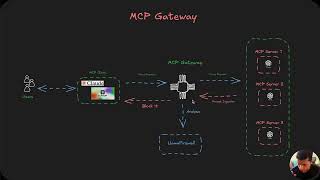
Github repo Hatch is a capability-based sandbox for MCP (Model Context Protocol) servers on Linux and macOS. Each server runs under a signed TOML manifest that declares its network destinations, filesystem paths, subprocess permissions, and per-tool argument rules in a CEL subset, enforced by user/mount/pid/net namespaces + cgroups + iptables on Linux and sandbox-exec + PF on macOS, plus an SNI-filtering proxy a



 DeepCamp AI