How to use SSH to fetch Github repo?
📰 Medium · Programming
Learn to use SSH to securely fetch a Github repository, a more secure alternative to traditional username and password authentication.
Action Steps
- Open a bash terminal and check if the SSH agent config file exists
- Create the SSH config file manually using the command 'touch ~/.ssh/config' if it doesn't exist
- Generate a new SSH key using the command 'ssh-keygen -t ed25519 -C "your-email-address"'
- Add the SSH key to your Github account for secure authentication
- Use the SSH protocol to clone your Github repository locally
Who Needs to Know This
Developers and software engineers can benefit from this tutorial to securely clone repositories, enhancing their workflow security and efficiency.
Key Insight
💡 SSH provides a secure way to clone repositories, and setting it up involves generating and adding an SSH key to your Github account.
Share This
💡 Securely clone your Github repo using SSH! Say goodbye to traditional username & password authentication. #Github #SSH #Security
Key Takeaways
Learn to use SSH to securely fetch a Github repository, a more secure alternative to traditional username and password authentication.
Full Article
Title: How to use SSH to fetch Github repo?
URL Source: https://medium.com/@ashish1772000/how-to-use-ssh-to-fetch-github-repo-f65695689a0a?source=rss------programming-5
Published Time: 2026-04-18T12:54:28Z
Markdown Content:
# How to use SSH to fetch Github repo? | by Ashish Garg | Apr, 2026 | Medium
[Sitemap](https://medium.com/sitemap/sitemap.xml)
[Open in app](https://play.google.com/store/apps/details?id=com.medium.reader&referrer=utm_source%3DmobileNavBar&source=post_page---top_nav_layout_nav-----------------------------------------)
Sign up
[Sign in](https://medium.com/m/signin?operation=login&redirect=https%3A%2F%2Fmedium.com%2F%40ashish1772000%2Fhow-to-use-ssh-to-fetch-github-repo-f65695689a0a&source=post_page---top_nav_layout_nav-----------------------global_nav------------------)
[](https://medium.com/?source=post_page---top_nav_layout_nav-----------------------------------------)
Get app
[Write](https://medium.com/m/signin?operation=register&redirect=https%3A%2F%2Fmedium.com%2Fnew-story&source=---top_nav_layout_nav-----------------------new_post_topnav------------------)
[Search](https://medium.com/search?source=post_page---top_nav_layout_nav-----------------------------------------)
Sign up
[Sign in](https://medium.com/m/signin?operation=login&redirect=https%3A%2F%2Fmedium.com%2F%40ashish1772000%2Fhow-to-use-ssh-to-fetch-github-repo-f65695689a0a&source=post_page---top_nav_layout_nav-----------------------global_nav------------------)

Member-only story
# How to use SSH to fetch Github repo?
[](https://medium.com/@ashish1772000?source=post_page---byline--f65695689a0a---------------------------------------)
[Ashish Garg](https://medium.com/@ashish1772000?source=post_page---byline--f65695689a0a---------------------------------------)
Follow
3 min read
·
Just now
[](https://medium.com/m/signin?actionUrl=https%3A%2F%2Fmedium.com%2F_%2Fvote%2Fp%2Ff65695689a0a&operation=register&redirect=https%3A%2F%2Fmedium.com%2F%40ashish1772000%2Fhow-to-use-ssh-to-fetch-github-repo-f65695689a0a&user=Ashish+Garg&userId=2dbe58a3f9e0&source=---header_actions--f65695689a0a---------------------clap_footer------------------)
[](https://medium.com/m/signin?actionUrl=https%3A%2F%2Fmedium.com%2F_%2Fbookmark%2Fp%2Ff65695689a0a&operation=register&redirect=https%3A%2F%2Fmedium.com%2F%40ashish1772000%2Fhow-to-use-ssh-to-fetch-github-repo-f65695689a0a&source=---header_actions--f65695689a0a---------------------bookmark_footer------------------)
[Listen](https://medium.com/m/signin?actionUrl=https%3A%2F%2Fmedium.com%2Fplans%3Fdimension%3Dpost_audio_button%26postId%3Df65695689a0a&operation=register&redirect=https%3A%2F%2Fmedium.com%2F%40ashish1772000%2Fhow-to-use-ssh-to-fetch-github-repo-f65695689a0a&source=---header_actions--f65695689a0a---------------------post_audio_button------------------)
Share
> Github restricted to use traditional `UserID`&`Password` approach and encourages the developers to utilize the other secured way of cloning the repo locally. One of these approach is the SSH.
Press enter or click to view image in full size
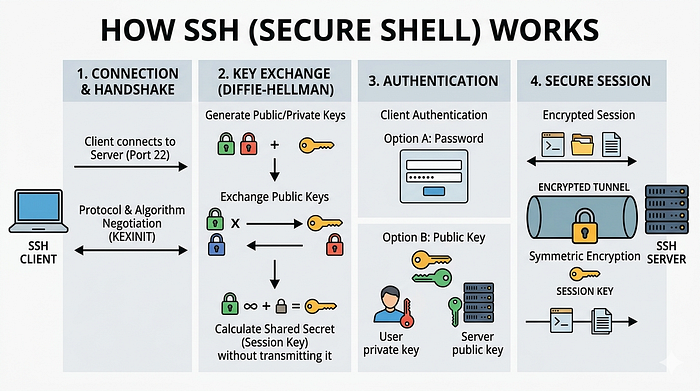
Credit: Google Gemini
SSH is the best way to clone your remote repo to the local directories. It’s secured. To achieve it you can follow the below steps. The SSH stands here for **_S_**ecured **_SH_**ell Protocol.
## First thing first
pen `bash` terminal. Check if the `SSH` agent config file exist on your mac or not. Usually it exist on your MAC users’ folder. Example, ~users/ag/.ssh/config. If you are on the users folder and you can’t find config file then create it manually.
touch ~/.ssh/config
## Generate SSH key
By using below command generate a new `SSH key` .
% ssh-keygen -t ed25519 -C "type-your-email-address@justan
URL Source: https://medium.com/@ashish1772000/how-to-use-ssh-to-fetch-github-repo-f65695689a0a?source=rss------programming-5
Published Time: 2026-04-18T12:54:28Z
Markdown Content:
# How to use SSH to fetch Github repo? | by Ashish Garg | Apr, 2026 | Medium
[Sitemap](https://medium.com/sitemap/sitemap.xml)
[Open in app](https://play.google.com/store/apps/details?id=com.medium.reader&referrer=utm_source%3DmobileNavBar&source=post_page---top_nav_layout_nav-----------------------------------------)
Sign up
[Sign in](https://medium.com/m/signin?operation=login&redirect=https%3A%2F%2Fmedium.com%2F%40ashish1772000%2Fhow-to-use-ssh-to-fetch-github-repo-f65695689a0a&source=post_page---top_nav_layout_nav-----------------------global_nav------------------)
[](https://medium.com/?source=post_page---top_nav_layout_nav-----------------------------------------)
Get app
[Write](https://medium.com/m/signin?operation=register&redirect=https%3A%2F%2Fmedium.com%2Fnew-story&source=---top_nav_layout_nav-----------------------new_post_topnav------------------)
[Search](https://medium.com/search?source=post_page---top_nav_layout_nav-----------------------------------------)
Sign up
[Sign in](https://medium.com/m/signin?operation=login&redirect=https%3A%2F%2Fmedium.com%2F%40ashish1772000%2Fhow-to-use-ssh-to-fetch-github-repo-f65695689a0a&source=post_page---top_nav_layout_nav-----------------------global_nav------------------)

Member-only story
# How to use SSH to fetch Github repo?
[](https://medium.com/@ashish1772000?source=post_page---byline--f65695689a0a---------------------------------------)
[Ashish Garg](https://medium.com/@ashish1772000?source=post_page---byline--f65695689a0a---------------------------------------)
Follow
3 min read
·
Just now
[](https://medium.com/m/signin?actionUrl=https%3A%2F%2Fmedium.com%2F_%2Fvote%2Fp%2Ff65695689a0a&operation=register&redirect=https%3A%2F%2Fmedium.com%2F%40ashish1772000%2Fhow-to-use-ssh-to-fetch-github-repo-f65695689a0a&user=Ashish+Garg&userId=2dbe58a3f9e0&source=---header_actions--f65695689a0a---------------------clap_footer------------------)
[](https://medium.com/m/signin?actionUrl=https%3A%2F%2Fmedium.com%2F_%2Fbookmark%2Fp%2Ff65695689a0a&operation=register&redirect=https%3A%2F%2Fmedium.com%2F%40ashish1772000%2Fhow-to-use-ssh-to-fetch-github-repo-f65695689a0a&source=---header_actions--f65695689a0a---------------------bookmark_footer------------------)
[Listen](https://medium.com/m/signin?actionUrl=https%3A%2F%2Fmedium.com%2Fplans%3Fdimension%3Dpost_audio_button%26postId%3Df65695689a0a&operation=register&redirect=https%3A%2F%2Fmedium.com%2F%40ashish1772000%2Fhow-to-use-ssh-to-fetch-github-repo-f65695689a0a&source=---header_actions--f65695689a0a---------------------post_audio_button------------------)
Share
> Github restricted to use traditional `UserID`&`Password` approach and encourages the developers to utilize the other secured way of cloning the repo locally. One of these approach is the SSH.
Press enter or click to view image in full size

Credit: Google Gemini
SSH is the best way to clone your remote repo to the local directories. It’s secured. To achieve it you can follow the below steps. The SSH stands here for **_S_**ecured **_SH_**ell Protocol.
## First thing first
pen `bash` terminal. Check if the `SSH` agent config file exist on your mac or not. Usually it exist on your MAC users’ folder. Example, ~users/ag/.ssh/config. If you are on the users folder and you can’t find config file then create it manually.
touch ~/.ssh/config
## Generate SSH key
By using below command generate a new `SSH key` .
% ssh-keygen -t ed25519 -C "type-your-email-address@justan
 DeepCamp AI